

Description
HIMA K9202 | T4 Cabinet Fan Module
Product Introduction
A cabinet fan is easy to overlook until a cooling failure starts affecting the equipment inside the enclosure. The HIMA K9202 is identified in HIMA certification documentation as a T4 cabinet fan module. It is a thermal-management component—not a safety CPU, relay module, or digital I/O card.
Surplus-market references describe the K9202 as a dual-fan, 24 VDC assembly and associate it with part number 99-6920302-00. For maintenance teams supporting legacy HIMA installations, the main procurement task is confirming that the offered assembly matches the installed unit in mechanical configuration, electrical requirements, and connector arrangement. Do not rely on the K9202 designation alone to establish every installation detail.
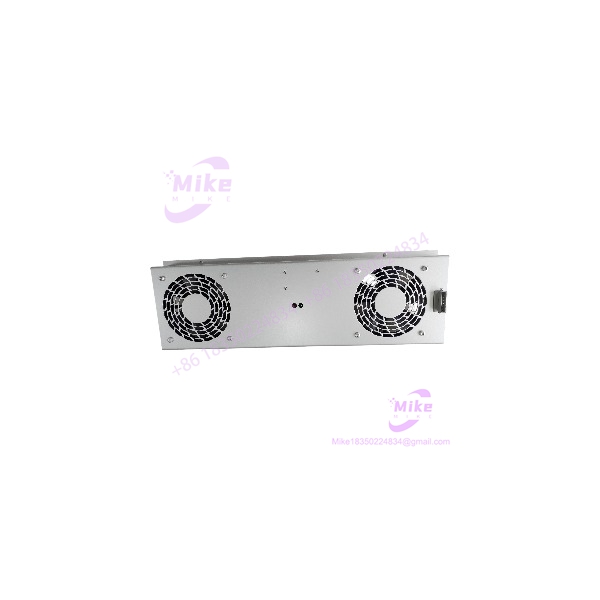
K9202
Key Technical Specifications
- Manufacturer: HIMA
- Model: K9202
- Module Classification: T4 cabinet fan module
- Function: Cabinet cooling / thermal management
- Fan Arrangement: Dual fan, according to surplus supplier documentation
- Supply Voltage: 24 VDC, reported by surplus supplier Radwell
- Associated Part Number: 99-6920302-00, as listed by surplus suppliers
- Installation Type: Cabinet/panel accessory
- System Role: Thermal management rather than safety logic processing
- Airflow Rating: Confirm from the unit nameplate or OEM documentation
- Power Consumption: Confirm from the unit nameplate or OEM documentation
- Dimensions and Mounting: Verify against the existing assembly before ordering
- Connector and Pinout: Not confirmed; inspect the actual unit and wiring documentation
The available documentation supports identifying the K9202 as a cabinet fan module. Detailed airflow, fan speed, connector pinout, and mechanical dimensions should not be assumed without matching OEM documentation.
Global Sourcing & Live-Test SOP
For a used or surplus HIMA , the objective is to verify the actual cooling assembly—not simply confirm that the fan blades rotate.
1. Inbound Verification
- Photograph the complete nameplate and all part-number markings.
- Confirm the model is , not K9202B or another visually similar HIMA fan assembly.
- Record any additional OEM part number, serial number, and revision markings.
- Inspect the fan housings, blades, guards, mounting points, and wiring.
- Check for dust buildup, corrosion, impact damage, cracked insulation, or evidence of prior repair.
- Compare the connector and mounting arrangement with the installed cabinet assembly.
- Retain supplier condition statements and available traceability documentation.
2. Controlled Power-Up and Functional Test
- Verify the required input voltage and polarity against the unit’s nameplate or applicable wiring documentation.
- Use a controlled supply with current monitoring.
- Do not energize the assembly based solely on a generic 24 VDC listing.
- Check startup behavior and confirm that both fans operate.
- Listen for bearing noise, rubbing, vibration, or intermittent startup.
- Inspect the wiring and connectors for abnormal heating or loose contacts.
- Record the applied voltage and measured current.
3. Cooling and Airflow Verification
A fan that spins is not automatically a serviceable cabinet-cooling assembly.
- Confirm airflow direction before installation.
- Check both fans for consistent operation.
- Inspect the assembly for restricted airflow, damaged blades, or excessive vibration.
- Verify that the installed fan arrangement matches the cabinet’s cooling design.
- Confirm any fan-failure monitoring or alarm function through the applicable system procedure.
- Do not bypass a cabinet cooling alarm to complete a functional test.
4. Extended Heat Run
For a unit being sold as tested, conduct an extended powered run under controlled conditions.
Monitor:
- Startup reliability
- Fan speed consistency
- Abnormal noise or vibration
- Current stability
- Connector and wiring temperature
- Airflow consistency
- Unexpected stoppages
Record the test duration, supply voltage, measured current, and observed condition. Do not claim a 24-hour test unless it was actually completed and documented.
5. Final Preparation and Shipment
- Record the exact model and associated part number.
- Photograph the tested assembly and connector arrangement.
- Preserve original mounting hardware when included.
- Protect fan blades and connectors against impact during transit.
- Use suitable ESD-aware packaging where electronic monitoring components are present.
- Clearly identify whether the unit is new, used, refurbished, or tested surplus.
- Do not represent third-party testing as HIMA factory certification.
Field Engineer’s Pitfall Guide
❗ Do not confuse with K9202B
HIMA’s and K9202B designations should not be treated as interchangeable. HIMA documentation separately identifies K9202B in its product records. Verify the complete model and mechanical arrangement before approving a replacement.
❗ Verify the actual supply and connector before energizing
Surplus listings report 24 VDC for the , but a marketplace description is not a substitute for the installed unit’s electrical documentation. Confirm voltage, polarity, connector, and wiring before applying power.
❗ A running fan does not prove cabinet cooling is adequate
Incorrect airflow direction, a failed second fan, restricted ventilation, or a mismatch with the cabinet’s original assembly can compromise cooling. Verify the complete assembly and its installed function before returning the cabinet to service.
Intent-Driven FAQ
What is the HIMA ?
The HIMA is identified as a T4 cabinet fan module used for cabinet thermal management. It is not a safety controller or I/O module.
Is the HIMA a 24 VDC fan module?
Surplus-market documentation identifies the as a 24 VDC dual-fan assembly. Confirm the voltage and polarity on the actual unit before installation.
What is the associated part number for HIMA ?
Some surplus suppliers associate with 99-6920302-00. Match the complete markings against the existing assembly before ordering.
Is the HIMA a safety I/O module?
No. HIMA certification documentation identifies as a cabinet fan module. It should be procured and evaluated as a thermal-management component, not as a safety logic or I/O card.
Can the HIMA be replaced with K9202B?
Do not assume direct interchangeability. Verify the exact part number, mounting configuration, electrical requirements, and cabinet compatibility before substitution.
Is the HIMA discontinued?
Radwell lists the as discontinued by the manufacturer. This is a surplus-market lifecycle indication, not a current OEM lifecycle confirmation. Check with HIMA or an authorized channel for definitive support status.
What should be checked before buying a used ?
Confirm the complete model number, associated part number, fan count, voltage, connector, mounting configuration, physical condition, and documented test status. Request clear photos of the nameplate and rear/connector side before purchase.
Bottom Line for Buyers
The is a legacy T4 cabinet fan module intended for thermal management. Surplus documentation identifies it as a dual-fan, 24 VDC assembly, but buyers should verify the actual nameplate, connector, mounting, and cooling configuration before treating it as a direct replacement.
For maintenance procurement, request photos of the complete assembly, confirm whether both fans are included and operational, and obtain the supplier’s actual test results. A matching model number is the starting point—not proof of installation compatibility.





