Description
Yaskawa JZNC-XPP02B | Motoman XRC Teach Pendant
Product Introduction
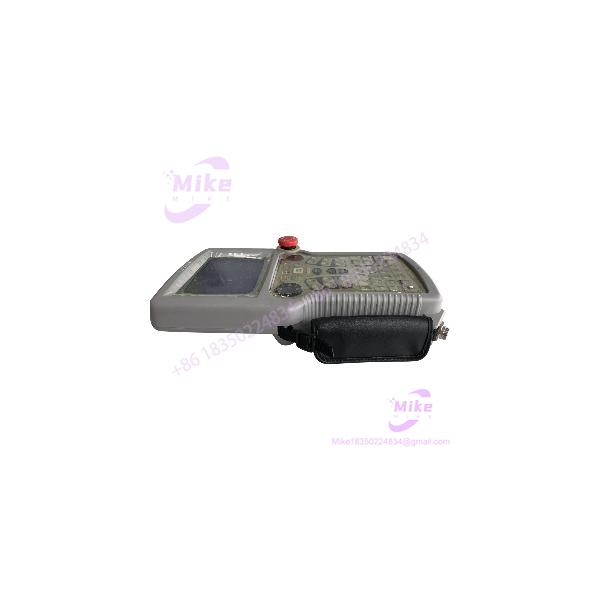
A failed teach pendant can sideline an otherwise serviceable Motoman robot. The Yaskawa JZNC-XPP02B is an XRC-era programming pendant used for robot teaching and operator interaction. Yaskawa’s Motoman parts catalog associates it with OEM part number 142136-1 and identifies it as an obsolete programming pendant with cable.
For maintenance teams keeping a legacy YASNAC XRC cell operational, matching the pendant reference is only the first step. Confirm the controller family, pendant connector, cable condition, key configuration, and required application before ordering. XRC documentation notes that the pendant’s key sheet may be specified for the application, such as arc, general handling, or spot welding. A pendant that physically connects is not automatically verified for every robot application or controller configuration.
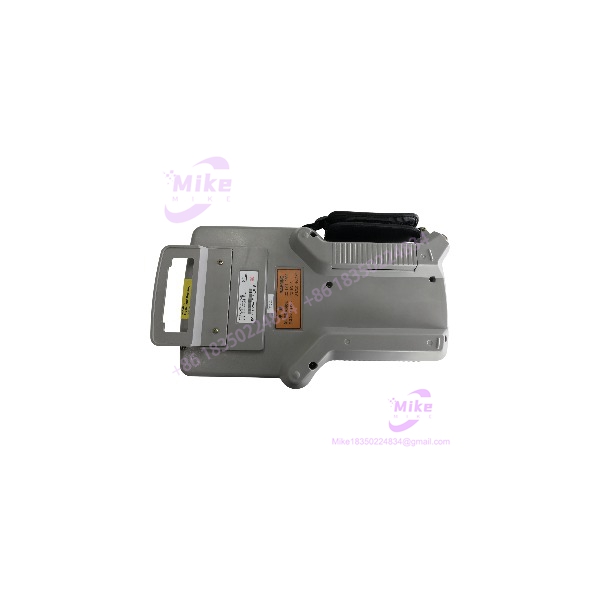
JZNC-XPP02B
Key Technical Specifications
- Model Number: JZNC-XPP02B
- Yaskawa Part Number: 142136-1
- Manufacturer: Yaskawa Electric / Motoman
- Equipment Category: Teach pendant / programming operator panel
- Robot Controller Family: YASNAC XRC
- Primary Use: Robot programming and teaching
- Operator Interface: Pendant-mounted display and operator controls; exact display specifications not verified
- Cable: Pendant cable assembly; inspect the included cable and connector
- Documented Cable Length: 8 meters in certain XRC configurations; confirm for the specific unit
- Alternate Reference: JZNC-XPP04B appears in Yaskawa’s associated-reference information; direct substitution requires confirmation
- Power Requirements: Supplied through the compatible controller connection; exact electrical specifications not independently verified
- Display Resolution: Not verified
- Connector Pinout: Not verified; use the applicable Yaskawa documentation
- Environmental Rating: Not verified for this exact model
- Lifecycle Status: Obsolete per Yaskawa’s Motoman parts catalog
Specification note: Do not assume display resolution, electrical ratings, cable length, or connector compatibility from another Motoman pendant model. Verify those details against the unit’s label and the intended XRC controller.
Global Sourcing & Live-Test SOP
For a used or surplus JZNC-XPP02B, the pendant, cable, and controller interface should be evaluated as a connected assembly.
1. Incoming Verification
- Photograph the complete pendant, rear label, cable, and connector.
- Confirm the exact JZNC-XPP02B marking.
- Record OEM part number 142136-1 if present.
- Record serial number and any hardware or revision markings.
- Inspect the housing, display window, keypad, emergency-stop assembly, enabling switch, and other fitted controls.
- Check the cable jacket for cuts, crushing, kinks, and signs of repair.
- Inspect the connector for bent pins, corrosion, damaged latches, or contamination.
- Confirm whether the pendant is supplied with its original cable.
- Compare the candidate unit with the existing pendant before approving it as a replacement.
2. Controller and Configuration Verification
- Identify the exact YASNAC XRC controller model.
- Confirm pendant compatibility using the applicable Yaskawa documentation.
- Verify connector and cable configuration against the installed system.
- Check whether the machine uses a specific application key sheet or pendant configuration.
- Do not assume JZNC-XPP02B and JZNC-XPP04B are interchangeable without OEM confirmation.
- Follow the controller’s approved shutdown and connection procedure.
3. Functional Test
Test the pendant using a compatible XRC controller or an approved service fixture.
- Confirm that the controller recognizes the pendant.
- Check display startup and readability.
- Test keypad response across the usable keys.
- Verify the response of fitted operator controls.
- Test the emergency-stop and enabling functions using the approved maintenance procedure.
- Check for intermittent display behavior, key chatter, communication loss, or cable-related faults.
- Confirm that the pendant can perform the expected operator functions in the intended controller configuration.
Safety note: Do not bypass the emergency-stop or enabling circuit to make a pendant appear operational. Functional safety checks must follow the robot manufacturer’s procedure.
4. Cable and Extended Operation Check
Where suitable test equipment is available:
- Flex the cable gently during operation to identify intermittent faults.
- Check for display dropouts or controller communication loss.
- Exercise keypad and operator functions repeatedly.
- Monitor for unexpected resets or unstable operation.
- Record test duration, controller model, pendant reference, and any observed faults.
A powered display alone is not evidence that the pendant’s control and safety-related functions are working correctly.
5. Final Preparation and Shipment
- Record the actual inspection and test status.
- Photograph the pendant label, connector, and cable.
- Document the included cable length if measured.
- Record any missing keys, damaged controls, display defects, or housing damage.
- Protect the display and operator controls from impact.
- Use ESD-safe packaging where appropriate for the electronic assembly.
- State clearly whether the pendant is untested, visually inspected, or functionally tested.
- Do not advertise a warranty unless it is explicitly offered for the specific unit.
Field Engineer’s Pitfall Guide
❗ Do not confuse a pendant match with controller compatibility
The is associated with the YASNAC XRC family. Verify the exact controller and pendant connection before ordering. Similar-looking Motoman pendants may belong to different controller generations.
❗ Check the application key configuration
XRC documentation indicates that pendant key-sheet configuration may be application-specific. Confirm the required key layout for the robot’s application rather than assuming every is configured identically.
❗ Inspect the cable and safety-related controls—not just the screen
A pendant can power up and still have defective keys, intermittent cable conductors, or faulty operator controls. Do not return it to production service until the required pendant functions have been checked using the applicable Yaskawa procedure.
Intent-Driven FAQ
What is the Yaskawa ?
The is a Yaskawa Motoman programming/teach pendant associated with the YASNAC XRC robot controller family. Yaskawa’s parts catalog associates it with OEM part number 142136-1.
Is the a robot controller or CPU board?
No. It is a programming pendant used for robot teaching and operator interaction. It is not the robot controller CPU or a servo amplifier.
Which robot controller uses the ?
Yaskawa identifies it as an XRC programming pendant. Confirm the exact YASNAC XRC controller model and connection requirements before purchasing a replacement.
Does the include a cable?
Yaskawa’s catalog describes the item as a programming pendant with cable. Certain XRC manuals document an 8-meter cable configuration. Verify that the offered unit includes a cable and confirm its length and condition.
Can I substitute a JZNC-XPP04B for a ?
Yaskawa lists JZNC-XPP04B as an associated reference, but that alone does not establish universal interchangeability. Confirm the controller, connector, application configuration, and OEM substitution guidance before using it as a replacement.
Is the obsolete?
Yes. Yaskawa’s Motoman parts catalog lists the under obsolete programming pendant information. Replacement sourcing may therefore depend on surplus inventory, repair, or exchange availability.
What should I verify before buying a ?
Confirm the complete model number, OEM part reference, controller compatibility, cable and connector condition, key configuration, display condition, and documented test status. For a production robot, request evidence that the pendant has been tested with a compatible XRC controller.
Bottom Line for Buyers
The is an obsolete Motoman YASNAC XRC programming pendant, cataloged under OEM part number 142136-1. It is a legacy operator-interface component—not a controller board—and its replacement value depends on matching the intended XRC system and pendant configuration.
For procurement, request clear photos of the pendant label, cable, connector, and operator controls. Confirm the exact controller model and require a clear condition statement. A matching part number is a necessary starting point; documented functional compatibility is what makes the spare useful.