Description
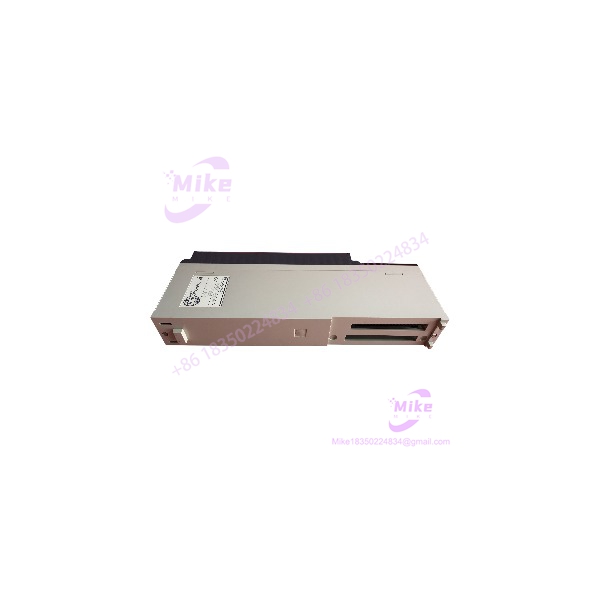
Yaskawa JAPMC-CP2230-E | 16 MB Flash CPU Module
Product Introduction
When an MP2200 control system loses its CPU module, the replacement decision is not simply a matter of finding a Yaskawa board with an Ethernet port. The controller generation, application data, startup settings, and installed system configuration all matter.
The Yaskawa JAPMC-CP2230-E is the CPU-04 module for the MP2200 Machine Controller. Yaskawa’s documentation specifies 16 MB of flash memory, 64 MB of DDR memory, 4 MB of SRAM, and one Ethernet interface channel. The module also provides status indicators and hardware switches used for operating-condition and Ethernet initialization settings.
For maintenance teams supporting legacy MP2200 equipment, the JAPMC-CP2230-E is a configuration-sensitive replacement component. Before installation, verify the original CPU model, preserve available application and parameter backups, and confirm the controller’s software environment. A matching part number is the starting point—not proof that the replacement is ready to run the machine.
JAPMC-CP2230-E
Key Technical Specifications
- Manufacturer: Yaskawa Electric Corporation
- Model Number: JAPMC-CP2230-E
- Module Designation: CPU-04
- Controller Series: MP2000
- Applicable Controller: MP2200
- Flash Memory: 16 MB
- Flash User Area: 11.5 MB
- DDR Memory: 64 MB
- SRAM: 4 MB
- Battery-Backed SRAM Table Data: Up to 3 MB, as specified in the manual
- Communication Interface: One Ethernet channel
- Calendar Function: Seconds-to-year timer with battery backup
- Status Indicators: RDY, RUN, ALM, ERR, TRX, BAT, LINK, and 100M
- Hardware Switches: SW1 operating-condition switches and SW2 E-INIT switch
- Dimensions: 125 × 95 mm (H × D)
- Mass: Approximately 105 g, per the cited CPU-04 hardware specification
Specifications above are based on Yaskawa’s MP2200 user’s manual. Confirm the module’s nameplate and physical condition when receiving surplus or used inventory.
Global Sourcing & Live-Test SOP
A used JAPMC-CP2230-E should be evaluated as a controller CPU—not merely as an electronic board that powers up. The following inspection process helps establish identity, condition, and configuration readiness.
1. Inbound Verification
- Photograph the full nameplate and confirm the exact JAPMC-CP2230-E model.
- Verify the CPU-04 designation and inspect for label damage or signs of rework.
- Record serial number and hardware revision where available.
- Inspect the PCB, connectors, and backplane interface for corrosion, bent contacts, contamination, or physical damage.
- Check the battery area for leakage, corrosion, or evidence of prior battery service.
- Photograph the switch positions before making any changes.
- Record whether the module is supplied with any accessories or supporting documentation; do not assume these are included.
2. Controlled Power-Up and Status Checks
- Test only in an appropriate MP2200-compatible system or approved test setup.
- Follow the controller manual and site electrical-safety procedures.
- Inspect startup behavior and record the RDY, RUN, ALM, ERR, TRX, and BAT indicators.
- Check Ethernet LINK and 100M indicators when connected to a suitable network.
- Record any startup alarms, abnormal LED patterns, or unexpected resets.
- Do not alter initialization switches simply to clear an unfamiliar fault.
3. Application and Communication Validation
A powered CPU is not necessarily a functional replacement.
- Confirm the target system’s CPU model and controller configuration.
- Verify the availability and integrity of the original application and parameter backups.
- Confirm the applicable Yaskawa engineering-software environment before attempting restoration.
- Verify Ethernet connectivity using the approved network configuration.
- Confirm controller status and application behavior in a controlled test environment.
- Do not connect the CPU to a live production network until its configuration and network settings have been reviewed.
4. Extended Heat Run
Where suitable test equipment is available, conduct an extended powered test under controlled conditions.
Monitor:
- Startup consistency
- RDY/RUN status
- Alarm and error indicators
- Ethernet link stability
- Unexpected resets
- Abnormal heating or intermittent behavior
Document the test duration, test-rack configuration, observed LED states, and any faults. Do not represent an untested unit as fully operational.
5. Final Preparation and Traceability
- Record the exact model, serial number, and hardware revision.
- Preserve the original switch settings in the inspection record.
- Document the test setup and results.
- Protect the backplane connector and PCB against impact and electrostatic discharge.
- Use ESD-safe packaging for shipment.
- Retain any customer-supplied application media or configuration files without modification unless explicitly authorized.
Field Engineer’s Pitfall Guide
❗ Do not confuse CPU-04 with a different MP2000 CPU
The is the CPU-04 module for the . Other CPU models have different feature sets and interfaces. Confirm the complete part number before ordering a replacement; a similar-looking CPU is not automatically interchangeable.
❗ Ethernet initialization settings can affect recovery
The includes an E-INIT switch used for Ethernet initialization. Yaskawa’s manual states that enabling E-INIT causes Ethernet transmission parameters, including the IP address, to be set to defaults at startup. Do not change this switch casually on a machine with established network settings.
❗ A replacement CPU does not guarantee application recovery
The CPU’s hardware identity does not establish that the original machine program, parameters, and communication configuration are present or compatible. Verify backups and the engineering-software environment before commissioning. Treat application restoration as a separate step from hardware replacement.
Intent-Driven FAQ
What is the Yaskawa ?
The is Yaskawa’s machine controller module for the platform. It provides controller processing, memory, and an Ethernet communication interface.
Is the an MP2300 controller?
No. Yaskawa identifies the as the module. The MP2300 is a separate controller platform with its own basic module designation.
How much memory does the have?
Yaskawa specifies 16 MB of flash memory, including an 11.5 MB user area, 64 MB of DDR memory, and 4 MB of SRAM. The manual notes that up to 3 MB of SRAM table data can use battery backup.
Does the have Ethernet?
Yes. The hardware specification lists one Ethernet interface channel. Actual network configuration and controller communication must still be verified in the target system.
Can I install the as a plug-and-play replacement?
Do not assume so. Confirm the original CPU model, application backup, controller configuration, and Ethernet settings before installation. A correct hardware match does not guarantee that the original machine program and parameters will be available on the replacement.
Is the hot-swappable?
Do not assume that it is. Treat CPU replacement as a controlled, power-off maintenance operation unless the specific machine documentation explicitly authorizes another procedure. Follow the applicable Yaskawa and site maintenance instructions.
What should I verify before buying a used ?
Confirm the full model number, designation, physical condition, backplane connector, battery area, serial/revision information, and seller’s test status. For a working-machine spare, also verify that the target system uses the and that the required application and configuration backups are available.
Bottom Line for Buyers
The is an controller module with documented flash, DDR, SRAM, and Ethernet specifications. It is a relevant replacement candidate when the installed system calls for this exact CPU model.
For procurement, match the complete part number and request clear nameplate and connector photographs. If the unit is used or surplus, ask for documented test results and confirm the condition of the battery area and backplane interface. Most importantly, establish application and configuration recovery requirements before treating the module as a production-ready spare.