

Description
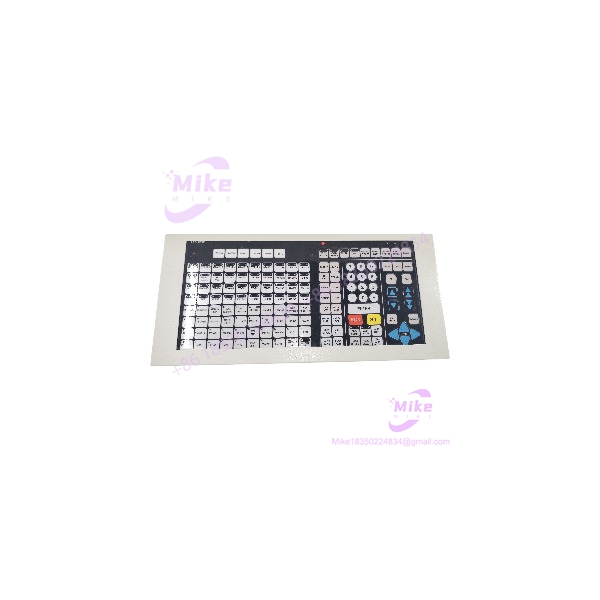
Honeywell 51402497-200 | Enhanced Operator Keyboard
Dynamic Product Introduction
The Honeywell 51402497-200 is not a generic USB keyboard that happens to be used beside a control-room workstation. It is an Enhanced Operator Keyboard (OEP) associated with Honeywell’s operator-interface architecture, where dedicated operator controls are integrated with the DCS workstation environment.
Honeywell documentation identifies part number 51402497-200 specifically as the Enhanced Operator Keyboard and lists it alongside the OEP keyboard cable and OEP/IKB adapter. The same documentation states that the adapter architecture supports PlantScape R500 and Experion PKS R100 or later.
That distinction matters when sourcing an obsolete workstation spare. A visually similar industrial keyboard or ordinary PC keyboard may provide typing capability but does not establish compatibility with the Honeywell operator-interface configuration. For a control-room workstation, the correct keyboard, adapter, cable, and software environment need to be considered together.
51402497-200
Key Technical Specifications
- Part Number: 51402497-200
- Manufacturer: Honeywell
- Product Type: Enhanced Operator Keyboard
- Abbreviation: OEP keyboard
- Application: Honeywell DCS operator-interface workstation
- System Context: PlantScape / Experion PKS
- Interface Architecture: OEP/IKB adapter-based operator interface
- Related Keyboard Cable: Honeywell 51305418-100
- Related Integrated Keyboard: Honeywell 51196694
- Related IKB Cable: Honeywell 51308124
- Adapter Compatibility: Honeywell OEP/IKB adapter architecture
- Documented Software Context: PlantScape R500 and Experion PKS R100 or later
- Physical Identification: Verify complete 51402497-200 marking and hardware revision before replacement
- Procurement Status: Legacy/field-replacement item; availability is primarily through existing inventory and industrial surplus channels
Do not infer modern USB/HID compatibility simply from the fact that the keyboard is used at a workstation. The Honeywell documentation treats the OEP keyboard as part of a specific adapter architecture.
Global Sourcing & Live-Test SOP
For the 51402497-200, receiving inspection should focus on the complete operator-interface chain rather than treating the keyboard as an ordinary computer peripheral.
1. Part-number verification
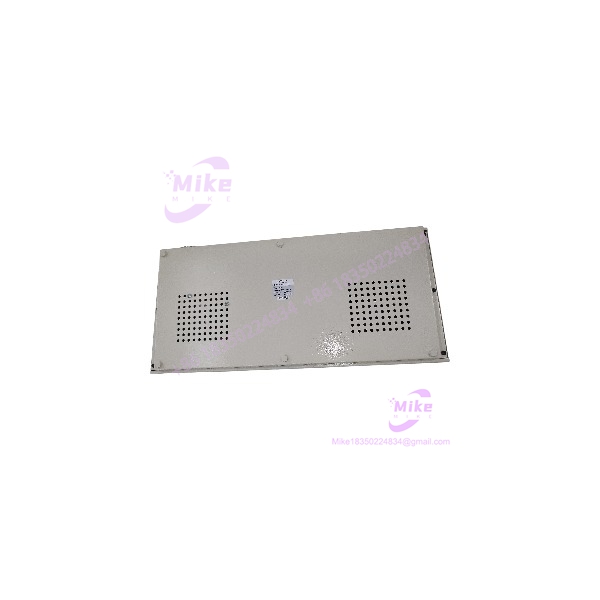
Confirm the rear or underside label reads exactly 51402497-200. Record revision information, serial number if present, and any additional Honeywell identification.
2. Mechanical inspection
Check the keyboard housing, keycaps, legends, mounting points, cable connection, and enclosure for cracking or impact damage. Pay particular attention to heavily used operator keys.
3. Cable and adapter verification
The keyboard should be evaluated together with the applicable OEP keyboard cable and OEP/IKB adapter. A known-good keyboard connected through the wrong interface path can create a misleading diagnosis.
4. Workstation compatibility check
Confirm the target workstation’s PlantScape or Experion PKS environment and the installed operator-interface hardware. Do not assume that a workstation upgrade automatically preserves compatibility with legacy OEP equipment.
5. Functional key test
Test every operator key used by the site’s operating procedure. Check for stuck, intermittent, duplicated, or nonresponsive inputs.
6. Extended operation
Run the keyboard through normal operator interaction for an extended period. Monitor intermittent key faults, cable movement sensitivity, and communication stability.
7. Final documentation
Record the exact part number, revision, test workstation, adapter used, test results, and condition. Package the unit to prevent key damage during storage or shipment.
Field Engineer’s Pitfall Guide
1. Do not substitute a generic PC keyboard just because it fits the workstation.
The 51402497-200 is documented as an Enhanced Operator Keyboard within Honeywell’s OEP architecture. The adapter and software environment are part of the compatibility equation.
2. Verify the OEP/IKB adapter before declaring the keyboard defective.
Honeywell documentation identifies an OEP/IKB adapter between the keyboard hardware and the workstation environment. If the adapter, cable, or associated configuration is wrong, replacing the keyboard may not solve the actual problem.
3. Check the physical revision before approving a surplus replacement.
Secondary listings show 51402497-200 Rev. F units as well as units simply identified by the base part number. Do not assume that every visually similar surplus unit has identical history or condition. For a control-room spare, obtain clear photographs of the actual nameplate and revision markings.
Intent-Driven FAQ
What is Honeywell 51402497-200?
The 51402497-200 is a Honeywell Enhanced Operator Keyboard (OEP) used as part of Honeywell DCS operator-interface equipment.
Is 51402497-200 a DCS I/O module?
No. It is an operator-interface input device, not a controller, remote I/O module, analog input card, or digital output card.
Which Honeywell systems is it associated with?
Honeywell documentation identifies the OEP/IKB adapter architecture for PlantScape R500 and Experion PKS R100 or later. The exact workstation configuration should still be verified before replacement.
What cable is associated with the 51402497-200?
Honeywell documentation lists 51305418-100 as the OEP Keyboard Cable associated with the Enhanced Operator Keyboard. It also identifies 51196694 as the Integrated Keyboard and 51308124 as the IKB Cable.
Can I use a standard USB keyboard instead?
Not as a verified drop-in replacement. The Honeywell OEP architecture uses specific keyboard and adapter hardware. A generic USB keyboard may be useful for temporary workstation access in some environments, but it should not be represented as an equivalent replacement for 51402497-200 without site-level engineering validation.
Does the keyboard require firmware?
The important compatibility issue is the Honeywell operator-interface architecture rather than treating 51402497-200 like a PLC module with user-selectable firmware. Verify the workstation software release, OEP/IKB adapter, cable, and hardware revision as a complete system.
How should a used 51402497-200 be tested?
Connect it through the correct Honeywell interface hardware to a compatible workstation and test the complete key set. Pay special attention to intermittent or duplicated keystrokes, damaged legends, cable faults, and keys that are operationally important to the site’s control-room procedure.
Is Honeywell 51402497-200 still a current product?
It should be treated as a legacy procurement item rather than assuming current OEM production. Current industrial listings show new/open-box, used, and repair/parts units in the secondary market. That makes condition and functional-test evidence especially important when building a spare-parts strategy.





