Description
Kongsberg HD 13T21 STD-EA1-FAGP | 13.3″ Marine Display
Product Introduction
A marine touchscreen is not just a monitor with a ruggedized bezel. In a Kongsberg bridge or control console, the display becomes part of the operator interface, alarm workflow, and human-machine interface—and replacing it with a generic commercial panel can create problems with mounting, DC redundancy, touch behavior, environmental qualification, and operator controls.
The HD 13T21 STD-EA1-FAGP-10051 belongs to Hatteland’s Series X 13.3-inch Standard Display family. The EA1-FAGP configuration is documented as a dual-DC, GDC, buzzer, PCTouch model. Hatteland documentation specifies a 13.3-inch HD widescreen display with LED backlight, while Kongsberg’s own type-approval documentation identifies the HD 13T21 KMD-DR1-CORx family as a K-Master Touch Control Panel.
The -10051 suffix should be retained in the purchasing description. It may identify a particular production or system configuration beyond the base Hatteland model, and I would not assume that every HD 13T21 STD-EA1-FAGP is an electrically identical replacement without comparing the rear label and connector arrangement.
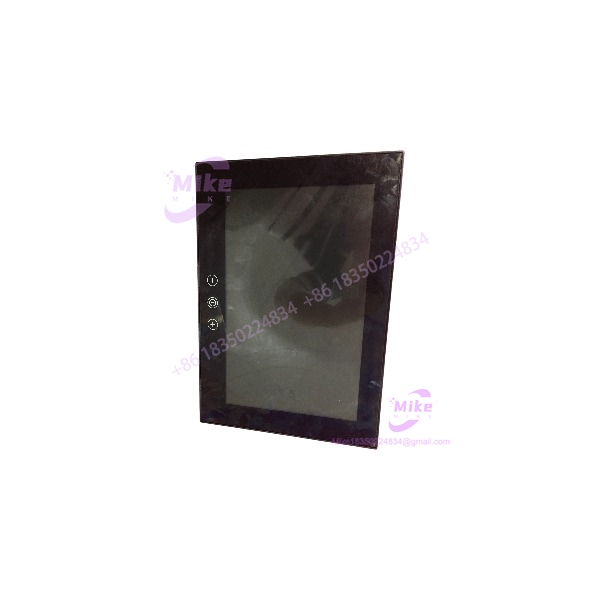
HD 13T21 STD-EA1-FAGP-10051
Key Technical Specifications
- Manufacturer: Hatteland Display / Hatteland Technology
- Marine System Association: Kongsberg Maritime
- Series: Series X Standard Display
- Exact Type: HD 13T21 STD-EA1-FAGP-10051
- Display Size: 13.3 inches
- Display Format: Widescreen, 16:9
- Display Technology: TFT active-matrix LCD
- Backlight: LED
- Native Resolution: 1366 × 768 HD
- Touch Technology: Projected capacitive, multitouch
- Touch Interface: USB
- Operator Control: Glass Display Control
- Integrated Alarm: Programmable alarm LED and buzzer
- Power Supply: Dual 24 VDC
- Power Architecture: Dual DC sources with automatic source switching in the documented EA1 configuration
- Front Protection: IP66
- Rear Protection: IP22
- Operating Temperature: -15°C to +55°C
- Storage Temperature: -20°C to +60°C
- Relative Humidity: Up to 95%
- Compass Safe Distance: 45 cm standard / 30 cm steering
- Approvals/Testing: IEC 60945, IACS E10, DNV, ABS, CCS, ClassNK, BV, GL and LRS
- Mounting: Marine console / panel installation
- Application: Bridge, DP, navigation, alarm, propulsion and marine automation operator interfaces
Hatteland’s documentation specifically lists HD 13T21 STD-EA1-FAGP = Dual DC, GDC, Buzzer, PCTouch. The environmental specification gives -15°C to +55°C operating temperature, -20°C to +60°C storage, and IP66 front/IP22 rear protection.
Kongsberg’s type-approval documentation independently identifies the HD 13T21 platform in K-Master equipment, including the 13.3-inch HD 13T21 KMD-DR1-CORx touch control panel.
Global Sourcing & Live-Test SOP
1. Inbound Verification
For a replacement HD 13T21 STD-EA1-FAGP-10051, inspect the physical identification before applying power.
- Photograph the complete rear nameplate.
- Confirm the exact
HD 13T21 -10051designation. - Record serial number and manufacturing information.
- Confirm the Hatteland label rather than relying solely on a Kongsberg system label.
- Photograph both DC input connectors.
- Inspect the touchscreen glass for cracks, delamination, scratches, or impact marks.
- Check the front gasket and mounting surface.
- Inspect the rear connectors for corrosion or bent contacts.
- Confirm that the buzzer and operator-control area are physically intact.
The exact -10051 suffix should remain in the inventory record. It is safer to treat the complete type number as the replacement identifier than to source simply by “HD 13T21.”
2. Power Verification
This is a 24 VDC marine display, and the EA1 configuration is designed around dual DC power.
Before energizing:
- Confirm both DC inputs.
- Verify polarity.
- Check the protective-earth arrangement according to the installation documentation.
- Measure supply voltage with an industrial multimeter.
- Check each input independently.
- Verify that the display starts correctly from each DC source.
- If both supplies are connected, verify the expected source-switching behavior.
Do not assume a random 24 VDC supply is an acceptable substitute simply because the nominal voltage matches. Marine control cabinets can have specific grounding, redundancy, surge, and distribution arrangements.
3. Display and Touch Test
Run a practical operator-interface test:
- Power up from DC source A.
- Repeat from DC source B.
- Check full-screen illumination.
- Inspect the LCD for dead pixels or abnormal areas.
- Verify brightness control.
- Test projected-capacitive touch across the complete active area.
- Check multitouch where the application uses it.
- Verify the GDC controls.
- Test the programmable alarm LED.
- Test the buzzer.
- Confirm that the display remains stable after warm-up.
For a used unit, a touch panel that works in the center but has intermittent edge zones is not a satisfactory test result.
4. Video and System Integration
The display should be tested with the intended host system or a compatible test source.
Verify:
- Correct video resolution.
- Stable synchronization.
- Correct aspect ratio.
- No intermittent signal loss.
- Touch communication.
- Operator-control response.
- Alarm/buzzer operation.
- Any associated Kongsberg application interface.
The monitor itself does not contain the Kongsberg control application. Do not describe a tested display as a tested Kongsberg automation workstation unless the complete system has actually been exercised.
5. Extended Heat Run
For critical marine spare inventory, operate the unit for an extended period while monitoring:
- LCD stability
- Backlight behavior
- Touch response
- DC input stability
- Temperature
- Alarm LED
- Buzzer
- GDC operation
- Video synchronization
Record the serial number and test result before ESD-safe packaging.
Field Engineer’s Pitfall Guide
❗ Do not confuse Hatteland hardware with the complete Kongsberg application
The display is an operator-interface component. Kongsberg systems such as K-Master can incorporate the HD 13T21 platform, but the display itself is not the DP controller, workstation software, or automation CPU.
This distinction matters when sourcing a spare: a functioning LCD does not prove that the complete Kongsberg operator station is functional. Kongsberg’s approval documentation separately identifies display panels, I/O controllers, workstations, and other system components.
❗ Verify the dual-DC arrangement before commissioning
The configuration is documented with dual 24 VDC power. That is a meaningful marine-system feature, not merely two spare terminals.
If the original installation uses redundant DC distribution, test both sources independently. A display that operates from DC-A but fails to start from DC-B should not be released as a fully tested replacement.
❗ Do not use the IP66 front rating as an enclosure rating
The documented protection is IP66 at the front and IP22 at the rear. The rear of the display therefore needs appropriate cabinet protection.
This is a common retrofit mistake: an installer sees “IP66” in the specification and assumes the complete assembly can tolerate the same exposure from every direction. It cannot.
Intent-Driven FAQ
Is H-10051 a Kongsberg display?
It is best described as a Hatteland Technology Series X marine display associated with Kongsberg marine systems. Kongsberg documentation identifies the HD 13T21 platform in K-Master equipment, while Hatteland documentation defines the actual display hardware and type-number structure.
What size is the display?
It is a 13.3-inch widescreen marine display with a 16:9 format and HD-class 1366 × 768 native resolution.
Does it have a touchscreen?
Yes. The configuration is documented with projected capacitive touchscreen technology, including multitouch and USB interface.
What does FAGP mean?
Hatteland documentation identifies the relevant configuration as Dual DC, GDC, Buzzer, PCTouch. Rather than relying on an unofficial character-by-character decoding of every suffix, the complete type code should be used when ordering the replacement.
What power does it require?
The HD 13T21 STD EA1 configuration uses 24 VDC, with dual DC inputs. A current classification record also lists HD 13T21 STD models as 24 VDC products.
What are the environmental ratings?
The documented operating range is -15°C to +55°C, with storage from -20°C to +60°C and humidity up to 95%. Protection is IP66 front / IP22 rear.
Can I replace it with any 13.3-inch Hatteland monitor?
Not safely by screen size alone. Compare the complete model code, DC power architecture, touchscreen configuration, GDC controls, buzzer, connectors, mounting dimensions, video interface, and the requirements of the Kongsberg system using the display.
Procurement Note
For an industrial or marine purchase order, specify:
KONGSBERG / HATTELAND H-10051
Preserve the complete suffix and request a photograph of the physical nameplate before purchasing surplus or refurbished inventory.
For in-stock, factory-sealed, surplus, or refurbished stock, specifically verify the LCD condition, touchscreen response, dual-DC operation, GDC controls, buzzer, alarm LED, rear connectors, and mounting hardware. A monitor that simply displays a video signal is not necessarily ready for installation into a Kongsberg bridge or DP workstation.