

Description
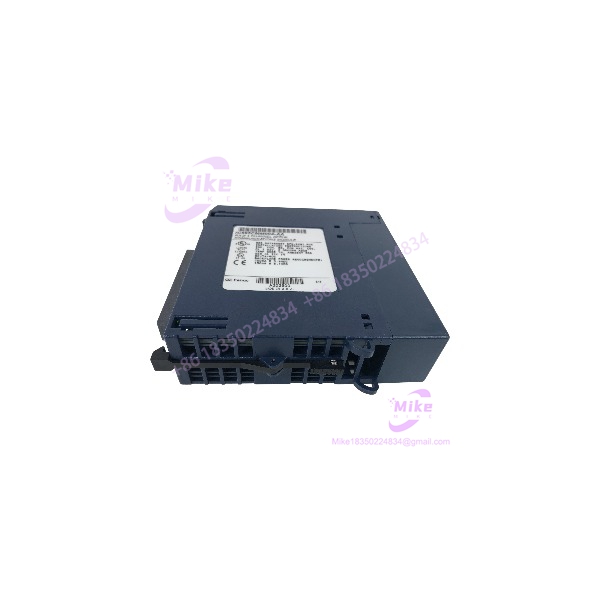
GE Fanuc IC695CMM004 | RX3i 4-Port Serial Module
Product Introduction
When a PLC must communicate with multiple serial field devices, port count and electrical isolation can make the difference between a clean integration and a complicated retrofit. The GE Fanuc IC695CMM004 provides four independent serial channels for PACSystems RX3i systems, supporting RS-232 or RS-485/RS-422 operation through software configuration.
The IC695CMM004 supports common industrial serial protocols, including Modbus Master/Slave, DNP3, CCM, and Serial I/O, with supported functions dependent on module revision and firmware. Each channel can be configured independently, allowing one module to serve different serial communication requirements within the same control system. For replacement procurement, verify the exact revision and protocol requirements—especially when maintaining legacy DNP3 or CCM applications.
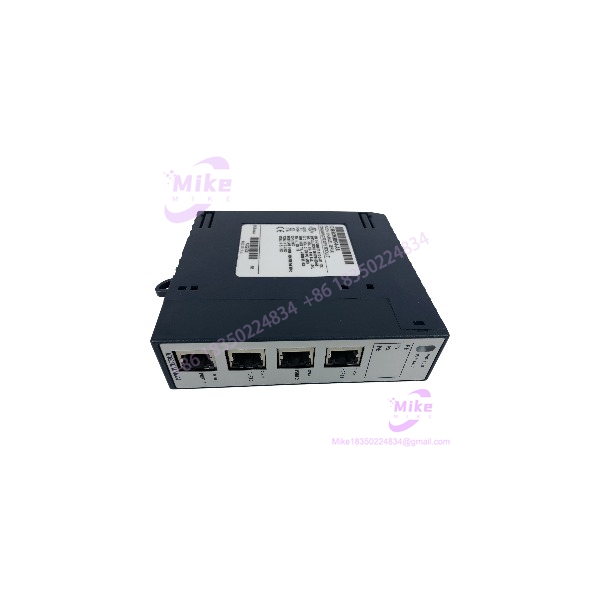
IC695CMM004
Key Technical Specifications
- Catalog Number: IC695CMM004
- Platform: PACSystems RX3i
- Module Function: Serial communications
- Number of Ports: Four independent ports
- Connector: Four RJ-45 female connectors
- Port Interface: RS-232 or RS-485/RS-422
- RS-485/RS-422 Modes: 2-wire half-duplex or 4-wire full-duplex
- Baud Rates: 1,200; 2,400; 4,800; 9,600; 19.2K; 38.4K; 57.6K; 115.2K baud
- Data Bits: 7 or 8
- Stop Bits: 1 or 2
- Parity: Even, odd, or none
- RS-232 Flow Control: Hardware CTS/RTS or none
- Protocols: Modbus Master/Slave, DNP3, CCM, and Serial I/O, subject to revision/firmware support
- Maximum Modules per Main Backplane: Six
- Backplane Power Requirement: 0.150 A maximum at 5 VDC; 0.7 A maximum at 3.3 VDC
- Operating Temperature: 0°C to +60°C
- RS-485/RS-422 Input Impedance: Greater than 96 kΩ
- RS-232 Input Impedance: 3 kΩ to 7 kΩ
- Maximum Overvoltage: ±25 V
- Port-to-Backplane Isolation: 250 VAC continuous; 1,500 VAC for 1 minute
- Port-to-Port Isolation: 500 VDC continuous; 710 VDC for 1 minute
- Configuration Software: Proficy Machine Edition; version compatibility depends on module release
- Installation: RX3i Universal Backplane
The IC695CMM004 manual, GFK-2461, documents the module’s interfaces, power requirements, protocol support, and release history. Later revisions added protocol capabilities, so do not assume all firmware features are present on every unit.
Global Sourcing & Live-Test SOP
A serial module may power up normally while still having a damaged port or an incompatible firmware revision. A useful procurement inspection should verify both module health and communication functionality.
Incoming Verification
- Confirm the IC695CMM004 catalog number and full revision suffix.
- Inspect the housing, backplane connector, RJ-45 ports, and status LEDs.
- Check for bent contacts, corrosion, heat damage, or evidence of prior electrical stress.
- Confirm whether serial cables or other accessories are included; do not assume they ship with the module.
Authenticity & Traceability
- Photograph the OEM label, catalog number, and revision markings.
- Record serial/date-code information where available.
- Compare module identification and physical details against available documentation.
- Clearly classify the item as new surplus, used, or refurbished.
Functional & Communications Test
- Install the module in a compatible RX3i Universal Backplane with a suitable CPU.
- Verify module recognition and startup status.
- Check the Module OK, Port Fault, and individual port status indicators.
- Configure available ports for supported serial modes.
- Perform loopback or device-communication testing where suitable equipment is available.
- Test representative channels in the required RS-232 or RS-485/RS-422 mode.
- Record which ports and protocols were actually tested. Do not claim full four-port functional testing if only one channel was verified.
Extended Run & Configuration Record
- Perform an extended powered run when test facilities permit.
- Record actual test duration, firmware/revision details, and observed diagnostics.
- Document protocol coverage and any limitations in the test setup.
- Do not claim a 24-hour heat run unless completed and recorded.
ESD-Safe Packaging
- Use ESD-protective packaging and suitable cushioning.
- Protect RJ-45 ports and the backplane connector from impact and contamination.
- Secure the module against movement during transit.
Field Engineer’s Pitfall Guide
- ❗ Revision affects protocol capability. release history includes added CCM Slave and DNP3 Master/Slave support. Confirm the exact hardware revision and firmware against the required protocol before approving a replacement.
- ❗ RJ-45 does not mean Ethernet. The uses RJ-45 connectors for serial communications. Do not connect it to an Ethernet switch or assume standard Ethernet patch cables are correctly wired for your serial application. Modbus configurations may require custom pinout cables.
- ❗ Isolation does not eliminate wiring requirements. Each port’s electrical interface and wiring mode must match the field device. Confirm RS-232 versus RS-485/RS-422, 2-wire versus 4-wire operation, shielded-cable requirements, and grounding before commissioning.
Intent-Driven FAQ
Q1: What is the GE Fanuc used for?
It is a four-port serial communications module for PACSystems RX3i PLC systems. It connects compatible serial devices using supported industrial protocols.
Q2: Does the support RS-485?
Yes. Each port can be configured for RS-232 or RS-485/RS-422 operation. RS-485/RS-422 supports 2-wire half-duplex or 4-wire full-duplex modes.
Q3: Which protocols does the support?
Documented protocols include Modbus Master/Slave, DNP3, CCM, and Serial I/O. The available protocol set depends on the module’s revision and firmware.
Q4: Can I use the in a Series 90-30 PLC?
It is designed for the PACSystems RX3i Universal Backplane. Do not assume Series 90-30 compatibility; confirm the target rack and CPU platform before purchase.
Q5: Can the be hot-swapped?
The RX3i serial communications module documentation describes hot insertion and removal under specified procedures. Confirm system configuration and follow the PACSystems RX3i System Manual, GFK-2314, along with site safety procedures before attempting a live replacement.
Q6: Does the include serial cables?
Not inherently. The module has RJ-45 serial ports, but cables and adapters are separate unless the seller explicitly lists them. Confirm pinout and wiring requirements for the intended protocol.
Q7: What should I verify before ordering a replacement?
Confirm the revision, required protocol, RX3i CPU compatibility, port interface and wiring mode, firmware support, condition classification, test coverage, and written warranty terms.





