


Description
Siemens 6ES7623-1SB01-0AC0 | C7-623 CPU314 OP5 Unit New Surplus
Architect’s Product Breakdown
The Siemens 6ES7623-1SB01-0AC0 is a highly specialized compact control system belonging to the SIMATIC C7 family (specifically model C7-623/P). Developed as a custom OEM hardware assembly for GEA process machinery, this unit merges the computing power of an S7-300 CPU 314 core, the user interface of an OP5 Operator Panel, an IM360 expansion interface, and a rich array of local digital and analog I/O into a single enclosure.
By packaging logic execution and operator interaction into one footprint, the 6ES7623-1SB01-0AC0 eliminates the space overhead and internal backplane wiring required by separate S7-300 rack configurations. Its onboard I/O density—comprising 16 Digital Inputs, 16 Digital Outputs, 4 Analog Inputs, 4 Analog Outputs, and 4 Universal Inputs—provides a complete standalone control solution for skid-mounted machinery, homogenizers, and sanitary liquid processing systems.
Navigating a replacement for this module requires careful attention to its OEM customization. Because the “SB01” suffix designates a custom GEA equipment firmware and pinout profile, substituting a standard off-the-shelf C7-623 unit (such as a standard 6ES7623-1A… model) will cause machine-level firmware mismatches and display routine errors. Sourcing the exact OEM-specific part number preserves existing STEP 7 and ProTool project files without demanding costly panel re-engineering.
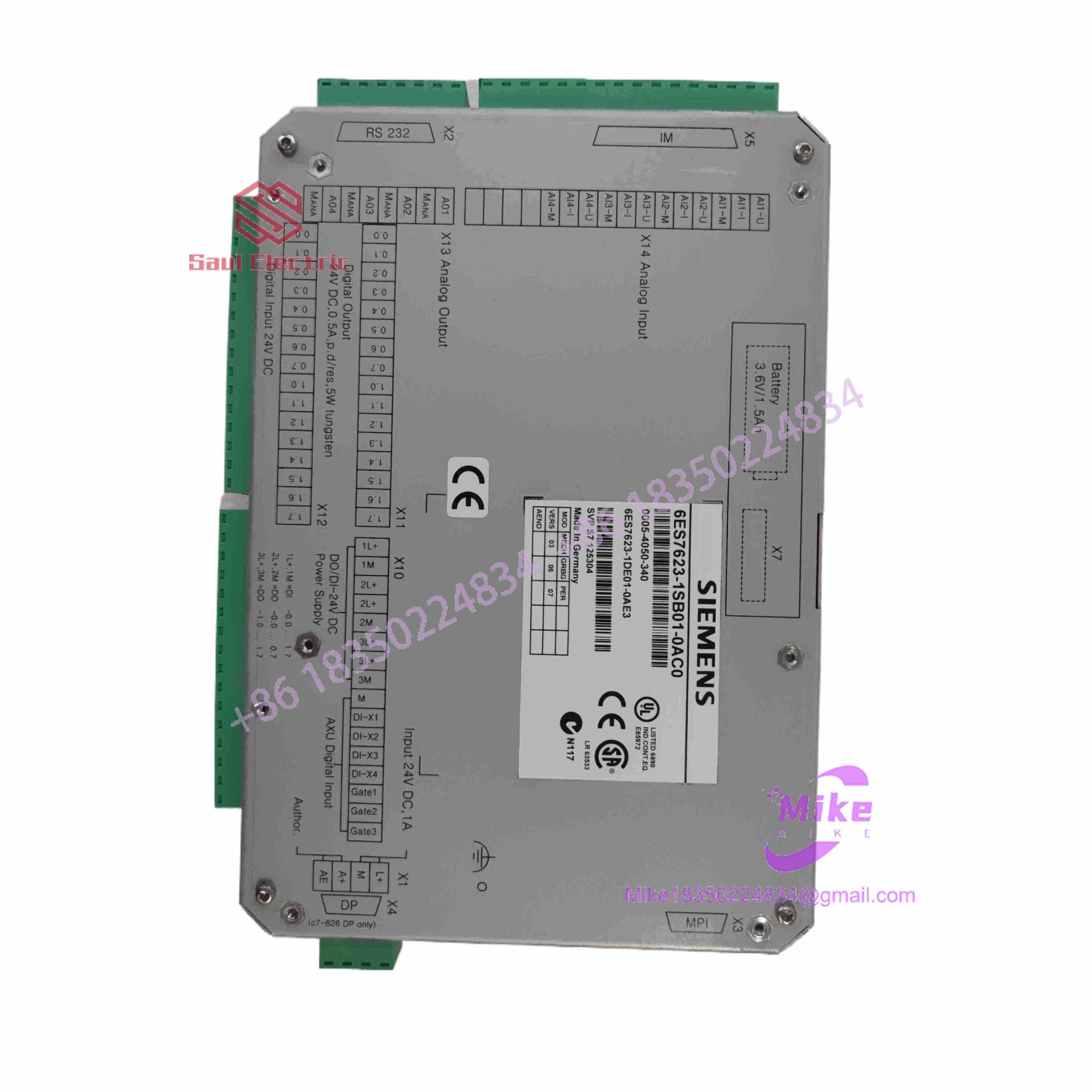
6ES7623-1SB01-0AC0
Key Technical Specifications
| Parameter | Technical Specification |
| Manufacturer | Siemens AG |
| Product Line | SIMATIC C7-623/P (Customized GEA Design) |
| Integrated Logic Core | SIMATIC S7-300 CPU 314 Engine |
| Integrated HMI Interface | SIMATIC OP5 Operator Panel (Text-based, Backlit Display) |
| Expansion Interface | Onboard IM360 Interface (Allows S7-300 Rack Expansion) |
| Digital I/O Density | 16 Digital Inputs (24VDC) / 16 Digital Outputs (24VDC, 0.5A) |
| Analog I/O Density | 4 Analog Inputs / 4 Analog Outputs / 4 Universal Inputs |
| Supply Voltage | 24 VDC Nominal (20.4 to 28.8 VDC allowable range) |
| Memory / Storage | S7 Memory Card Slot (FEPROM / RAM) for logic retention |
| Communication Ports | MPI (Multi-Point Interface) for programming and networking |
| Enclosure Rating | IP65 Front Panel / IP20 Rear Chassis |
Field Engineer’s Pitfall Guide (Unique Value)
- CROSS-REPLACING WITH A STANDARD C7-623 UNIT: Do not install a standard Siemens 6ES7623 unit in place of the -1SB01-0AC0. The
-1SB01-0AC0contains custom GEA OEM system configurations, specific hardware addressing maps, and tailored I/O board calibration. Installing a non-GEA variant will fail logic execution during the initial boot phase due to missing system data blocks (SDBs) expected by GEA-proprietary equipment logic. - LOSS OF RETENTIVE DATA FROM DEAD MEMORY BATTERY: Always check the internal back-up battery before pulling power for panel maintenance. The CPU 314 core inside this unit relies on an internal lithium battery to retain retentive memory flags, timer states, and user parameters when main 24VDC power is removed. If the battery is depleted, powering down the machine will wipe runtime parameters, forcing an emergency memory reload from an external S7 memory card.
- OVER-TORQUING PANEL MOUNTING CLAMPS: Tighten the front-bezel mounting clips evenly using hand tools only. The composite front housing seals against the NEMA 4/IP65 panel cutout. Using power drivers to torque down the mounting clips can crack the front plastic frame or warp the keypad membrane, destroying the fluid-tight seal and allowing wash-down moisture to enter the display electronics.
QA & Testing SOP (Transparency)
- Visual & Bezel Quality Audit: Microscopic check of the front keypad membrane for tears or key wear. Inspection of rear terminal blocks, connector pins, and OEM serial labels.
- Power & Isolation Check: Insulation resistance testing across 24VDC input rails and ground points to confirm zero chassis leakage.
- Live Bench Simulation Setup: Unit mounted on a diagnostic test bench supplied with 24VDC.
- I/O & Diagnostic Functional Validation:
- PLC Core: STEP 7 program downloaded to verify logic execution and cycle time limits.
- Display & Keypad: Every membrane key tested for tactile feedback; LCD backlight and contrast tested across full range.
- Analog/Digital I/O: Signal generator applied to all 16 DIs, 4 AIs, and 4 UIs; outputs loaded to verify switching thresholds.
- Memory Clear & Anti-Static Pack: Firmware set to neutral factory mode, RAM cleared, unit sealed in static-shielding bags, and packed in heavy-duty protective foam shipping containers.
Technical FAQ
What software is required to program the 6ES7623-1SB01-0AC0?
Programming the internal PLC logic requires STEP 7 (V5.x) or higher via an MPI communication adapter. Configuring or editing the integrated OP5 text display screens requires SIMATIC ProTool (or Step 7 integrated HMI tools for older legacy systems).
Can I expand the I/O capacity on this unit if 16 DI/DO isn’t enough?
Yes. The 6ES7623-1SB01-0AC0 includes an integrated IM360 interface module. This port allows you to connect an S7-300 expansion cable (e.g., 368 series) directly to additional SIMATIC S7-300 racks (using an IM361 receiver) to add standard SM321, SM322, or SM331 I/O modules.
Why does my replacement unit display an “OP5 Comm Error” on startup?
This error indicates a communication failure between the internal OP5 display board and the CPU 314 core. Ensure that the internal ribbon interconnects are fully seated and that the MPI node address defined in the ProTool project matches the internal CPU address assignment (typically set to Node 2 by default).
Can I hot-swap this entire unit while the control cabinet is energized?
No. The 6ES7623-1SB01-0AC0 is a panel-mounted unit with main power, communication, and field I/O wiring attached directly to rear terminal blocks. Power to the 24VDC supply and field circuits must be shut down before disconnecting wiring and removing the unit from the panel cutout.
Is this part still manufactured by Siemens?
No. The SIMATIC C7 series, including special OEM variants like the 6ES7623-1SB01-0AC0, has been officially discontinued by Siemens. Maintenance spares are available as New Surplus or fully tested reconditioned units to support existing operational production lines.





