


Description
PHEONIX TECH ECC1-1 | Ethernet Communication Controller
Product Introduction
When a legacy PLC, RTU, flow meter, or remote instrument suddenly disappears from the control network, the failure is rarely just “a network problem.” A failed communication controller can isolate an entire group of field devices from the SCADA or DCS layer. PHEONIX TECH ECC1-1 was designed for precisely this type of communication architecture—acting as an industrial gateway between older serial equipment and Ethernet-based supervisory systems.
The practical value is straightforward: keep an existing control installation communicating without forcing an immediate wholesale migration. The ECC1-1 provides an Ethernet-facing connection alongside serial communication capability, making it relevant to legacy rack maintenance, remote I/O communications, plant-floor data collection, and protocol-conversion applications. Its reported -20°C to +70°C operating range also fits many conventional industrial cabinet environments—though actual cabinet temperature, airflow, humidity, and field wiring conditions still need to be checked before installation.
Do not treat the ECC1-1 as a generic Ethernet converter. Port configuration, protocol mapping, firmware, serial parameters, and the host system’s communication architecture all matter.
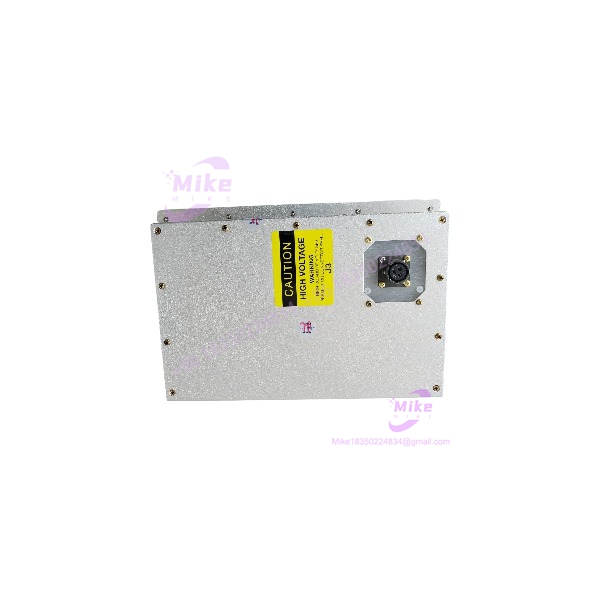
ECC1-1
Key Technical Specifications
| Parameter | ECC1-1 Technical Detail |
|---|---|
| Manufacturer | PHEONIX TECH |
| Model | ECC1-1 |
| Product Category | Ethernet Communication Controller |
| Primary Function | Industrial communication gateway |
| Network Interface | Ethernet |
| Ethernet Connector | RJ45 |
| Serial Interface | RS-485 |
| Application Layer | SCADA / DCS / PLC communication |
| Typical Architecture | Serial field devices to Ethernet supervisory network |
| Operating Temperature | -20°C to +70°C |
| Lifecycle | Obsolete / legacy hardware |
| Procurement Strategy | Tested spare / replacement stock |
Engineering note: Publicly available documentation for this legacy model is limited. Do not infer unsupported protocol combinations, power requirements, pin assignments, firmware compatibility, or baud-rate limits from the model number alone. Confirm those items from the original equipment documentation or the installed unit’s identification label before commissioning.
Application Scenarios & Pain Points
When the existing plant network cannot simply be replaced
A legacy serial instrument network can remain connected to an Ethernet-based supervisory architecture, reducing the immediate need to replace every downstream field device.
Without :
A failed gateway can leave otherwise healthy PLCs, meters, RTUs, and instruments invisible to the control room. The hardware may still be running perfectly—the communication path is what has disappeared.
Legacy SCADA Migration
Older installations often contain layers of equipment from different generations. Replacing the gateway first can buy engineering time while the plant team plans a controlled migration rather than making a forced change during production.
That matters during shutdown windows. A communication failure discovered at 2:00 a.m. is not the time to start reverse-engineering a twenty-year-old network.
Remote RTU and Instrument Connectivity
For remote equipment using serial communications, the can serve as the network-side interface between field equipment and Ethernet infrastructure. This is particularly useful where replacing the entire instrument population would create unnecessary wiring, calibration, and commissioning work.
High-Temperature Control Cabinets
The reported -20°C to +70°C operating range makes temperature verification important during replacement planning. Measure the actual cabinet temperature rather than relying on room temperature—especially when the controller is installed beside power supplies, drives, or other heat-generating equipment.
Obsolete-System Spare Strategy
This is where the becomes more interesting.
Once a communication controller reaches obsolete status, the engineering problem changes from routine purchasing to lifecycle risk management. A tested spare on the shelf can prevent a relatively inexpensive communication failure from turning into an emergency redesign.
QA & Live Testing SOP
For a legacy communication controller, visual inspection alone is not enough.
Our preferred incoming inspection sequence is:
- Identity Verification
- Confirm the PHEONIX TECH marking.
- Verify the complete model designation.
- Compare connector layout, PCB revision, labels, and serial identification against the customer’s reference unit.
- Physical Inspection
- Inspect PCB condition and connectors.
- Check RJ45 and serial terminals for corrosion, cracked housings, bent contacts, or previous field-repair evidence.
- Examine mounting points for mechanical damage.
- Power-Up Test
- Apply the specified supply voltage using a controlled test setup.
- Monitor startup behavior and indicator status.
- Check for abnormal current draw before extended operation.
- Communication Test
- Establish an Ethernet link.
- Verify the serial interface.
- Where the customer’s application requires Modbus or another supported protocol, perform an actual communication handshake rather than merely checking link LEDs.
- Validate packet exchange, response behavior, and communication stability.
- Extended Run
- Leave the controller operating under communication load.
- Monitor for intermittent link loss, unexpected resets, or thermal instability.
- ESD-Safe Packaging
- Protect the electronics using ESD-safe packaging.
- Use connector protection and sufficient mechanical cushioning for international shipment.
Engineering rule: A blinking Ethernet LED does not prove that the controller is communicating correctly. Application-level data exchange is the test that matters.
Field Engineer’s Pitfall Guide
❗ Do not assume every is firmware-equivalent
Legacy controllers can exist with different firmware or hardware revisions. A replacement that looks identical may still behave differently during startup or protocol negotiation.
Verify the installed firmware/revision before commissioning. Do not assume that a newer revision is automatically backward-compatible.
❗ Check the serial configuration before blaming the Ethernet network
RS-485 systems depend on correct communication parameters and physical wiring. Baud rate, parity, stop bits, device addressing, termination, polarity, and grounding can all affect the communication handshake.
If the Ethernet side looks healthy but the PLC receives no field data, move down the communication stack instead of immediately replacing the network switch.





