Description
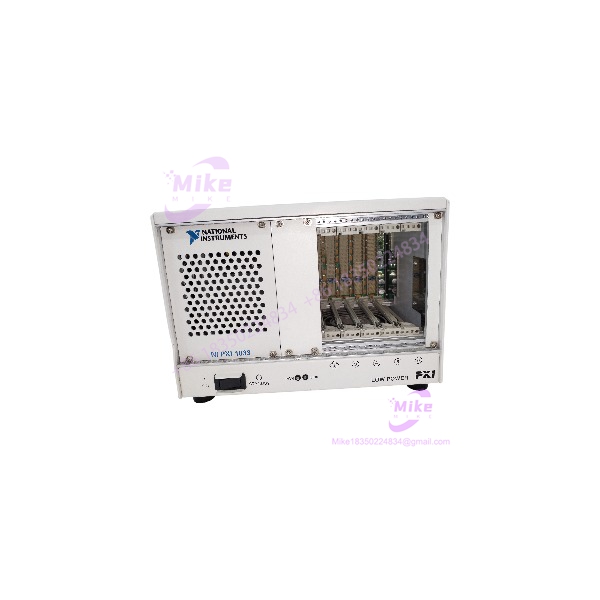
NI PXI-1033 | 5-Slot PXI Chassis with MXI-Express Controller
Dynamic Product Introduction
In automated test bench setups and desktop data acquisition systems, engineering teams often face a tradeoff between compact rack footprints and high data throughput. Standard standalone PXI chassis require a dedicated system controller card taking up Slot 1, leaving fewer slots available for actual measurement hardware. The National Instruments PXI-1033 eliminates this limitation by integrating the MXI-Express controller directly into the backplane, freeing up all 5 slots for 3U peripheral cards while linking directly to a host PC or laptop over a high-speed x1 PCIe cable.
Delivering up to 110 MB/s sustained throughput across its 5 3U peripheral slots, the PXI-1033 provides integrated PXI timing and synchronization features, including the 10 MHz system clock and PXI trigger bus. (Honestly, using the front-panel auto/high fan speed switch allows you to run low-noise acoustic tests on the desktop without thermally throttling high-density DAQ cards.) Built with a lightweight, rugged enclosure and wide-range AC power input, the PXI-1033 remains a workhorse for portable automated testing—though maintaining host link stability requires using certified MXI-Express cabling and proper boot-sequencing.
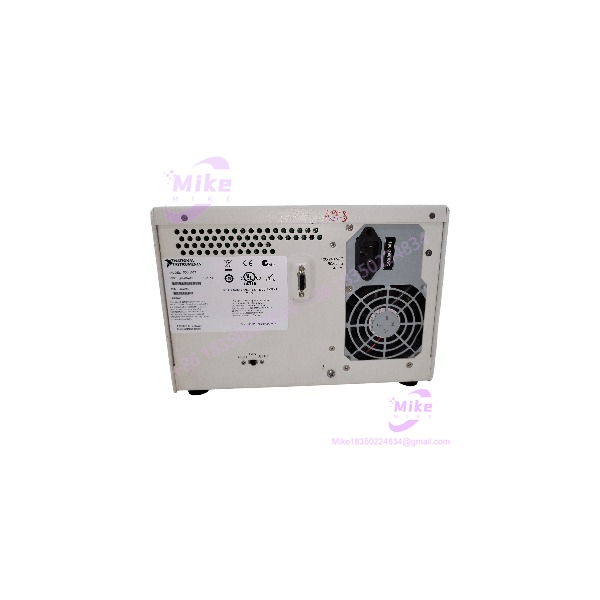
PXI-1033
Key Technical Specifications
- Manufacturer & System Platform: National Instruments (NI) / PXI Automated Test Series
- Chassis Model & Part Numbers: PXI-1033 / 779756-01 / 196327B-01L
- Total Peripheral Slots: 5 3U PXI slots (Slot 1 integrated into backplane control)
- Integrated Remote Controller: Built-in MXI-Express (x1) link interface (110 MB/s max sustained throughput)
- Backplane Clock & Timing: 10 MHz system clock (\pm 25 ppm stability) with PXI trigger bus and star trigger alignment
- DC Power Supply Output: 110 W total continuous output across +3.3V, +5V, +12V, and -12V rails
- AC Input Voltage Range: 100 V AC to 240 V AC universal line input (47 Hz to 63 Hz)
- Cooling System: Integrated forced-air fan with rear-panel Auto/High speed mode switch
- Operating Ambient Temperature: 0°C to +50°C (32°F to 122°F) continuous operational range
- Dimensions & Weight: 17.7 cm \times 25.7 cm \times 21.3 cm (6.97″ \times 10.12″ \times 8.38″), 5.0 kg (11.0 lbs)
Global Sourcing & Live-Test SOP (Transparency Core)
Procuring pre-owned or secondary-market PXI chassis hardware demands rigorous electrical and signal integrity validation before placing units into production test cells. Every NI PXI-1033 chassis entering inventory undergoes a comprehensive five-stage bench test protocol:
- Inbound Mechanical & Backplane Inspection: Serial numbers and PCB assembly tags are cross-referenced against NI manufacturing manifests. We inspect all 5 slot connectors for bent card-guide pins, test card ejector levers, verify backplane ground plane condition, and clean cooling fan shrouds.
- Live Host Link & Power Simulation: The PXI-1033 is connected to a host test PC via an MXI-Express x1 cable and PCIe interface card. Power is supplied through an adjustable AC line source across the 100–240 VAC range.
- Diagnostics & Slot Verification: Fully populated with standard 3U PXI cards (e.g., NI PXI-6221 DAQ and NI PXI-4070 DMM), MAX (Measurement & Automation Explorer) system sweeps are executed. We verify that all 5 slots enumeration correctly and validate 10 MHz backplane clock stability using a frequency counter.
- Load Regulation & Thermal Soak: Power supply rails (+3.3V, +5V, +12V, -12V) are loaded using electronic load banks. Voltage regulation is confirmed within ±5% tolerances while running a 4-hour thermal soak with the cooling fan set to Auto and High modes.
- Final Prep: Non-volatile bus configuration caches are cleared, MXI-Express cable port caps are fitted, and the PXI-1033 chassis is vacuum-sealed in heavy-duty anti-static moisture-barrier packaging.
The Field Engineer’s Pitfall Guide
❗ Incorrect Boot Sequencing Causing Host PC Enumeration Failures: Always turn on the PXI-1033 chassis before powering on the host computer. Because MXI-Express acts as a transparent PCI Express bridge, the host PC’s BIOS/OS enumerates connected PCIe devices during startup. If the PXI-1033 is powered on after the host PC boots, the host will fail to detect the chassis backplane and any installed peripheral cards.
❗ Attempting to Install a PXI Express (PXIe) Card: Never attempt to insert PXI Express (PXIe) or PXI Hybrid cards into the PXI-1033 backplane. The PXI-1033 utilizes standard 3U PXI architecture backplane connectors (J1/J2). Forcing PXIe hardware into standard PXI slots will bend connector pins and permanently damage the backplane.
❗ Unplugging the MXI-Express Cable While System is Live: Never disconnect or plug in the MXI-Express cable while either the host PC or PXI-1033 chassis is powered on. Hot-unplugging the MXI-Express cable causes instant PCIe bus faults, crashing the host operating system and potentially corrupting open data files or test routines.
Intent-Driven FAQ
Q: Can I install a standard PXI Controller (like an NI PXI-8106) into Slot 1 of the PXI-1033? No. The PXI-1033 features an integrated MXI-Express remote controller built directly into the Slot 1 backplane section. Slot 1 is not physically or electrically accessible for plug-in embedded controllers; the chassis is designed strictly to be controlled remotely via a host PC or laptop using an MXI-Express link.
Q: What cable and host card do I need to connect the PXI-1033 to a standard desktop PC? To link the PXI-1033 to a desktop PC, you need an NI PCIe-8361 (or PCIe-8362) host interface card installed in the PC, connected to the chassis via a standard x1 MXI-Express cable (such as NI MXI-Express Cable 1m or 3m).
Q: How does the front-panel fan speed switch affect chassis cooling and operation? The rear-panel fan switch offers “Auto” and “High” settings. In “Auto” mode, the chassis dynamically adjusts fan speed based on ambient temperature to reduce noise—ideal for desktop laboratory environments. In “High” mode, the fan runs at maximum RPM continuously, which is recommended for high-power module setups or elevated ambient temperature environments.
Q: What should I check if NI MAX shows “Device Not Found” for cards installed in the PXI-1033? First, confirm the boot order: power off both units, power on the PXI-1033, wait 5 seconds, and then boot the host PC. Next, check the MXI-Express link LED on the rear panel—a solid green light indicates a healthy link. If the LED is unlit or red, re-seat the MXI-Express host card and check the cable connection.
Q: Is the PXI-1033 rack-mountable in standard 19-inch equipment racks? Yes. National Instruments offers a dedicated rack-mount kit (Part Number: 779779-01) that allows the PXI-1033 to be mounted into standard 19-inch instrument racks.