

Description
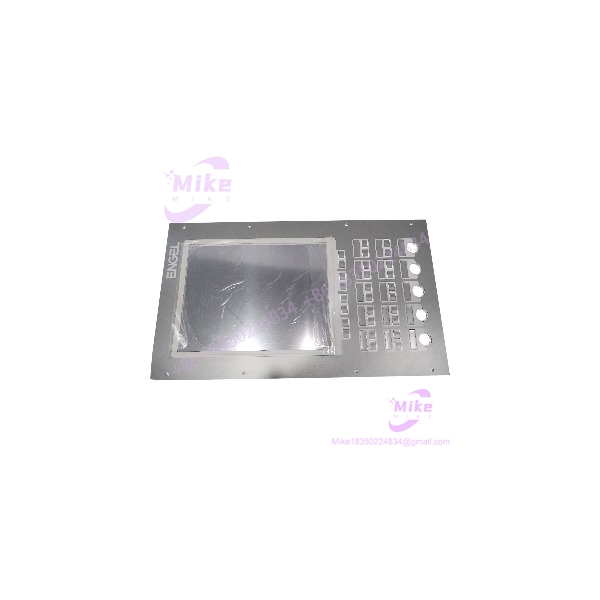
KEBA OP362-LD/W-5200 Industrial HMI Operator Panel for Kemro K2-200
Product Introduction
When an operator panel fails on an older injection-molding machine or other automated production system, replacing it is not simply a matter of finding a display with the same dimensions. The HMI may depend on a particular controller family, cable interface, visualization software, and mounting arrangement. A physically compatible panel can still be electrically or functionally incompatible.
The KEBA OP362-LD/W-5200 is listed as an operator panel for the Kemro K2-200 platform and is also associated with ENGEL equipment. Its touchscreen and membrane keypad provide the operator interface for machine commands and visualization. Repair and replacement services are listed by industrial automation suppliers, which may be useful when sourcing a legacy spare.
For maintenance teams, the first decision is whether to purchase a complete panel, repair the original unit, or replace only a failed front component. The correct choice depends on the fault, availability of the original project, and the condition of the display, touch layer, keypad, and internal electronics.
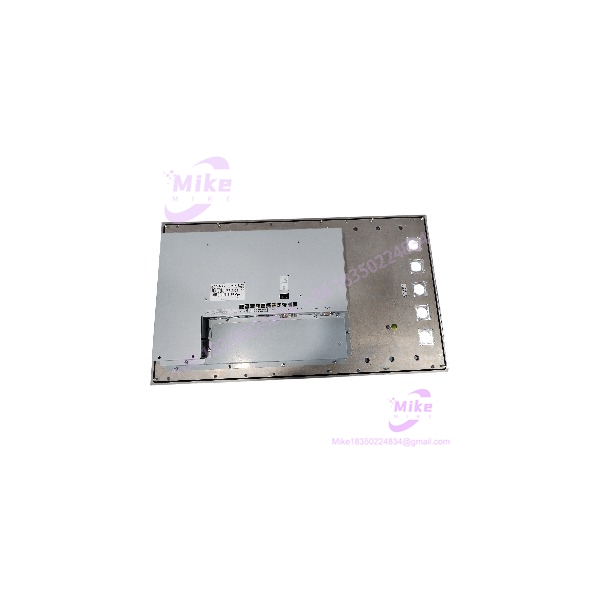
OP362-LD/W-5200
Key Technical Specifications
The following details are reported by third-party industrial equipment listings. Some specifications vary between sources, so verify the actual unit and applicable documentation before engineering approval.
- Manufacturer: KEBA
- Model: OP362-LD/W-5200
- Product category: Industrial HMI / operator panel
- Associated control platform: Kemro K2-200
- Application: Machine operation and visualization
- Display type: TFT color LCD, according to a replacement-parts listing
- Touch interface: Touchscreen
- Additional controls: Membrane keypad
- Power supply: 24 VDC
- Listed power consumption: 40 W
- Display resolution: 1024 × 768 (XGA), according to one industrial parts listing
- Product status: Listed as discontinued by a third-party supplier
- Alternative references: KEBA 73739 and ENGEL 73739 appear in reseller cross-reference information.
Specification verification warning: Available reseller sources are inconsistent about display size and resolution. One source identifies a 15-inch, 1024 × 768 panel, while another replacement-parts listing associates the model family with a 12.1-inch display and a 768 × 1024 pixel specification. Do not treat those conflicting details as interchangeable or confirmed for every unit. Check the original nameplate, front-panel dimensions, and correct KEBA documentation before ordering.
Other details that should be confirmed for the exact hardware revision include connector type and pinout, cable requirements, mounting cutout, display-interface configuration, supported firmware, and compatibility with the installed controller.
Application Scenarios & Pain Points
Legacy machine operator-panel replacement
The OP362-LD/W-5200 may be relevant when restoring an existing Kemro K2-200 installation. Match the full model designation and verify the controller interface before assuming that a replacement will work without further configuration.
ENGEL machine maintenance
The panel is associated with ENGEL equipment in supplier listings. For machine-specific replacements, compare the installed panel’s label and machine documentation rather than relying solely on the brand name or a broad product-family description.
Touchscreen or keypad faults
Unresponsive touch areas, inaccurate touch positioning, worn membrane keys, or display degradation can disrupt machine operation. Determine whether the fault lies in the touch layer, display assembly, keypad, internal electronics, or upstream control system before choosing a repair strategy.
Obsolete HMI sourcing
When the original panel is no longer in regular production, sourcing a tested surplus unit or arranging a repair may be more practical than redesigning the entire operator interface. Confirm lead time, repair scope, warranty, and return conditions before committing.
Configuration recovery
A replacement panel may need the original machine visualization or compatible system configuration. Preserve the existing project and parameters wherever possible, and establish the recovery procedure before removing the working panel.
QA & Live Testing SOP
Use the following procedure for incoming inspection and pre-installation verification. These are recommended steps, not a claim that the listed unit has already passed testing.
1. Confirm model identity. Photograph the rear nameplate and verify the complete designation OP362-LD/W-5200. Record the serial number and hardware revision.
2. Check physical condition. Inspect the front glass, touchscreen, membrane keypad, enclosure, mounting points, and connector area for cracks, corrosion, impact damage, and signs of repair.
3. Verify display specifications. Compare the actual screen size, orientation, resolution, and panel layout with the original unit and applicable documentation. Resolve discrepancies before installation.
4. Inspect electrical connections. Confirm the connector type, pinout, grounding arrangement, and required cable from the correct wiring documentation. Do not apply power based on connector appearance alone.
5. Check the power supply. Verify the 24 VDC requirement and ensure the supply has adequate capacity. Inspect for short circuits or damaged wiring before energizing the panel.
6. Perform a controlled startup. Power the unit using an approved test setup. Observe startup behavior, image stability, and any diagnostic indicators. Record unexpected resets, flickering, or abnormal heating.
7. Test the touchscreen. Check the full active area for dead zones, inconsistent response, and alignment errors. Perform calibration only according to the applicable procedure.
8. Test the membrane keypad. Check each accessible key and verify that the response matches the expected function in a safe test environment.
9. Verify system communication. Test the panel with a compatible controller or approved service setup. Confirm that the expected visualization loads and that operator inputs are interpreted correctly.
10. Record acceptance results. Document model and serial number, physical condition, power-up results, display and touch tests, keypad operation, communication status, and any limitations.
A basic power-up test does not establish full operational compatibility. For used inventory, request the supplier’s actual test scope and written warranty terms.
Field Engineer’s Pitfall Guide
- Conflicting display specifications: Available reseller listings disagree on display size and resolution. Confirm the actual unit before treating either specification as definitive.
- Assuming a universal replacement: A different KEBA panel may have a similar appearance but different connectors, dimensions, electronics, or software requirements.
- Overlooking the machine controller: Verify compatibility with the installed Kemro K2-200 configuration and the specific machine application.
- Buying a repair component instead of a complete HMI: Touch glass, digitizers, membrane keypads, and complete operator panels are separate items. Check exactly what the quotation includes.
- Ignoring project backups: A replacement panel may not include the original machine visualization. Confirm that the required project and tools are available before shutdown.
- Treating a seller’s “tested” label as proof of compatibility: Ask whether the supplier tested the display, touchscreen, keypad, and controller communication, or only confirmed power-up.
- Skipping mechanical measurements: Verify the panel cutout, mounting depth, cable clearance, and front-panel dimensions before scheduling installation.
- Assuming factory support remains available: A third-party supplier lists the model as discontinued. Confirm current repair options and any proposed replacement with a qualified KEBA service provider.
Intent-Driven FAQ
Q1: What is the KEBA OP362-LD/W-5200?
It is an industrial operator panel associated with the KEBA Kemro K2-200 platform and listed for machine operation and visualization.
Q2: What is its operating voltage?
Third-party product listings specify 24 VDC. Verify the label and applicable documentation before applying power.
Q3: Does the panel include a touchscreen and keypad?
Supplier descriptions identify a touchscreen and membrane keypad. Confirm that both are present and functional on the actual unit being offered.
Q4: What are the display size and resolution?
One listing reports a 15-inch display with 1024 × 768 resolution, while another source reports different display specifications for the model family. Verify the physical panel and correct documentation rather than relying on an unconfirmed cross-reference.
Q5: Is the OP362-LD/W-5200 discontinued?
A third-party industrial parts supplier lists it as discontinued by the manufacturer. Availability, repair services, and replacement options should be confirmed with the supplier or KEBA support.
Q6: Can I replace a faulty panel without changing the machine controller?
Potentially, if the replacement is compatible with the installed controller, cabling, and software configuration. Verify those details before purchase and test the replacement in a controlled commissioning process.





