Description
Yaskawa JRMSI-120XBP01200 | GL120 12-Slot Rack
Product Introduction
When maintaining a legacy PLC, the rack is more than a mechanical support. It provides the module mounting and system interconnection structure that the controller, power supply, and I/O modules depend on. Replacing it with a visually similar chassis without confirming the exact system family can introduce compatibility problems.
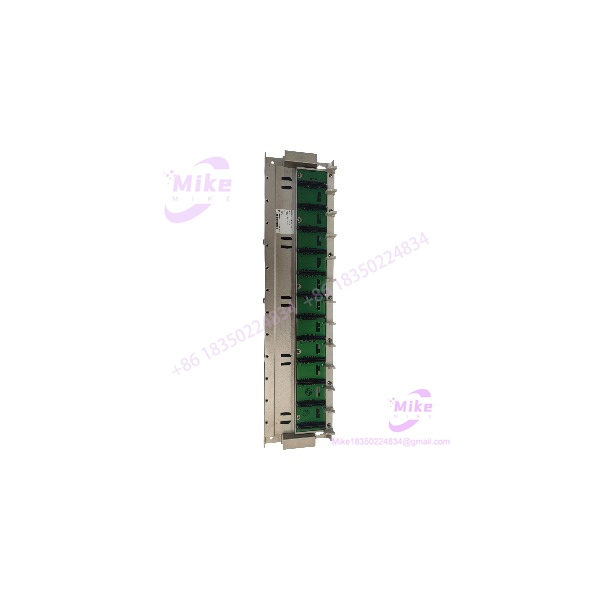
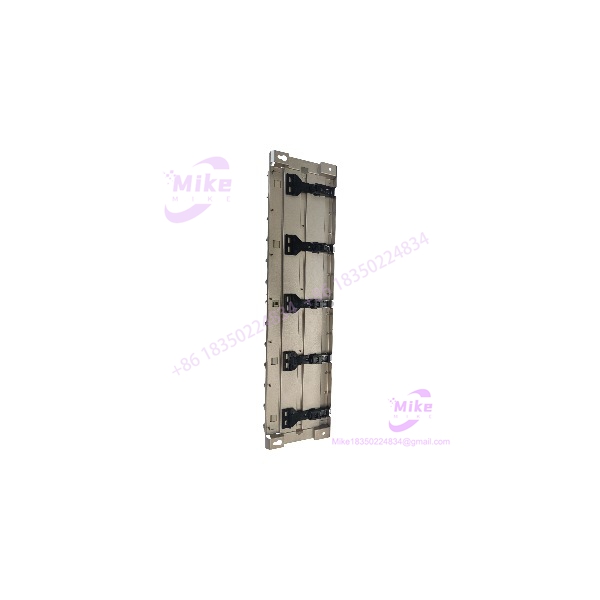
The Yaskawa JRMSI-120XBP01200 is identified in Yaskawa’s MEMOCON GL120/GL130 hardware documentation as the MB12 12-slot mounting base. It is a rack-level component intended for the GL120 platform—not an active CPU, standalone I/O module, or servo drive.
For legacy-system procurement, match the full model number and confirm the existing rack configuration before ordering. Slot count alone is not enough: the target system’s module family, power-supply arrangement, rack interconnection, and installed hardware must also be checked.
JRMSI-120XBP01200
Key Technical Specifications
- Manufacturer: Yaskawa Electric Corporation
- Model Number: JRMSI-120XBP01200
- Product Family: MEMOCON GL120
- Mounting Base Designation: MB12
- Product Category: PLC mounting base / rack
- Rack Capacity: 12 slots
- Primary Function: Module mounting and system interconnection
- Intended Platform: Yaskawa MEMOCON GL120
- System Type: Modular PLC/control system
- Standalone Operation: Not a standalone controller; requires compatible system modules
- Related Rack Models: GL120 MB06, MB08, MB10, and MB16 are separately identified mounting-base configurations
- Documentation Reference: MEMOCON /GL130 Hardware User’s Manual
The /GL130 manual lists JRMSI-120XBP01200 as the MB12 12-slot mounting base. Exact dimensions, rack power limits, connector details, and module-position restrictions should be verified against the applicable manual and the physical unit.
Global Sourcing & Live-Test SOP
A mounting base should be evaluated for mechanical integrity and electrical interconnection condition. A rack that looks intact may still have damaged contacts or mounting features that compromise system operation.
1. Inbound Verification
- Photograph the complete model label and confirm JRMSI-120XBP01200.
- Verify the MB12 designation and 12-slot configuration.
- Record serial or revision markings, where present.
- Inspect the rack body, mounting points, slot guides, and backplane contacts.
- Check for corrosion, contamination, bent contacts, cracked insulation, or evidence of repair.
- Inspect module-retention features and connector alignment.
- Compare the unit with the original rack and applicable documentation.
2. Mechanical Inspection
- Check all 12 module positions for visible damage.
- Inspect slot guides and retention hardware for wear or deformation.
- Verify that compatible modules can be seated correctly in the intended rack.
- Check mounting points for stripped threads or physical distortion.
- Do not force modules into a slot if connector alignment or fit is uncertain.
3. Backplane and System Validation
- Inspect backplane contacts using an appropriate non-damaging inspection method.
- Verify the rack’s intended module and power-supply arrangement from the system documentation.
- Use a compatible test configuration where available.
- Confirm that installed modules are recognized and operate as expected.
- Record any intermittent faults, connector issues, or abnormal system diagnostics.
- Do not apply power to an unidentified or damaged rack.
4. Extended Functional Run
Where a suitable test setup is available, perform an extended system test with compatible modules installed.
Monitor:
- Module recognition and communication
- Rack/backplane stability
- Intermittent connection faults
- Unexpected system resets
- Abnormal heating or visible electrical issues
Record the test configuration, installed modules, test duration, and observed results. Do not claim that the rack has been functionally tested if it was only visually inspected.
5. Final Preparation
- Record the full model number and inspection findings.
- Photograph the rack slots, connectors, and mounting features.
- Document the test status and any known limitations.
- Protect backplane contacts against impact and contamination.
- Use ESD-safe packaging and suitable cushioning.
- Clearly state whether the rack is tested, untested, or sold for parts/repair.
Field Engineer’s Pitfall Guide
❗ Do not confuse the mounting base with an active PLC module
The JRMSI-120XBP01200 is the MB12 mounting base. It does not independently perform PLC processing, supply all required system power, or provide standalone I/O functionality. The required controller and supporting modules must be present in the complete system.
❗ Slot count does not establish full system compatibility
The MB12 is a 12-slot rack, but that does not mean every Yaskawa MEMOCON module or power supply is compatible. Verify the intended configuration, module positions, and system documentation before installation.
❗ Inspect the backplane—not just the rack housing
A clean enclosure does not prove that the rack’s electrical interconnections are sound. Damaged or contaminated contacts can cause intermittent module recognition or system faults. Inspect the backplane and validate it in a compatible test setup before returning it to service.
Intent-Driven FAQ
What is the Yaskawa ?
It is the 12-slot mounting base for the Yaskawa MEMOCON control system.
How many slots does the have?
The is documented as a 12-slot mounting base.
Is the a PLC CPU?
No. It is a mounting base/rack used to support compatible system modules. It is not a standalone CPU or controller.
Is the compatible with MEMOCON ?
Yaskawa’s /GL130 hardware manual identifies this part number as the mounting base in the system. Confirm the target system’s rack and module configuration before replacement.
Can I replace another Yaskawa rack with the ?
Not based on brand or slot count alone. Verify the original rack’s part number, system family, module arrangement, and power-supply configuration before treating this model as a direct replacement.
Is the hot-swappable?
Do not assume it is. Treat rack replacement as a controlled, power-off maintenance operation unless the applicable system documentation explicitly authorizes another procedure. Follow site isolation and electrical-safety requirements.
What should I verify before buying a used ?
Confirm the complete model number, designation, 12-slot configuration, backplane condition, mounting features, and seller’s test status. For operational use, also verify compatibility with the installed modules and power-supply arrangement.
Bottom Line for Buyers
The is a MEMOCON 12-slot PLC mounting base. Its primary value is as a rack-level replacement component for compatible legacy installations.
For procurement, specify the full part number, request clear photographs of the label and backplane, and verify the rack against the target system’s hardware documentation. A matching slot count is not enough to establish drop-in compatibility.