

Description
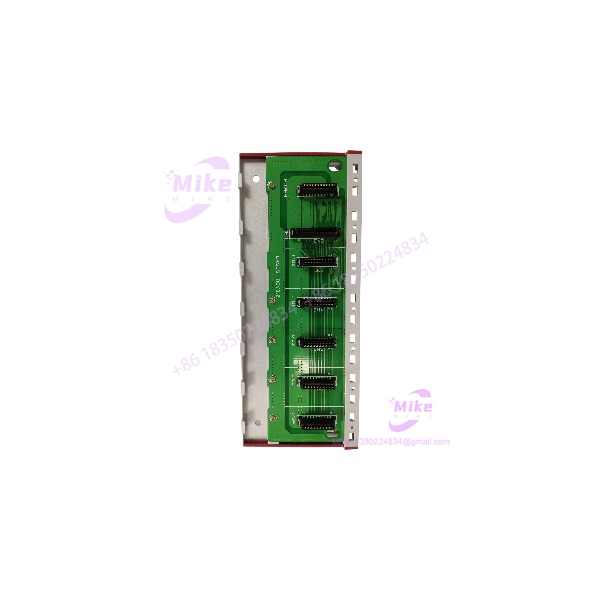
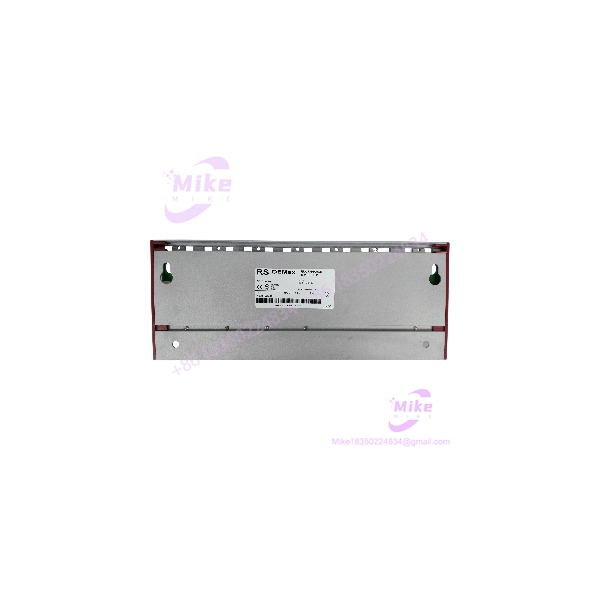
Samsung Automation NX70-BASE05 Industrial PLC Backplane
Product Introduction
A PLC base unit can become a critical spare when a legacy controller is still running production equipment. Damage to the motherboard, backplane connectors, or module-retention points may prevent otherwise functional CPU and I/O modules from operating correctly.
The NX70-BASE05 provides the mounting structure and backplane connections required by compatible NX70 PLC modules. The power supply installs in its designated position, the CPU must be installed beside the power unit, and I/O or special-function modules occupy the appropriate remaining positions.
This is a hardware base, not a standalone controller. It does not execute ladder logic by itself, and its slot capacity should not be confused with the number of field I/O points supported by the completed system.
For maintenance and procurement teams, the main requirement is to match the installed NX70 platform and its module layout. Do not assume compatibility with a different PLC family simply because the modules look similar.
NX70-BASE05
Key Technical Specifications
- Product code: NX70-BASE05
- Product family: NX70 Series PLC
- Component classification: Basic motherboard / backplane
- Slot designation: 5-slot type
- Compatible module categories: Power supply, CPU, digital or analog I/O, and supported special-function modules
- Installation: Control-panel mounting
- Mounting hardware: M5 screws, as specified in the manual
- Overall width: Approximately 256 mm
- Mounting-hole dimensions: Refer to the manufacturer’s dimensional drawing
- Electrical role: Provides module interconnection through the base-unit connectors
- Standalone operation: Not applicable; requires compatible PLC modules and a power supply
- Expansion capability: Treat as the NX70 basic motherboard; confirm the architecture’s expansion limits before planning additional racks
- Operating voltage: Determined by the installed power supply, not by the motherboard alone
- Communication interfaces: Determined by the installed CPU and communication modules
The NX70 manual lists additional base variants, including NX70-BASE02, NX70-BASE03, NX70-BASE06, NX70-BASE08, NX70-BASE10, and NX70-BASE12. Select the exact slot configuration required by the application.
Application Scenarios & Pain Points
Legacy PLC repair
A damaged backplane can take a functioning control system offline even when the CPU and I/O modules remain serviceable. Replacing the NX70-BASE05 may restore the mounting and interconnection structure without requiring a complete PLC migration, provided the replacement is compatible with the existing hardware.
Maintenance of existing production lines
Packaging machines, assembly equipment, and other industrial systems may depend on older NX70 controllers. Keeping the exact base-unit reference available can reduce the time required to recover from physical damage or connector failure.
PLC cabinet refurbishment
During a cabinet overhaul, engineers can use the NX70-BASE05 as the reference for checking module order, mounting space, and cable routing. Confirm the available clearance before replacing a base, particularly where wiring ducts and neighboring components restrict access.
Replacement of a damaged backplane
Potential failure indicators include loose module connections, damaged connectors, broken mounting features, or visible heat damage. These symptoms require diagnosis; a defective power supply or module can produce similar system-level faults.
Important compatibility note: NX70 and older N70 PLC platforms are not universally interchangeable. Legacy product documentation specifically warns that the CPU, basic motherboard, and power supply are not compatible between these families. Verify the complete platform before ordering.
QA & Live Testing SOP
Use a structured inspection procedure before releasing an NX70-BASE05 for service.
- Part-number verification: Confirm the NX70-BASE05 designation and any available manufacturer or revision markings.
- Physical inspection: Check the base for cracks, deformation, corrosion, damaged tracks, and signs of overheating.
- Connector inspection: Examine the power-supply, CPU, and I/O module connectors for bent contacts, contamination, or mechanical wear.
- Dimensional verification: Compare the base width, mounting-hole positions, and module spacing against the original assembly.
- Module-layout check: Confirm the required power supply, CPU, and I/O modules are supported and positioned correctly.
- Power-supply verification: Test the installed power supply independently according to its specifications. Do not attribute every startup failure to the motherboard.
- Controlled system test: Install the base in a suitable test configuration, apply the correct supply, and check CPU startup, module recognition, and diagnostic indicators.
- I/O verification: Test representative input and output points using safe test equipment and the system’s approved commissioning procedure.
- Documentation: Record the part number, physical condition, inspection results, installed modules, and acceptance status.
Do not insert or remove modules while the PLC is energized unless the manufacturer explicitly permits it for that module and configuration.
Field Engineer’s Pitfall Guide
- Confusing slot count with I/O capacity: Five slots do not mean five I/O modules or a specific number of I/O points. The power supply and CPU also occupy positions in the system layout.
- Ignoring module order: NX70 documentation specifies that the CPU must be installed next to the power unit. Follow the manual’s prescribed arrangement.
- Substituting a different base size: NX70 base models differ in slot capacity and width. Check cabinet clearance and module requirements before selecting another variant.
- Assuming N70 compatibility: The legacy N70 and NX70 families have important hardware compatibility differences, particularly for CPUs, base units, and power supplies.
- Overlooking the actual fault: A defective power supply, CPU, or I/O module can cause startup or communication symptoms that resemble a base-unit problem.
- Buying without condition evidence: For used or surplus stock, request clear photographs of the actual unit, connectors, mounting points, and any identifying labels.
- Skipping application verification: Confirm the installed PLC family, CPU model, power-supply model, and module arrangement before commissioning a replacement.
Intent-Driven FAQ
Q1: Wis the ?
The NX70-BASE05 is a five-slot motherboard or base unit for the NX70 Series PLC. It provides the mounting structure and electrical connections for compatible controller modules.
Q2: How many slots does the NX70-BASE05 have?
It is designated as a five-slot base. Check the module layout in the NX70 manual to determine how many positions remain available for I/O or special-function modules after installing the power supply and CPU.
Q3: Does the NX70-BASE05 include a CPU or power supply?
No. The base unit is the motherboard/backplane. The CPU, power supply, and I/O modules are separate components unless a supplier explicitly offers them as part of a complete assembly.
Is the compatible with -BASE06?
Both belong to the NX70 family, but they have different slot capacities and physical dimensions. Choose based on the required module layout and cabinet space rather than assuming they are interchangeable.
Q5: Can the NX70-BASE05 be used with an N70 PLC?
Do not assume compatibility. Manufacturer documentation warns that the N70 and NX70 CPU units, basic motherboards, and power supplies are not interchangeable.
Q6: What should I verify before buying a replacement?
Confirm the exact part number, PLC family, slot configuration, mounting dimensions, connector condition, and seller’s item condition. If possible, compare the replacement with the original base and its module arrangement.
Q7: How can I tell whether the base unit has failed?
Inspect for physical connector damage, overheating, corrosion, or poor module seating. Then test the power supply and modules separately where practical. A qualified technician should use the manufacturer’s troubleshooting procedure to isolate the fault.
Q8: What information is most useful for sourcing the NX70-BASE05?
The part number NX70-BASE05, clear photographs of the base and connectors, the existing CPU and power-supply models, and confirmation of whether the unit is new, used, or refurbished will help reduce procurement errors.
Procurement recommendation: Source the exact NX70-BASE05 when maintaining an installed NX70 PLC system. Before installation, verify the module layout, power supply, CPU compatibility, and mechanical fit. For a legacy controller, matching the original hardware configuration is more important than choosing a base with a similar appearance.





