

Description
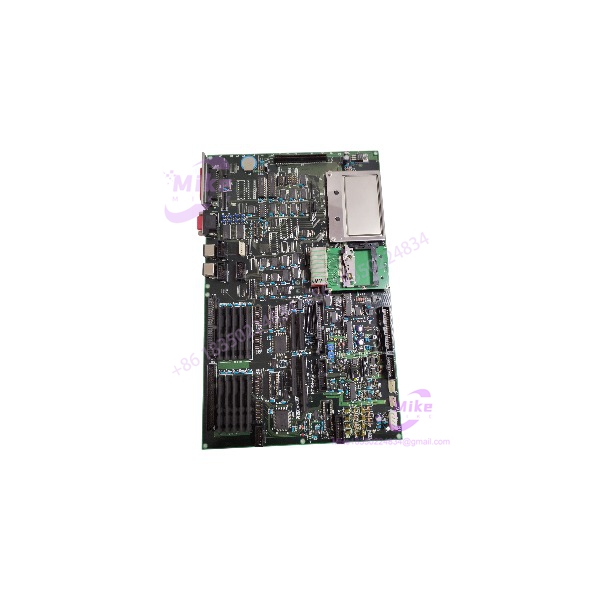
KOKUSAI KOMS-A2 | Semiconductor Equipment CPU Board
Product Introduction
In semiconductor equipment, a replacement control board is only useful when its identity and hardware configuration match the machine being serviced. The KOKUSAI KOMS-A2 appears in industrial repair and surplus listings as a CPU/control board associated with Kokusai equipment. Repair-service records also identify KOMS-A2 independently as a Kokusai CPU board, while other suppliers pair it with CXP-544A.
That distinction should be resolved before purchasing. The available supplier material does not establish a reliable standalone specification for the KOMS-A2 designation, including its supply voltage, processor, memory, connector pinout, or exact compatibility range. For maintenance and procurement teams, the safest approach is to match the original board markings, assembly number, revision, and equipment configuration—not a generalized product description.
KOMS-A2
Key Technical Specifications
- Model: KOMS-A2
- Manufacturer: Kokusai / Kokusai Electric
- Board Classification: CPU/control PCB, as identified by repair-service listings
- Associated Model Reference: CXP-544A KOMS-A2 appears in supplier listings
- Equipment Context: Kokusai semiconductor processing equipment
- Board-Level Function: Exact functional partition is not independently confirmed
- Processor Type: Not verified
- Memory Capacity: Not verified
- Operating Voltage: Not verified for the standalone
- Power Consumption: Not verified
- Communication Interfaces: Not verified
- Backplane / Connector Pinout: Not verified
- Firmware Revision: Confirm from the original board and equipment records
- Operating Temperature: No verified standalone rating located
- Mounting: Equipment-specific PCB installation; confirm the original assembly
- Replacement Compatibility: Requires comparison with the installed board and equipment configuration
Important identification note: Do not automatically apply specifications advertised for CXP-544A/ assemblies to a standalone board. The available listings do not establish that all such descriptions refer to the same hardware configuration.
Global Sourcing & Live-Test SOP
For a legacy KOKUSAI board, incoming inspection should establish exact identity and condition before any attempt to power or install it.
5.1 Inbound Verification
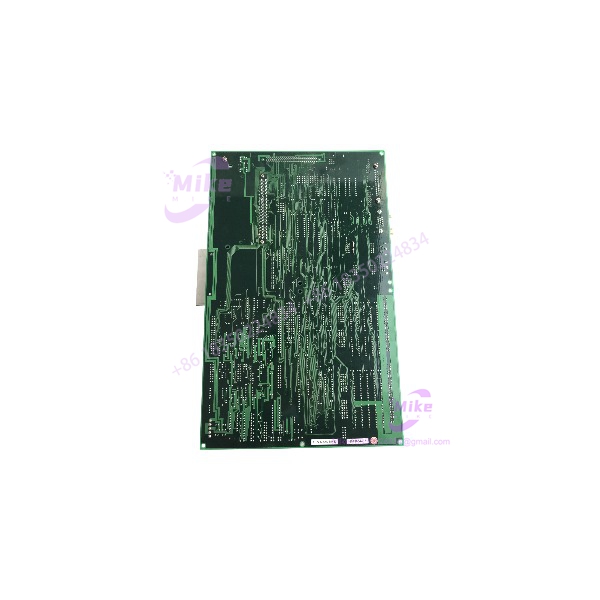
- Photograph the complete PCB, component side, solder side, and every identification label.
- Confirm the marking and record any additional assembly or PCB numbers.
- Record revision identifiers, serial numbers, date codes, and visible firmware labels.
- If CXP-544A is also marked, document whether it is a separate board, parent assembly, or combined seller designation.
- Compare the connector layout, board dimensions, mounting points, and component placement against the customer’s original.
- Inspect for corrosion, cracked solder joints, damaged traces, missing components, and evidence of prior repair.
- Request traceability records and the source equipment model from the seller where available.
5.2 Controlled Electrical Inspection
- Obtain the correct equipment service documentation before applying power.
- Do not infer supply voltage from a similar KOKUSAI board.
- Do not energize the PCB through unidentified connector pins.
- Inspect for obvious electrical damage, contamination, and connector deformation.
- Use an approved test fixture and documented voltage/current limits.
- Record the applied supply conditions and measured current only when a valid test procedure is available.
5.3 Functional Verification
A basic power-up is not proof that a board is compatible with the target semiconductor tool.
- Verify the intended equipment model and board position.
- Confirm required companion boards and backplane arrangement.
- Check firmware and revision compatibility against the original installation.
- Use the appropriate KOKUSAI equipment or authorized repair test procedure.
- Record startup behavior, diagnostics, and any communication or interlock faults.
- Confirm that the seller’s test report refers to the actual board serial number or identifiable unit.
5.4 Extended Run and Diagnostics
Where a compatible test setup and approved procedure are available, perform a monitored operating run appropriate to the board’s function.
Record:
- Exact board markings and revision
- Test fixture or host-equipment identification
- Applied power conditions
- Startup and diagnostic results
- Communication or functional test results
- Test duration
- Observed faults or abnormalities
Do not claim a 24-hour burn-in, full-tool test, or verified production operation unless it was performed and documented.
5.5 Final Preparation and Packaging
- Preserve all original identification labels.
- Photograph the PCB before shipment.
- Use ESD-safe packaging and rigid impact protection.
- Protect edge connectors and exposed pins from mechanical damage.
- Include available inspection and test documentation.
- Clearly distinguish new-old-stock, used, repaired, refurbished, and untested condition.
- State whether the sale includes alone or a larger CXP-544A assembly.
Field Engineer’s Pitfall Guide
❗ and CXP-544A may not be interchangeable descriptions
Some listings identify as a CPU board; others advertise as a combined product. Confirm the physical board markings and assembly scope before accepting a replacement.
❗ Do not guess the power supply or connector pinout
The available records do not establish verified standalone electrical ratings or a connector pinout for . Applying assumed voltage or wiring based on another Kokusai board can damage the replacement or connected equipment.
❗ Firmware and equipment compatibility must be checked at the installed-system level
A matching model label does not independently establish compatibility with every Kokusai tool or control-system revision. Confirm the original equipment model, board revision, firmware identifiers, and companion hardware before installation.
Intent-Driven FAQ
What is the KOKUSAI ?
is identified in industrial repair and sourcing records as a Kokusai CPU/control board used in semiconductor equipment. The exact standalone hardware specification remains unverified.
Is the same as ?
Not conclusively. Supplier listings associate the two designations, but the available evidence does not establish that every listing refers to the same assembly. Compare the original PCB and assembly labels before ordering.
What voltage does the require?
A verified standalone supply-voltage specification was not located. Use the original equipment documentation and board identification—not an unverified supplier listing—to establish the correct power requirements.
Is a PLC I/O card?
It is described by repair-service sources as a CPU/control board. The available evidence does not establish a universal channel count or standalone I/O configuration.
Can be tested outside the original machine?
Only with a compatible, documented test setup. Do not apply power through unidentified pins or assume a generic PLC test fixture is suitable.
Is obsolete?
It is encountered through legacy-equipment repair and surplus sourcing channels. However, a definitive OEM lifecycle notice was not located, so current manufacturer support status should be confirmed directly.
What should I verify before buying a replacement?
Confirm the exact marking, all secondary PCB and assembly numbers, hardware revision, connector layout, source equipment model, and whether the unit is standalone or part of a assembly. Request clear photographs and serial-linked test documentation.
Bottom Line for Buyers
The is best treated as a specialized legacy semiconductor-equipment CPU/control board whose replacement suitability depends on exact hardware identification.
Before committing to a purchase, obtain clear PCB photographs, confirm whether is part of the required assembly, and establish the original equipment model and revision. Do not rely on generic voltage, processor, I/O, or communication claims without matching documentation for the actual board.
For manufacturer background and current corporate information, consult the official SCREEN Holdings website, the parent company’s corporate site.





