


Description
ComNet FVR110M | Multimode Fiber Video Receiver
Dynamic Product Introduction
A fiber link is only useful if the receiving equipment can reliably reconstruct the camera signal at the other end. The ComNet FVR110M was built for exactly that job: receiving digitally encoded CCTV video over optical fiber while supporting the control/data functions needed by many professional camera installations.
The FVR110 family uses 10-bit EIA RS-250C digitally encoded video and can carry video plus bidirectional data over a single optical fiber. The architecture supports RS-232, RS-422, and 2- or 4-wire RS-485 interfaces, along with several established camera control schemes. ComNet documentation also identifies compatibility with Panasonic Proteus, Pelco Coaxitron, and Bosch Bilinx “up-the-coax” systems.
That makes the FVR110M more than a simple fiber-to-BNC converter. In an installed CCTV system, it sits between the optical transmission infrastructure and the receiving video/control equipment. If a legacy surveillance system is still operational, retaining a tested FVR110M spare can be considerably easier than redesigning the complete fiber link.
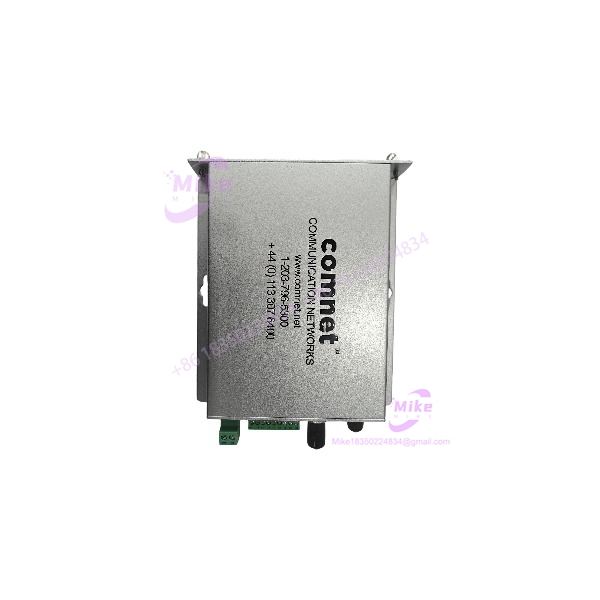
FVR110M
Key Technical Specifications
- Model: FVR110M
- Manufacturer: ComNet
- Series: FVT/FVR110
- Function: Fiber-optic video receiver and data transceiver
- Video Encoding: 10-bit digitally encoded video
- Video Standard: EIA RS-250C short-haul digital video architecture
- Fiber Type: Multimode optical fiber
- Optical Connection: ST
- Video Connection: BNC
- Data Interfaces: RS-232, RS-422, and 2-/4-wire RS-485 within the FVR110 platform
- Camera-Control Support: Panasonic Proteus, Pelco Coaxitron, and Bosch Bilinx “up-the-coax” systems
- Optical Link: Single-fiber transmission architecture
- Status Indication: Bi-color LED indicators for operating/link/video/data conditions
- Mounting: Stand-alone or compatible rack configuration within the FVR110 family; DIN-rail mounting is available with the appropriate ComNet adaptor on applicable versions
- Environmental Design: FVT/FVR110 documentation specifies suitability for demanding environmental conditions including temperature variation, shock, vibration, humidity, and transient voltage conditions.
A procurement note is important here: FVR110M and FVR110M1 are not interchangeable model designations. Current ComNet documentation identifies FVR110M1 as a later/related multimode receiver/data-transceiver model, while the older FVR110 documentation identifies the within the original FVT/ architecture. Match the complete nameplate before approving a substitute.
Global Sourcing & Live-Test SOP
1. Nameplate verification
Record the complete designation, serial number, revision information, manufacturer markings, and connector configuration. Photograph the front and rear panels before installation.
2. Optical inspection
Inspect the ST optical connector for contamination or mechanical damage. Fiber-optic connectors can look perfectly serviceable while carrying enough contamination to cause intermittent or degraded communication.
3. Electrical inspection
Check the power input, BNC video interface, terminal connections, and enclosure for damage. Verify the applicable power arrangement from the exact unit documentation rather than assuming the specification of a newer variant.
4. Optical-link test
Connect the receiver to a known-good compatible ComNet transmitter using the correct multimode fiber. Confirm optical link establishment and verify the corresponding status indication.
5. Video verification
Feed a known-good camera signal through the complete transmitter/receiver path. Check image stability, synchronization, contrast, artifacts, and intermittent loss.
6. Data-path verification
Where the installed application uses PTZ or camera control, exercise the applicable RS-232, RS-422, RS-485, or supported up-the-coax control path. Video-only testing is insufficient when the receiver is part of a controlled surveillance system.
7. Extended operation
Run the receiver continuously under representative load. Monitor the power indicator, optical link, video status, data activity, and enclosure temperature. An intermittent fiber receiver can pass a five-minute bench test and still fail after thermal stabilization.
8. Final preparation
Clean the optical interface, protect the ST connector with a suitable dust cap, document the test result, and package the receiver against ESD and mechanical impact.
Field Engineer’s Pitfall Guide
1. Do not substitute FVR110M1 solely because the model looks similar.
The family has multiple generations and configurations. The current ComNet catalog identifies FVR110M1/MIR and related models separately from the older architecture. Confirm fiber mode, data interface, power arrangement, mounting format, and system compatibility before substitution.
2. Do not test the unit with video only when the installation uses PTZ control.
A receiver can pass video while its data path remains unverified. In a surveillance deployment using RS-485 or an up-the-coax control protocol, exercise the camera-control function as part of acceptance testing.
3. Do not overlook the optical connector.
ST connectors are mechanically simple, but contamination, scratched end faces, poor coupling, or excessive optical loss can produce intermittent link behavior. In field deployments, cleaning and inspection of the fiber interface should be standard procedure, not an afterthought.
Intent-Driven FAQ
What is the ComNet ?
The is a ComNet fiber-optic video receiver used within the FVT/ transmission platform. It receives digitally encoded CCTV video over multimode optical fiber and supports the associated data-transmission architecture.
Is the a fiber media converter?
Functionally it performs optical-to-electrical video reception, but calling it a generic Ethernet media converter would be misleading. It is specifically designed for professional video transmission, with video and camera-control interfaces rather than Ethernet switching.
What fiber does the use?
The is the multimode version of the FVT/ family. The documented architecture uses a single multimode optical fiber and ST optical connectivity.
Does support PTZ camera control?
The FVT/ platform supports bidirectional data interfaces including RS-232, RS-422, and 2-/4-wire RS-485, as well as several established camera-control methods. Whether a particular installation uses those functions depends on the paired transmitter, camera, and system configuration.
What video systems can it support?
The architecture is designed for NTSC, PAL, and SECAM CCTV systems and supports established camera-control systems including Panasonic Proteus, Pelco Coaxitron, and Bosch Bilinx.
Can I replace with FVR110M1?
Do not approve that replacement from the model number alone. Although both belong to the family, the exact optical, electrical, mounting, and data configuration must match the installed system.
How should a used be tested before deployment?
Test the complete optical path with a known-good compatible transmitter, verify video at the BNC output, confirm optical/link status, and exercise the data interface if the installation uses PTZ or other camera control. For a critical CCTV system, an extended run is preferable to a simple power-on check.
Is the suitable for industrial environments?
The FVT/ platform was designed for demanding CCTV and infrastructure applications, with documented environmental and transient-protection provisions. The actual suitability of a particular installation should still be checked against its temperature, mounting, power, vibration, and humidity conditions.





