

Description
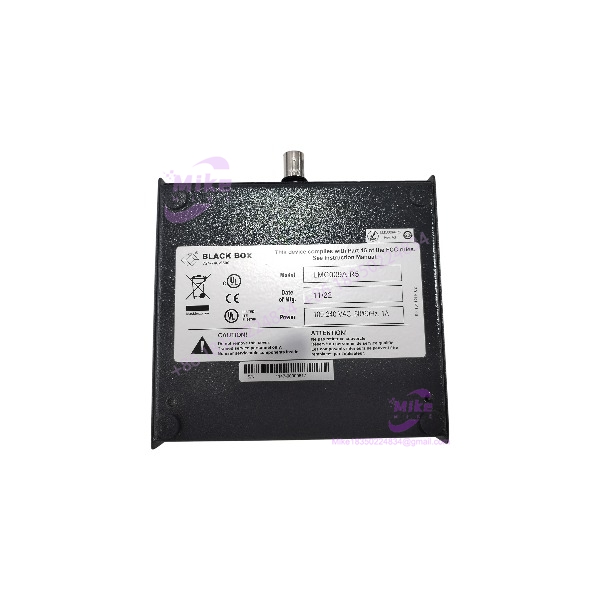
Black Box LMC009A-R5 | RJ45 to BNC Media Converter
Product Introduction
Legacy Ethernet installations can become difficult to maintain when modern network hardware no longer supports the original physical cabling. The Black Box LMC009A-R5 Compact Media Converter addresses that problem by bridging 10BASE-T twisted-pair Ethernet and 50-ohm 10BASE2 coaxial Ethernet.
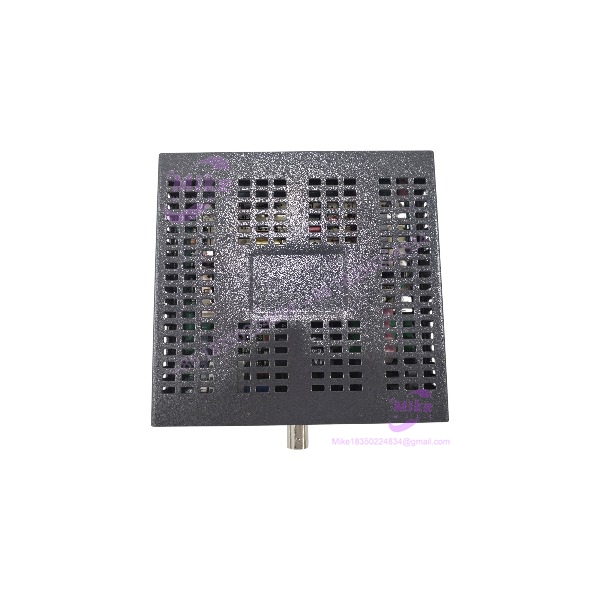
The unit provides an RJ45 twisted-pair connection and a BNC coaxial connection, allowing compatible Ethernet equipment to communicate across the two media types. Its internal universal AC power supply and front-panel diagnostic LEDs simplify standalone deployment, while the crossover/pass-through and coax termination controls support different network connection arrangements. This is a 10 Mbps legacy Ethernet converter—not a modern Fast Ethernet or fiber-optic media converter.

- LMC009A-R5
Key Technical Specifications
- Model: LMC009A-R5
- Manufacturer: Black Box
- Product Type: Compact Media Converter TP/BNC 50-ohm
- Ethernet Standard: IEEE 802.3, 10 Mbps Ethernet
- Twisted-Pair Interface: 10BASE-T
- Twisted-Pair Connector: RJ45
- Coaxial Interface: 10BASE2
- Coaxial Connector: BNC
- Coaxial Impedance: 50 ohms
- Maximum 10BASE2 Segment Length: Up to 185 m under applicable 10BASE2 network conditions
- Power Supply: Internal universal AC supply
- AC Input: 100–240 VAC
- TP Configuration: Crossover/pass-through push-button selector
- BNC Configuration: Switchable coax termination
- Diagnostic LEDs: TP LNK/ACT, BNC ACT, BNC COL, and POWER
- Operating Speed: 10 Mbps; not a 100 Mbps Fast Ethernet converter
- Fiber Interface: None
- Typical Deployment: Standalone Ethernet media conversion between twisted pair and 50-ohm coax
The model-specific documentation identifies the LMC009A-R5 as a Compact Media Converter TP/BNC 50-ohm. Confirm actual operating condition and configuration on the supplied unit before installation.
Global Sourcing & Live-Test SOP
For a legacy network converter, acceptance should establish correct model identification, stable link behavior, and proper coax termination. A power-on indication alone does not demonstrate reliable data conversion.
5.1 Inbound Verification
- Photograph the complete model label and serial number, if present.
- Confirm the exact part number: LMC009A-R5.
- Inspect the RJ45 and BNC connectors for physical damage.
- Check the enclosure for cracks, deformation, or signs of liquid ingress.
- Inspect the AC power cord and inlet.
- Confirm the unit is the 50-ohm TP/BNC version, not a fiber or other media-converter variant.
- Record supplier, condition, and any included accessories.
5.2 Power-Up and Interface Inspection
- Verify the AC input rating on the unit before energizing.
- Connect the converter to a suitable, filtered AC supply.
- Confirm the POWER LED illuminates.
- Inspect the TP link/activity indicator after connecting a known-good 10BASE-T device.
- Check the BNC connector and coaxial cable for secure mechanical fit.
- Verify the TP crossover/pass-through selector is set appropriately for the connected equipment.
5.3 Network Conversion Test
- Connect the to a known-good 10BASE-T Ethernet device.
- Connect the BNC port to a compatible 50-ohm 10BASE2 coaxial segment.
- Configure the coax termination correctly for the segment topology.
- Confirm TP link indication.
- Verify BNC activity during traffic transmission.
- Run a controlled data-transfer or packet test across the converter.
- Check for intermittent link loss, excessive errors, or unstable communication.
- Record the test topology, connected equipment, and results.
5.4 Final Preparation
- Record the exact model and observed operating condition.
- Photograph the connector panel and configuration switches.
- Document the TP crossover/pass-through and BNC termination settings used during testing.
- Protect the RJ45 and BNC connectors during shipment.
- Use suitable cushioning and packaging to prevent enclosure or connector damage.
- Clearly distinguish a power-on check from a completed data-transfer test.
Field Engineer’s Pitfall Guide
❗ Do not connect the BNC port to 75-ohm video coax
The is specified for 50-ohm 10BASE2 coaxial Ethernet. Do not assume that common 75-ohm video coax or BNC cabling is electrically interchangeable with the required network segment.
❗ Incorrect coax termination can disrupt the entire segment
The unit includes a BNC termination switch. If an external T-connector and terminator are already installed, configure the converter to avoid double termination. Incorrect termination can cause communication faults that resemble a failed converter.
❗ This is a 10 Mbps legacy Ethernet device
The is not a 100BASE-TX or Gigabit Ethernet converter. Confirm that the intended network equipment supports the required 10 Mbps connection and that the coaxial segment is compatible with 10BASE2 Ethernet.
Intent-Driven FAQ
What is the Black Box ?
It is a Compact Media Converter that converts 10BASE-T twisted-pair Ethernet to 50-ohm 10BASE2 coaxial Ethernet.
What connectors does the use?
It provides an RJ45 twisted-pair Ethernet port and a BNC coaxial Ethernet port.
Is the a fiber-optic media converter?
No. The is a TP/BNC converter. It does not provide a fiber-optic interface.
What power supply does the require?
The unit has an internal universal AC power supply. Published documentation identifies a 100–240 VAC input range. Verify the nameplate on the actual unit before applying power.
Does the support 100 Mbps Ethernet?
No. It is a 10 Mbps Ethernet media converter. Do not specify it as a Fast Ethernet or Gigabit converter.
Is the suitable for modern network installations?
It may be useful where legacy 10BASE2 coaxial Ethernet must be retained. It is not a general-purpose substitute for modern 100 Mbps or Gigabit Ethernet conversion hardware.
What should I verify before buying a used ?
Confirm the complete model number, and BNC connector condition, AC input rating, TP selector operation, BNC termination switch, and successful data transfer across a compatible 10BASE2 segment.
Bottom Line for Buyers
The is a legacy 10 Mbps Ethernet media converter designed to connect 10BASE-T twisted pair with 50-ohm 10BASE2 coaxial Ethernet. Its value is primarily in maintaining or restoring existing coax-based network infrastructure.
For procurement, verify the exact model, connector condition, AC power configuration, and stable communication across both interfaces. Request a data-transfer test rather than accepting a power-on check as proof of operational condition.





