


Description
AVG EZ-S6M-F 5.7-Inch STN Touchscreen Operator Panel
Product Introduction
A failed operator panel does not always justify replacing the PLC behind it. When the machine still runs on an older control architecture, finding a tested AVG Automation EZ-S6M-F can be the more practical maintenance solution.
The EZ-S6M-F is a full-featured 6-inch EZTouch monochrome HMI with a 5.7-inch STN LCD, 320 × 240 resolution, and 16 shades of gray. The manufacturer documentation identifies 512 KB user memory, field-expandable RAM, nonvolatile flash backup capability, and support for the standard serial PLC-driver set.
The “F” suffix matters. This is not the basic EZ-S6M-R configuration. The EZ-S6M-F was designed as the full-featured standard-bezel version, with optional Ethernet hardware and a broader communication capability than the entry-level models.
It is also a legacy product. AutomationDirect lists the EZ-S6M-F as retired in June 2006, while EZAutomation’s current product page identifies the model as obsolete and points to a later drop-in replacement.
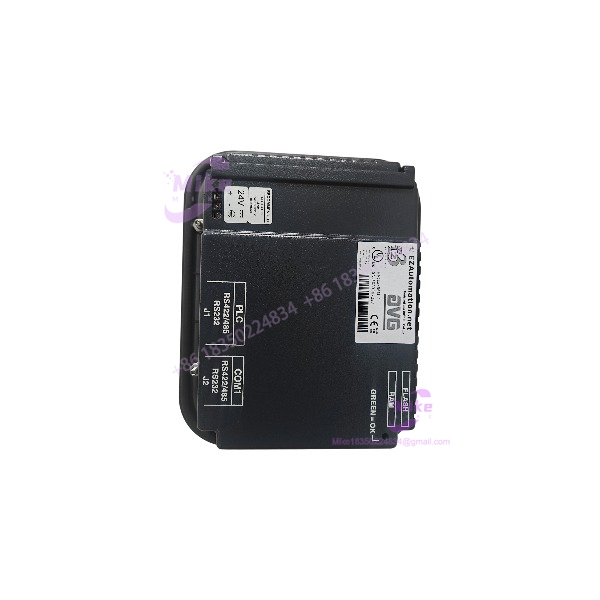
EZ-S6M-F
Key Technical Specifications
- Exact model: EZ-S6M-F
- Manufacturer: AVG Automation / EZTouch
- Product family: EZTouch / EZ Series
- Product type: Industrial touchscreen HMI
- Panel type: Programmable operator interface
- Display technology: STN monochrome LCD
- Display size: 5.7 inches diagonal
- Display resolution: 320 × 240 pixels
- Grayscale: 16 shades
- Touch technology: Resistive touchscreen
- Touch cells: 192, arranged as 16 × 12
- User memory: 512 KB
- RAM expansion: Field expandable to 1 or 2 MB depending on option/configuration
- Program backup: Nonvolatile flash-card option
- PLC driver support: All standard serial drivers
- Optional Ethernet: EZ Ethernet expansion option
- Optional Modbus TCP/IP: EZ Ethernet Plus expansion option
- Front enclosure rating: NEMA 4 / 4X indoor
- Bezel: Standard bezel
- Installed depth: Approximately 59 mm / 2.3 inches
- Backlight: Lamp-based monochrome LCD
- Expected bulb half-life: Approximately 50,000 hours
- Programming software: EZSeries Programming Software
- Programming cable: EZ-PGMCBL is documented as an accessory
- Application: PLC-based machine/operator control
- Product status: Obsolete / retired
The current EZAutomation documentation specifies the EZ- as a 6-inch monochrome model with 512 KB memory, expandable RAM, flash backup, all serial PLC drivers, optional EZ Ethernet, and NEMA 4/4X front protection. The product page specifies the 5.7-inch STN display, 320 × 240 resolution, 16 gray levels, approximately 59 mm installed depth, and 50,000-hour expected bulb half-life.
Application Scenarios & Pain Points
1. Legacy PLC Machine Replacement
The is most useful where an existing machine still depends on an EZTouch HMI and the original panel has become unreliable.
A matching replacement can preserve the existing PLC communication architecture and HMI project rather than forcing an immediate controls migration.
2. Older Packaging and Assembly Equipment
The monochrome 320 × 240 display is sufficient for traditional operator screens containing pushbuttons, status indicators, numeric setpoints, alarms, counters, timers, and machine-state information.
For this generation of equipment, display resolution is rarely the primary engineering constraint. Compatibility with the existing HMI project and PLC driver is more important.
3. Material-Handling Machinery
Conveyors, indexing machines, feeders, and automated work cells commonly use relatively simple discrete PLC/HMI interfaces. A tested can provide a practical spare for these installations.
4. Plant Spare Inventory
Because the model is obsolete, keeping a known-good available can reduce the exposure created by a single failed operator panel.
This is particularly relevant when the original HMI application has not been migrated to a current platform.
5. Controlled Modernization
A legacy spare can also buy engineering time. Instead of performing an emergency PLC/HMI migration during a production outage, the plant can restore the machine first and schedule the modernization under controlled conditions.
QA & Live Testing SOP
For a used AVG Automation EZ-, powering the panel on is only the beginning.
Our recommended incoming inspection sequence:
- Verify the exact model marking.
- Inspect the front bezel and mounting area for cracks or deformation.
- Check the LCD for dark segments, uneven illumination, scratches, pressure damage, and contrast problems.
- Power the unit using a controlled test supply.
- Verify normal startup behavior.
- Test the entire touchscreen rather than pressing only several convenient locations.
- Exercise the documented 192 touch cells where the test application permits.
- Check for dead zones, inaccurate registration, or intermittent touch response.
- Verify the programming/serial communication interface.
- Test communication with a compatible PLC or known-good simulator where practical.
- Confirm that the installed HMI project loads correctly if software is included.
- Perform controlled power cycling to verify program/memory retention.
- Inspect any installed flash-memory or expansion hardware.
- Verify optional Ethernet hardware if the unit is being sold with that option.
- Check the mounting gasket for deterioration.
- Record LCD and touchscreen condition before shipment.
A unit that boots correctly can still have a degraded touchscreen or communication interface. Those are the failures most likely to create commissioning problems after installation.
Field Engineer’s Pitfall Guide
❗ Do not confuse EZ- with EZ-S6M-R. Both are 6-inch monochrome EZTouch panels, but the F model has 512 KB memory, expandable RAM, flash backup capability, and broader driver support.
❗ Do not assume every EZ- includes Ethernet. Ethernet was an optional expansion capability; it was not simply a default network port on every unit.
❗ Do not advertise the panel as a modern TFT display. The exact EZ- uses a 5.7-inch monochrome STN LCD with 16 shades of gray.
❗ Check the touchscreen thoroughly. The EZ- uses 192 touch cells. Age-related failures can be localized, so a quick center-screen test proves very little.
❗ Verify the PLC driver before promising compatibility. The F model supports the standard serial driver family, but the exact PLC protocol and cable still have to match the customer’s installation.
❗ Do not assume the existing project will automatically migrate to another HMI. AutomationDirect documentation shows a cross-reference from the EZ- to a C-more replacement, but physical replacement and project conversion are separate engineering tasks.
Intent-Driven FAQ
What is the AVG Automation EZ-?
The AVG Automation EZ- is a 6-inch EZTouch monochrome industrial HMI/operator interface designed to display and control PLC-based machine processes.
What display does the EZ- use?
The uses a 5.7-inch STN monochrome LCD with 320 × 240 pixel resolution and 16 shades of gray.
How much memory does the EZ- have?
The standard has 512 KB user memory. The platform supports field-expandable RAM, with documentation identifying expansion to 1 or 2 MB depending on configuration.
Does EZ- support Ethernet?
The EZ- can use an optional Ethernet expansion card. Ethernet should not be assumed to be installed on every unit carrying the EZ- model number.
Is the EZ- still manufactured?
No. AutomationDirect lists the EZ- as retired in June 2006, and EZAutomation currently identifies the model as obsolete.
What is the touchscreen technology?
The EZ- uses a resistive touchscreen with 192 touch cells. The manufacturer’s documentation distinguishes this from several other 6-inch EZTouch variants that use only 48 touch cells.
What enclosure rating does the EZ- have?
The EZ- has a NEMA 4 / 4X indoor front-bezel rating. The rating applies to the exposed front bezel; the rear of the panel is intended to be enclosed within an appropriately sealed customer enclosure.
Procurement Note
The correct procurement identifier is:
AVG Automation EZ-
For surplus or replacement sourcing, also search the equivalent EZTouch / EZAutomation EZ- designation. The model appears under AVG Automation, AutomationDirect, and EZAutomation-related documentation because the product line has passed through different commercial channels over its service life.
Before buying a used , verify:
- Exact model marking
- 5.7-inch STN LCD condition
- 320 × 240 display operation
- 16-level grayscale operation
- Full 192-cell touchscreen response
- 512 KB memory configuration
- Installed RAM expansion, if any
- Flash backup hardware, if included
- Ethernet option, if advertised
- Serial communication port
- Existing HMI application/project
- Mounting gasket and bezel
- Power-input condition
- Physical mounting dimensions
Bottom line: the is valuable primarily as a legacy replacement HMI. Its technical advantage today is compatibility with an existing EZTouch installation — not modern display resolution or networking.





