

Description
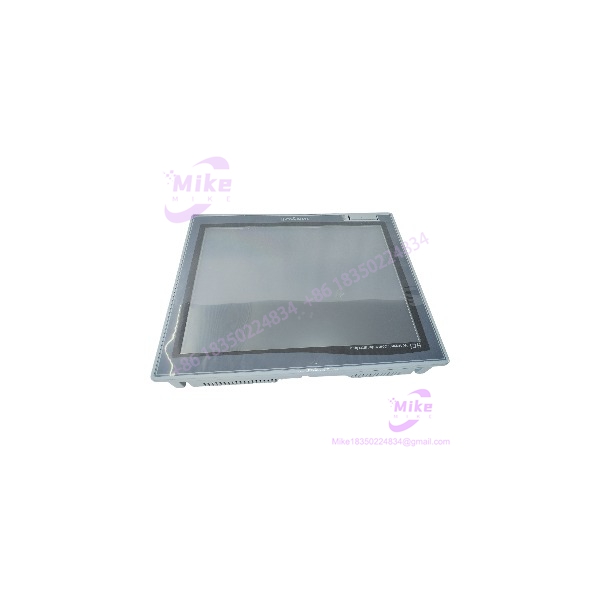
Honeywell HCiX15-TE-FA-NC | 15-Inch Industrial HMI
Product Introduction
The Honeywell HCiX15-TE-FA-NC is a 15-inch industrial operator interface built around a 1024 × 768 XGA color display and analog resistive touchscreen. That combination places it in the traditional process-automation HMI category: large enough for alarm banners, process graphics, trends, and operator controls while retaining the panel-mount format used in industrial control cabinets. Multiple current parts listings independently identify the 15-inch display, XGA resolution, and analog touch architecture.
The important procurement issue is configuration, not the screen size alone. Current secondary sources disagree on several internal specifications—one reports 32-bit RISC with 128 MB RAM and 512 MB flash, another reports 1 GB RAM/32 GB storage, while another identifies 12 MB flash. Power descriptions also vary between 24 VDC and AC 85–264 V. Those discrepancies are substantial enough that they should not be copied into a commercial listing as definitive specifications without checking the actual HCiX15-TE-FA-NC nameplate or original Honeywell documentation.
For a maintenance buyer, an exact-match HCiX15-TE-FA-NC can be valuable when the existing panel, mounting cutout, application environment, and HMI project configuration are already established. The replacement process still requires verification of the rear interface configuration and application/runtime data.
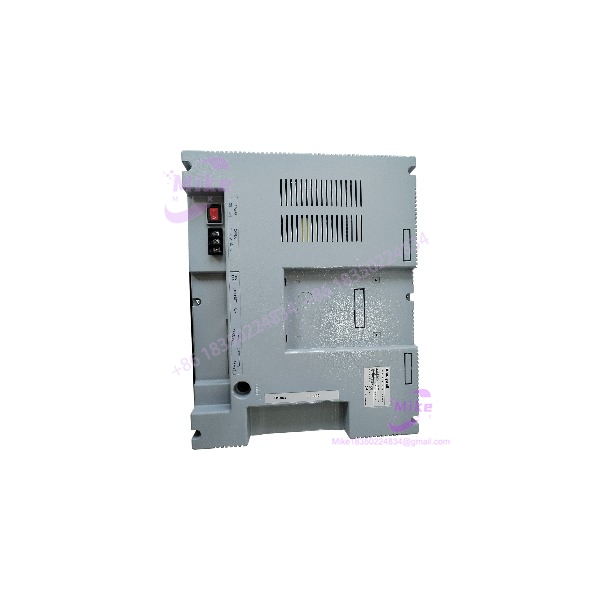
HCIX15-TE-FA-NC
Key Technical Specifications
- Manufacturer: Honeywell
- Model: HCiX15-TE-FA-NC
- Product type: Industrial HMI / operator terminal / touch panel
- Display size: 15.0 inches
- Display technology: Color TFT LCD
- Resolution: 1024 × 768 pixels
- Aspect ratio: 4:3
- Touchscreen: Analog resistive
- Touch cell/resolution: 1024 × 768 is reported for the HCiX15 family; verify on the exact unit before treating it as a guaranteed specification
- Front enclosure: IP65/IP65F is reported by current industrial-part sources
- Mounting: Panel/flush mount
- Operating temperature: 0 to +50°C is reported by multiple sources
- Storage temperature: Approximately -10 to +60°C or -20 to +60°C depending on the source/version; verify the unit’s documentation
- Processor: 32-bit RISC is reported by several sources
- Memory: Conflicting secondary specifications; verify exact hardware revision
- Power input: Conflicting secondary specifications; verify the nameplate before connection
- Communication: Ethernet and serial communications are reported; exact port combination must be confirmed on the physical panel
- Weight: Approximately 3.3 kg is reported by some current listings, but verify shipping weight from the actual unit
The 15-inch/XGA/resistive-touch identification is considerably better supported than the internal processor, memory, and power specifications.
HCiX15-TE-FA-NC Interface and Configuration Notes
The HCiX15-TE-FA-NC should be treated as a complete operator-terminal assembly rather than simply an LCD monitor.
Reported interfaces include combinations of:
- Ethernet
- RS-232
- RS-485 / RS-422
- USB
However, the sources do not agree on the exact number and combination of ports. One source specifies 1 × 10/100 Ethernet, 1 × RS-232C, 1 × RS-422/485, and 2 × USB 2.0, while another gives a different interface description.
Procurement rule: photograph the rear panel and connector labels before approving a replacement. Do not assume that every unit carrying the same base model has identical interface hardware.
Display and Touch Considerations
The 1024 × 768 XGA display is important when evaluating an older HMI replacement because the application graphics were typically designed around the panel’s native resolution.
Before replacing an installed unit:
- Record the existing screen resolution.
- Photograph the current HMI screens.
- Back up the application/runtime project where possible.
- Record communication settings.
- Record Ethernet addressing and network configuration.
- Record serial-port mode and baud settings if used.
- Preserve touchscreen calibration data where supported.
- Verify the replacement’s physical cutout and bezel dimensions.
Do not assume that transferring an application file automatically reproduces every communication and calibration setting.
Global Sourcing & Live-Test SOP
1. Inbound Verification
For a new-surplus, open-box, or used HCiX15-TE-FA-NC:
- Photograph the complete model label.
- Record serial number and hardware revision.
- Photograph the front glass and bezel.
- Inspect the touchscreen for dead areas, cracks, pressure marks, and delamination.
- Inspect the rear connectors for bent pins or corrosion.
- Check mounting studs and panel clamps.
- Inspect the gasket/sealing surface.
- Record the exact power rating from the nameplate.
- Photograph all rear interface ports.
Do not rely solely on the e-commerce description. The current secondary market contains conflicting technical specifications for this exact model.
2. Power-Up Test
Use the actual voltage printed on the unit’s rating label.
Before energizing:
- Confirm polarity if DC powered.
- Check the power-entry connector.
- Measure supply voltage with a calibrated meter.
- Inspect for shorts or damaged power components.
- Use a current-limited source during controlled bench testing where appropriate.
The reason for this caution is simple: current commercial sources conflict on whether the exact model uses 24 VDC or a wider AC input. Do not resolve that conflict by guessing.
3. Display and Touch Test
Once powered:
- Check the entire LCD for missing pixels.
- Check brightness uniformity.
- Test every corner of the touchscreen.
- Run a touch-grid test.
- Verify that touch coordinates track correctly.
- Check for phantom touches.
- Test screen response after warm-up.
A touchscreen that works for five minutes can still develop digitizer drift or intermittent areas as the panel heats.
4. Communications Test
Where the appropriate Honeywell application or host system is available:
- Confirm Ethernet link.
- Verify serial communications if equipped.
- Check network addressing.
- Confirm HMI-to-controller data exchange.
- Test alarm annunciation.
- Test process values.
- Test trends and operator controls.
- Verify communication recovery after a controlled cable disconnect/reconnect.
A powered display is not the same thing as a functioning HMI node.
5. Extended Heat Run
For a used HCiX15-TE-FA-NC, run the panel continuously for an extended period.
Monitor:
- Display stability
- Touch accuracy
- Backlight behavior
- CPU/application stability
- Network link
- Serial communication
- Internal temperature
- Unexpected reboots
- Touchscreen drift
Record the final test results against the unit’s serial number.
6. Final Preparation
Before shipment:
- Record the exact model and revision.
- Record the nameplate power specification.
- Document the tested interfaces.
- Photograph the powered display.
- Package the touchscreen against impact.
- Protect connectors with caps or suitable anti-static packaging.
- Keep the front glass away from hard contact during transit.
Field Engineer’s Pitfall Guide
❗ 1. Do not guess the power supply
This is the biggest procurement trap for the HCiX15-TE-FA-NC.
Current sources report both 24 VDC and AC 85–264 V configurations. One source gives 24 VDC ±10%, while another lists AC 85–264 V and 25 W maximum consumption. These are not interchangeable assumptions.
Before installation, read the actual rating label on the panel and compare it with the machine’s wiring diagram.
❗ 2. Do not assume identical internal hardware from the model number alone
The market data for HCiX15-TE-FA-NC is inconsistent on RAM, flash/storage, processor implementation, and port count. That means a replacement should be compared physically and electrically with the customer’s existing panel.
For a legacy HMI, the suffix TE-FA-NC and the hardware revision should remain part of the procurement record.
❗ 3. A working LCD does not prove that the HMI is application-ready
The display, touch digitizer, operating environment, communication drivers, and runtime project are separate failure points.
A seller can truthfully report that the screen powers up while the unit still lacks the correct application configuration. For a production replacement, request evidence of touch testing plus communication/application testing, not merely a photograph of a lit screen.
Intent-Driven FAQ
What is the Honeywell HCiX15-TE-FA-NC?
It is a 15-inch Honeywell industrial touchscreen HMI/operator terminal with a 1024 × 768 XGA color display and analog resistive touch interface. It is intended for industrial operator visualization and control applications.
What is the screen resolution?
The documented resolution is 1024 × 768 pixels (XGA). Several independent current listings agree on this specification.
Is the touchscreen resistive?
Yes. The HCiX15-TE-FA-NC is consistently described as using an analog resistive touchscreen.
What voltage does HCiX15-TE-FA-NC require?
This needs to be checked on the actual unit. Current secondary sources conflict: some list 24 VDC, while another lists AC 85–264 V. Because applying the wrong supply can destroy the panel, the physical rating label and applicable Honeywell documentation should take precedence.
Does it have Ethernet?
Ethernet is reported by multiple sources, but the exact port arrangement varies between published specifications. Verify the rear connector panel before promising a particular Ethernet/serial configuration.
What temperature range does it support?
Several current parts sources specify 0 to +50°C operating temperature. Storage-temperature figures vary, so use the applicable hardware documentation for a formal installation specification.
Is the front panel sealed?
Current industrial-part records identify the front enclosure as IP65/IP65F, making the front bezel suitable for the type of dust and washdown exposure associated with industrial panel installations when correctly mounted and sealed. The rear enclosure should not automatically be treated as IP65.
Can I directly replace an existing HCiX15-TE-FA-NC?
A physically matching replacement is the logical starting point, but verify the power configuration, hardware revision, rear interfaces, mounting dimensions, runtime/application data, and communication settings before installation. Do not treat the model number alone as proof of a completely drop-in software replacement.





