


Description
Woodward easYgen-3500-5 | Genset Controller
Product Introduction
When a generator system moves beyond simple automatic start/stop, the controller has to coordinate far more than engine cranking. The Woodward easYgen-3500-5 is designed for that job, combining generator monitoring, synchronization, breaker control, protection, load management, and engine-control functions within the easYgen-3000 platform.
The easYgen-3500-5 is the 5 A CT version of the easYgen-3500 controller family. Its front-panel architecture provides local operating information through a graphical LCD, while CAN and serial interfaces connect the controller to engine ECUs, external devices, and supervisory systems. This makes it suitable for generator installations where synchronization and power management matter just as much as starting the engine (particularly on multi-unit installations).
The “-5” suffix should not be ignored. It relates to the 5 A current-transformer configuration, making it an important selection parameter when replacing an installed controller. Match the existing CT secondary circuit and complete Woodward ordering code before approving a substitute.
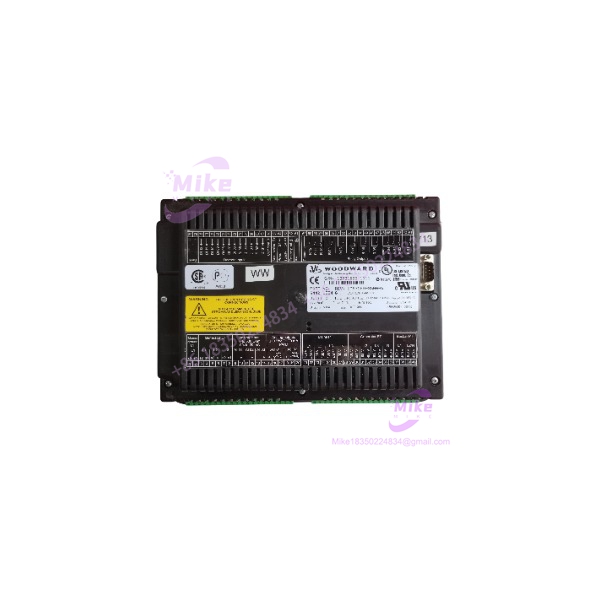
easYgen-3500-5
Key Technical Specifications
| Parameter | easYgen-3500-5 |
|---|---|
| Manufacturer | Woodward |
| Model | easYgen-3500-5 |
| Product Family | easYgen-3000 |
| Controller Type | Generator-set / power-management controller |
| CT Configuration | 5 A |
| Display | 5.7-inch graphical LCD |
| Resolution | 320 × 240 pixels |
| DC Supply | 12/24 VDC class |
| Communication | CAN, RS-232, RS-485 |
| Protocol Support | Modbus and engine/ECU communications, configuration dependent |
| Operating Modes | Standby, island, mains parallel, peak shaving, cogeneration |
| Control Functions | Synchronization, breaker control, load sharing, start/stop |
| Installation | Front-panel mounting |
| Configuration | Local HMI and PC-based configuration |
Procurement note: Exact I/O count, terminal assignment, communication functions, and electrical characteristics can vary with the complete ordering configuration. Verify the nameplate before treating the unit as a direct replacement.
Application Scenarios & Pain Points
1. Multi-Genset Synchronization
Condition: Multiple generator sets feeding a common bus.
The problem is not getting the engines running. It is getting each machine synchronized and loaded correctly without unnecessary breaker trips.
The easYgen-3500-5 provides the control functions required for synchronization, breaker management, generator protection, and load-sharing applications.
2. 5 A CT Generator Switchgear
With the correct 5 A controller:
- Current measurement matches the installed CT secondary.
- Generator kW/kVA calculations can be configured correctly.
- Protection thresholds can be scaled correctly.
- Load-control calculations remain consistent with the switchgear design.
With the wrong CT variant:
The controller may power up normally while reporting incorrect current and power values.
That is a particularly nasty failure because the LCD can look completely healthy.
3. Utility-Paralleled Generation
For peak shaving or cogeneration, the generator operates alongside the utility rather than waiting for a blackout.
The controller therefore has to manage synchronization, breaker sequencing, generator loading, and protective functions. The easYgen-3500-5 is intended for this class of application.
4. Legacy Generator Controller Replacement
A failed controller in an operating plant creates pressure to restore the generator quickly. The tempting approach is to order the same family number and install it immediately.
Don’t.
Check the existing parameter file, CT ratio, voltage sensing, breaker feedback, digital I/O polarity, engine CAN configuration, and firmware/hardware revision first. Those details determine whether the replacement will actually operate correctly.
5. Engine ECU Communication
Modern diesel and gas engines increasingly expose operating information through CAN-based ECU networks. Instead of relying entirely on discrete signals, the controller can exchange engine information through the appropriate communication interface.
This reduces the amount of point-to-point wiring required—but introduces another commissioning variable: CAN configuration and protocol compatibility.
QA & Live Testing SOP
A proper inspection of an easYgen-3500-5 should include functional testing, not simply visual inspection.
Origin Verification
- Confirm Woodward manufacturer markings.
- Record complete model and ordering information.
- Inspect serial/production information where available.
- Check OEM seals and enclosure condition.
- Compare the nameplate against the customer’s requested configuration.
Hardware Inspection
Inspect:
- PCB condition
- Terminal blocks
- Communication connectors
- LCD
- Keypad/soft keys
- Housing
- Mounting hardware
- Signs of corrosion, overheating, contamination, or modification
Live Test
On a controlled test rack:
- Apply an appropriate regulated DC supply.
- Verify startup sequence.
- Confirm LCD and HMI operation.
- Exercise configuration and status menus.
- Simulate generator voltage/current inputs.
- Check applicable digital I/O.
- Verify CAN communication.
- Test RS-485/Modbus communication where applicable.
- Check measurement response against the simulated input.
For a 5 A CT configuration, current-input verification deserves special attention.
Packaging
After testing, package the controller in:
- ESD-safe antistatic protection
- Connector protection
- Shock-resistant internal cushioning
- Moisture-resistant external packaging where required
A controller should leave the test bench in the same electrical condition in which it was accepted—not merely looking clean.
Field Engineer’s Pitfall Guide
❗ Do Not Substitute a 1 A Version
The easYgen-3500-5 is associated with the 5 A CT configuration.
If the existing switchgear uses 5 A CT secondaries, do not replace it with a 1 A model without engineering review. Current scaling affects metering, protection, power calculations, and potentially load-control behavior.
❗ Firmware Is Only Half the Problem
Even if the firmware revision matches, the parameter set may not.
Check:
- Generator voltage
- Frequency
- CT ratio
- VT ratio
- Breaker logic
- Synchronization limits
- Start/stop timers
- Engine communication
- Protection thresholds
- Load-sharing settings
A controller with factory-default parameters is not necessarily ready for your generator.
❗ Never Assume Hot-Swap
The easYgen-3500-5 connects to generator voltage sensing, CT circuits, breaker control, engine signals, and potentially mains circuitry.
Isolate the relevant electrical sources before replacement and follow the generator manufacturer’s procedure.
CT circuits require particular care. Never casually open a live CT secondary circuit.
Intent-Driven FAQ
What is the Woodward easYgen-3500-5?
The easYgen-3500-5 is a Woodward easYgen-3000-series generator controller configured for 5 A CT inputs. It provides generator management, synchronization, protection, breaker control, load sharing, and power-management functions.
Is the easYgen-3500-5 a 5 A controller?
Yes. The “-5” designation identifies the 5 A CT configuration. Verify the complete ordering code because related easYgen-3500 variants can have different electrical configurations.
Can I replace an easYgen-3500-5 with an easYgen-3500-1?
Not automatically. The CT input configuration is different. If the existing installation uses 5 A CT secondaries, the replacement must be checked against the actual current-measurement circuit.





