

Description
Hirschmann MM20-M4M4T1T1SBH | Industrial Ethernet Module
Product Introduction
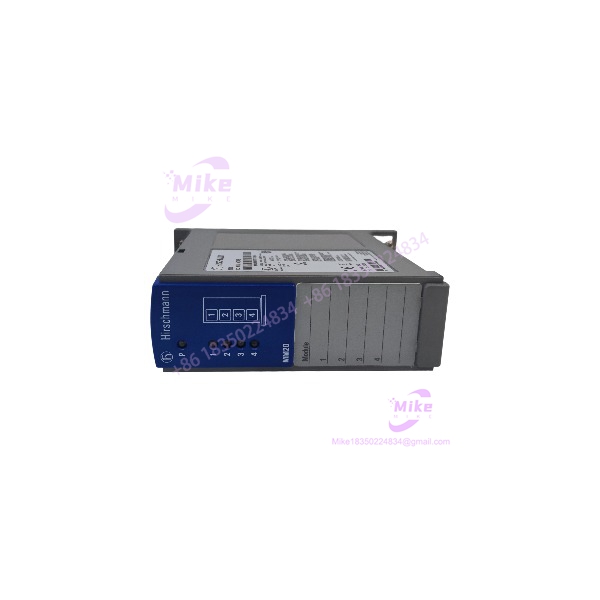
The Hirschmann MM20-M4M4T1T1SBH is a modular media module from the MICE MM20 family, intended for use with Hirschmann modular industrial Ethernet switch platforms. The exact model appears in spare-parts records alongside MS20-1600 systems, and dedicated product references identify it specifically as an MS20 Ethernet Switch MICE Media Module.
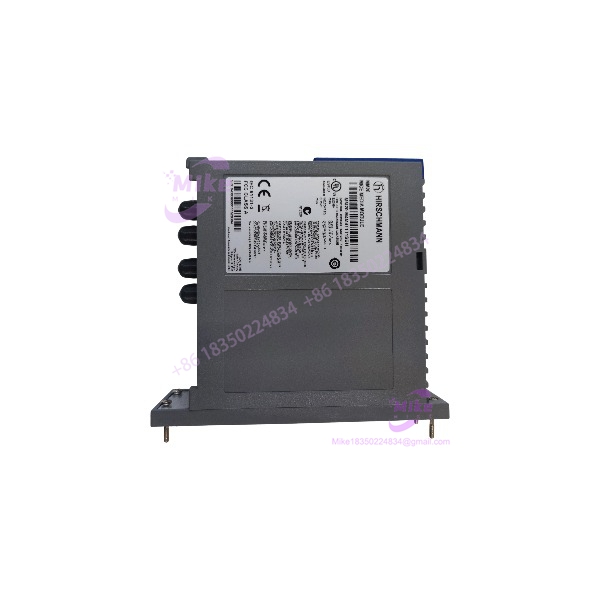
For maintenance and replacement work, the complete MM20-M4M4T1T1SBH identifier matters because the MM20 family contains numerous interface combinations. Current reseller data is inconsistent about the exact port breakdown of this specific suffix, so the physical module label, connector arrangement, and original Hirschmann system documentation should control the final port-level identification rather than generic MM20 specifications.
MM20-M4M4T1T1SBH
Key Technical Specifications
- Manufacturer: Hirschmann / Belden
- Model: MM20-M4M4T1T1SBH
- Product Family: MICE MM20
- Product Type: Modular industrial Ethernet media module
- Host System: Hirschmann MS20 modular Ethernet switch platform
- Associated Chassis: MS20-1600 is documented in spare-parts references with this module
- Interface Configuration Code: M4M4T1T1
- Network Function: Industrial Ethernet media/interface expansion
- Module Architecture: Field-replaceable modular design
- Switching Architecture: Determined by the host MICE switch platform
- Management: Provided through the compatible MICE host switch
- Installation: Installed into the compatible Hirschmann modular switch chassis
- Application Environment: Industrial automation and control networking
- Condition: Legacy / verify condition
- Exact Port Assignment: Verify against physical module revision and OEM documentation before installation
Important Specification Note
Do not automatically publish the frequently repeated claim that the -M4M4T1T1SBH itself contains four Gigabit RJ45 ports, four SFP slots, and an RS-232 interface. That configuration appears on several reseller pages, but it conflicts with references identifying the part as an MS20 MICE media module and should therefore be treated as unverified for the exact suffix.
Application Scenarios & Pain Points
MS20 Modular Ethernet Switch Replacement
The -M4M4T1T1SBH is applicable to maintenance of Hirschmann modular switch assemblies where the existing media module carries the same complete part designation.
Engineering pain point: A replacement media module must match the host chassis and module architecture. A visually similar module with a different interface code is not automatically interchangeable.
Industrial Automation Network Maintenance
The module can be used in legacy industrial Ethernet infrastructure supporting PLCs, HMIs, controllers, remote I/O, and other Ethernet-based automation equipment.
Engineering pain point: Replacing the module without documenting the existing topology can result in mismatched copper/fiber interfaces or unexpected network redundancy behavior.
MS20-1600 Spare-Part Programs
Spare-parts records specifically associate with MS20-1600 systems.
Engineering pain point: Procurement should identify the complete host chassis and installed module position rather than purchasing solely from the prefix.
Legacy Industrial Ethernet Infrastructure
The family is relevant to maintaining older Hirschmann MICE-based industrial networks where a complete network redesign is not practical during an outage.
Engineering pain point: Current reseller descriptions can mix specifications from different configurations. Incoming inspection should therefore verify connector count, connector type, PCB revision, and module labeling.
QA & Live Testing SOP
- OEM Identity Verification
- Confirm the physical label reads .
- Record serial number, hardware revision, production information, and any additional Hirschmann/Belden identification.
- Photograph the complete front and rear connector arrangement before installation.
- Module Configuration Verification
- Compare the physical connector configuration against the original system documentation.
- Verify every port designation.
- Do not rely solely on reseller descriptions of the M4M4T1T1 configuration.
- Confirm the host chassis is an appropriate Hirschmann MICE platform.
- Mechanical Inspection
- Inspect the module housing for cracks, deformation, corrosion, or impact damage.
- Check the module-to-chassis interface for damaged contacts.
- Inspect Ethernet connectors, fiber interfaces, and retaining hardware where fitted.
- Remove dust or conductive contamination using an appropriate ESD-safe procedure.
- Host-Chassis Test
- Install the module in a known-compatible MICE chassis.
- Verify correct mechanical seating.
- Power the chassis using the approved host-system procedure.
- Confirm the host recognizes the installed module.
- Check module and port status indicators.
- Ethernet Port Test
- Connect a controlled test device to each applicable interface.
- Verify link establishment.
- Check negotiated speed and duplex where applicable.
- Transmit controlled traffic and monitor packet errors.
- Test each port individually before placing the module into production service.
- Network Management Test
- Verify the host switch reports the expected module configuration.
- Check port status through the applicable Hirschmann management interface.
- Confirm VLAN, redundancy, or other configuration parameters remain associated with the correct physical ports.
- Document the module position and port mapping.
- Fiber Interface Verification
- If the physical module contains optical interfaces, inspect connectors for contamination.
- Verify the installed transceiver type and optical budget before connecting production fiber.
- Check transmit/receive polarity.
- Measure optical levels when appropriate test equipment is available.
- Final QA & Packaging
- Record module revision and host compatibility.
- Use ESD-safe packaging.
- Protect optical connectors with suitable dust caps.
- Prevent mechanical loading on Ethernet connectors during shipment.
Field Engineer’s Pitfall Guide
❗ o not treat as a standalone switch without verification.
The exact part is identified in multiple references as an MICE media module. The host chassis supplies the modular switching architecture.
❗ Do not copy the port specification from a generic reseller page.
Current listings conflict substantially. Some describe this exact part as a complete 4-RJ45/4-SFP/RS-232 switch, while other references identify it as a modular media module. The physical module and OEM documentation should control.
❗ Verify the complete suffix.
The family contains many interface combinations. A module beginning with is not necessarily an electrical or mechanical replacement for another module.
❗ Check the host chassis before applying power.
This is modular network hardware. Installation into the wrong chassis or an incompatible MICE platform can create a hardware or configuration fault even when the module itself is functional.
❗ Record the original port mapping.
When replacing a field module, photograph and document every Ethernet connection before removal. Port numbering can matter to VLAN assignments, redundancy configuration, and machine-network documentation.
❗ Do not assume fiber compatibility from the model number.
If optical interfaces or SFPs are involved in the actual assembly, verify the installed transceiver type, wavelength, fiber mode, connector, and link budget separately.
Intent-Driven FAQ
Q: What is Hirschmann ?
A: It is a MICE -series modular industrial Ethernet media module associated with Hirschmann modular switch platforms.
Q: Is a complete Ethernet switch?
A: The available references identify the exact part as a media module for the modular switch architecture. It should not be treated as a standalone switch without confirming the physical hardware and documentation.
Q: What Hirschmann system is associated with this module?
A: Spare-parts documentation specifically lists together as an Ethernet-switch and media-module combination.
Q: What does represent?
A: identifies a MICE modular media-module family used with Hirschmann modular industrial Ethernet systems.
Q: What does the M4M4T1T1 configuration mean?
A: It identifies a particular interface configuration within the family. The exact connector-level interpretation should be verified against the physical board and applicable Hirschmann documentation rather than inferred from generic reseller descriptions.
Q: Can another ule replace ?
A: Not automatically. The replacement must match the host chassis, mechanical interface, network media, connector configuration, and system requirements.
Q: What should I verify before purchasing this legacy module?
A: Verify the complete designation, physical connector layout, hardware revision, host /MICE chassis, existing port assignments, installed transceivers, and required network configuration.
Q: What is the correct QA proce for a used ?
A: Verify identity first, inspect the module and connectors, install it in a known-compatible MICE chassis, confirm module recognition, test each applicable Ethernet interface, verify link negotiation and traffic, and document the final port mapping.





