

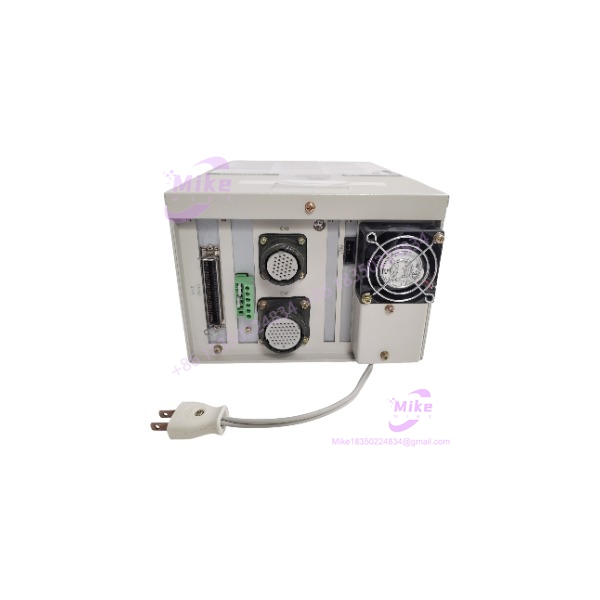
Description
Mitsubishi MELFA CR1-571 | Industrial Robot Controller
Product Introduction
The Mitsubishi MELFA CR1-571 is a dedicated robot controller from the CRn-500 generation, designed to operate compatible MELFA robot mechanisms rather than function as a conventional PLC CPU. Mitsubishi documentation associates the controller with several legacy RV, RH, and RP robot families, making exact robot/controller compatibility a primary procurement check.
The controller provides PTP and continuous-path control, MELFA-BASIC IV programming, multitasking, palletizing functions, interpolation functions, and position/program storage. Mitsubishi specifies control of up to four simultaneous axes, 2,500 taught positions, 5,000 program steps, and 88 programs.
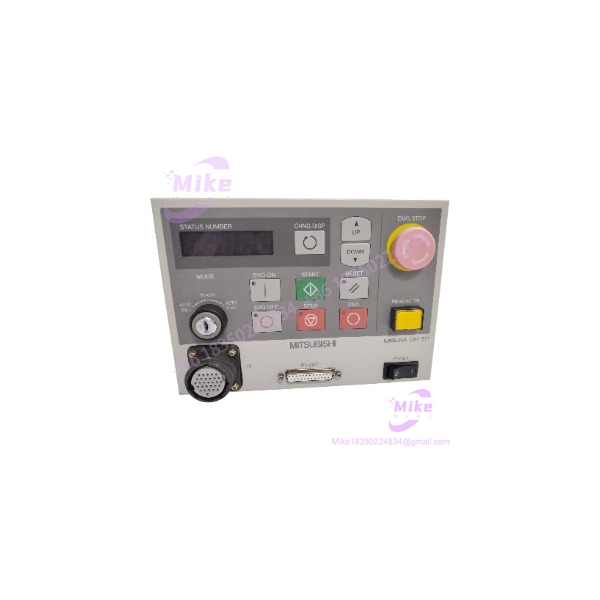
MELFA CR1-571
Key Technical Specifications
- Model: CR1-571
- Controller Family: Mitsubishi MELFA CRn-500 series
- Controller Type: Industrial robot controller
- Maximum Simultaneous Axes: 4
- CPU: 64-bit RISC + DSP
- Control Methods: PTP and CP
- Programming Language: MELFA-BASIC IV
- Taught Positions: 2,500
- Program Steps: 5,000
- Programs: 88
- General-Purpose I/O: 16 inputs / 16 outputs standard
- Maximum General-Purpose I/O: 240 inputs / 240 outputs with applicable options
- RS-232C: 1 port for PC, vision sensor, or related equipment
- RS-422: 1 port for dedicated teaching pendant connection
- Hand Interface: 1 dedicated slot
- Expansion Slots: 0 standard / up to 3 with expansion options
- Robot I/O Link: 1 channel
- Control Power Input: Single-phase 90–132 VAC or 180–242 VAC
- Specified Power Capacity: 0.7 kVA
- Operating Temperature: 0–40°C
- Relative Humidity: 45–85%
- Dimensions: Approximately 212 × 290 × 165 mm
- Construction: Freestanding/open structure
The published Mitsubishi specifications should be treated as configuration-specific: optional expansion hardware can materially change available I/O and expansion capability.
Application Scenarios & Pain Points
1. Legacy MELFA Robot Replacement
The CR1-571 is relevant when maintaining an existing MELFA cell whose robot arm and controller configuration were engineered around the CRn-500 generation.
The main procurement issue is not simply finding a controller with the same model number. The robot model, controller revision, options, teaching pendant, I/O configuration, and stored programs should be checked together.
2. RP-1AH / RP-3AH / RP-5AH Systems
Mitsubishi specifically documents the CR1-571 controller with the RP-1AH, RP-3AH, and RP-5AH robot families.
This makes the controller relevant for legacy assembly, handling, palletizing, and pick-and-place installations where replacing the complete robotic cell would require mechanical and application requalification.
3. RV/RH Legacy Robot Cells
Mitsubishi’s CAD documentation lists CR1-571 combinations for RV-3S/3SJ, RV-1A/2AJ/2A/3AJ, RH-5AH, and RP-1AH/3AH/5AH.
Before purchase, match the controller to the exact robot arm model and controller configuration, not merely the MELFA brand.
4. Legacy Program Recovery
The controller supports MELFA-BASIC IV and provides PC-based program editing, file operations, monitoring, debugging, parameter management, and controller backup functions through Mitsubishi’s support software.
For an obsolete production cell, recovering the original program, position data, parameters, and controller configuration can be more important than the controller hardware alone.
QA & Live Testing SOP
For a used or surplus , testing should be performed as a robot-controller system whenever the matching robot arm is available.
- OEM Identity Verification
- Confirm the model designation on the controller nameplate.
- Record serial number, hardware revision, and visible option cards.
- Photograph the complete front and rear configuration before power-up.
- Mechanical/Electrical Inspection
- Inspect enclosure, connectors, cooling openings, terminal areas, and card interfaces.
- Check for corrosion, contamination, impact damage, and evidence of unauthorized modification.
- Verify the incoming supply configuration before energization.
- Controlled Power-Up
- Use the documented single-phase input range.
- Confirm correct grounding and protective equipment.
- Observe startup behavior and controller diagnostics.
- Do not connect a robot arm until controller compatibility has been confirmed.
- Robot Interface Test
- Connect only a documented compatible MELFA robot mechanism.
- Verify controller recognition and servo-related status.
- Check emergency-stop and safety interlock circuits before enabling motion.
- Teaching Pendant / Programming Test
- Verify communication with the teaching pendant.
- Access program and position-data functions.
- Confirm MELFA-BASIC IV program handling where applicable.
- Check controller memory and backup/restore functions.
- I/O Test
- Verify the standard 16-input/16-output interface where fitted.
- Test representative input sensing and output operation using a controlled test fixture.
- If optional I/O hardware is installed, record the exact option configuration.
- Motion Test
- Perform initial testing at reduced speed and in a controlled work envelope.
- Confirm axis movement, homing/reference behavior, limit functions, and emergency-stop response.
- Run a known-good test program only after safety checks are complete.
- ESD-Safe Packaging
- Protect electronic boards and connectors against electrostatic discharge.
- Immobilize the controller during shipment.
- Preserve configuration labels and option information with the unit.
Mitsubishi’s documentation emphasizes controlled step operation and verification before automatic operation, particularly after program changes.
Field Engineer’s Pitfall Guide
❗ Do not buy the solely by controller model. Mitsubishi documents the across several robot families. Confirm the exact robot arm model and applicable controller specification before installation.
❗ Do not assume every has the same I/O configuration. The published standard configuration provides 16 inputs and 16 outputs, while optional hardware can increase this to 240/240. Record installed option cards before comparing replacement units.
❗ Do not confuse the with newer MELFA controllers. This is a legacy CRn-500 generation controller, and Mitsubishi’s current product information lists it as discontinued.
❗ Check the teaching-pendant interface. The controller documentation specifies an RS-422 interface dedicated to the teaching pendant. A physically similar communication connector should not automatically be treated as interchangeable.
❗ Preserve the original controller data before replacement. Robot programs, position data, parameters, and I/O assignments can be application-specific. A controller that powers up correctly may still require configuration restoration before the production cell can operate.
❗ Safety circuits must be validated separately. Emergency-stop, door/interlock, and robot-enable behavior should be verified during commissioning; successful controller boot-up does not constitute a complete functional safety test. Mitsubishi’s hardware documentation specifically calls for appropriate protective and safety arrangements around the controller and robot system.
Intent-Driven FAQ
What is the Mitsubishi MELFA ?
The is a Mitsubishi MELFA CRn-500 series industrial robot controller used with compatible legacy Mitsubishi robot arms.
Which robots use the ?
Mitsubishi documentation lists the with RV-3S/3SJ, RV-1A/2AJ/2A/3AJ, RH-5AH, and RP-1AH/3AH/5AH configurations. Other historical combinations also exist, so the exact robot model should be verified before purchase.
How many axes can the control?
The published specification states a maximum of 4 simultaneous axes.
What programming language does use?
The supports MELFA-BASIC IV. Mitsubishi’s associated PC software documentation also describes program editing, position-data editing, file operations, debugging, monitoring, and backup functions.
How much program memory does provide?
The published robot-controller specification lists 88 programs, 5,000 program steps, and 2,500 taught positions.
What I/O does the have?
The standard specification lists 16 general-purpose inputs and 16 outputs, with optional configurations capable of up to 240 inputs and 240 outputs.
What power supply does the require?
The published specification lists single-phase 90–132 VAC or 180–242 VAC and a power capacity of 0.7 kVA. Verify the actual nameplate and installation documentation before energizing a replacement unit.
Is the still supported by Mitsubishi?
Mitsubishi lists the as a discontinued controller. Its published product-closure information states that the repair-parts and repair-support periods for listed applications ended in March 2026.
Can a be used as a direct replacement?
Only after confirming the robot arm model, controller revision, installed options, teaching pendant, I/O configuration, software/program compatibility, and safety circuitry. Matching the model number alone is not sufficient for a production replacement.





