

Description
Cisco IE-4000-16GT4G-E | Managed Industrial Ethernet Switch
Product Introduction
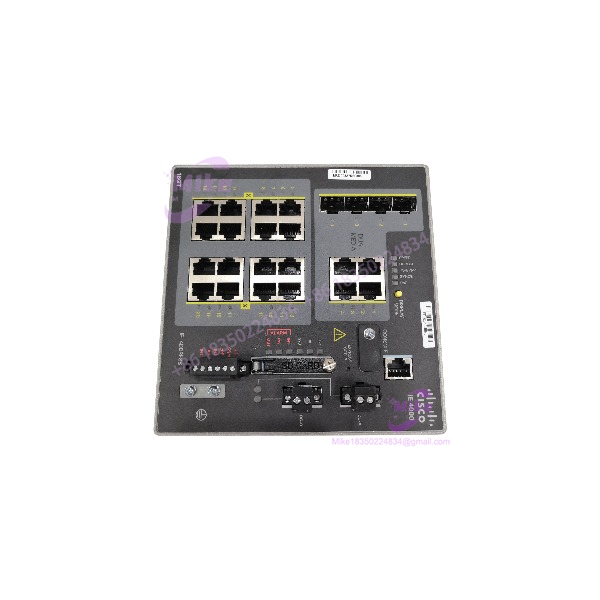
In a plant-floor Ethernet network, replacing a switch with the wrong port speed or uplink configuration can create more work than the hardware failure itself. The Cisco IE-4000-16GT4G-E is built for industrial Ethernet networks requiring Gigabit copper connectivity across multiple devices, with additional Gigabit uplinks for network aggregation or fiber connectivity.
This IE 4000 model provides 16 Gigabit copper ports and four Gigabit Ethernet combo uplinks. Cisco’s IE 4000 platform supports industrial network functions including REP, PRP, MRP, and other resiliency mechanisms, subject to the applicable software feature set and configuration. For maintenance spares and network refresh projects, verify the exact PID, installed software, and required redundancy topology before approving a replacement.
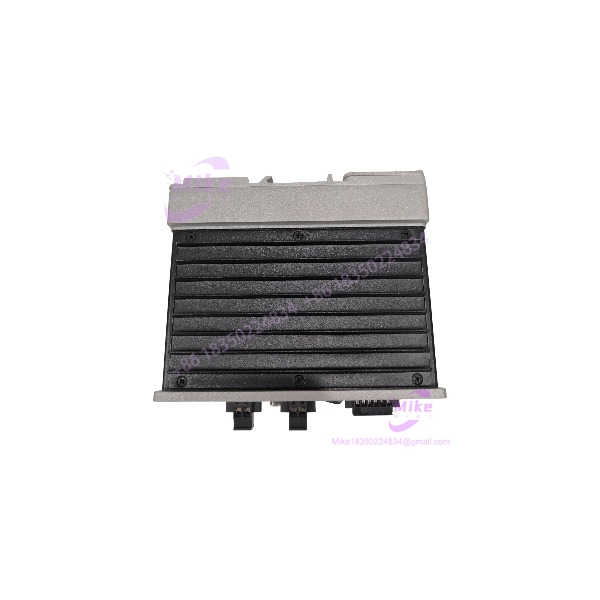
IE-4000-16GT4G-E
Key Technical Specifications
- Manufacturer: Cisco
- Model: IE-4000-16GT4G-E
- Series: Industrial Ethernet 4000
- Switch Type: Managed industrial Ethernet switch
- Total Ethernet Ports: 20
- Copper Access Ports: 16 × Gigabit Ethernet (10/100/1000 Mbps)
- Gigabit Combo Uplinks: 4 × GE combo ports
- Combo Port Operation: SFP fiber or RJ-45 copper, with one interface active per combo port
- Default Software Feature Set: LAN Base
- Switching Capacity: 20 Gbps nonblocking, per IE 4000 family documentation
- Forwarding Rate: Line rate for all ports and packet sizes, per Cisco datasheet
- Unicast MAC Address Table: Up to 16,000
- VLAN Capacity: Up to 1,000 VLANs
- IGMP Multicast Groups: Up to 1,000
- Memory: 1 GB DRAM and 128 MB onboard flash
- Removable Storage: 1-GB SD flash memory card included in the documented system configuration; confirm whether the card is present in the actual offer.
- Alarm I/O: Two alarm inputs and one alarm output relay
- Power Input: Redundant DC input, nominal 9.6–60 VDC
- Maximum Input Current: 4.3 A for the applicable model group
- Power Consumption: 40 W, measured at 9.6 VDC per Cisco documentation
- Dimensions (H × W × D): 155.4 × 155.4 × 129.2 mm (6.12 × 6.12 × 5.09 in.)
- Weight: Approximately 2.88 kg (6.35 lb.)
- PoE Capability: No PoE/PoE+ output specified for this model
- Management: Cisco IOS-based industrial switch management; exact features depend on software version and license/feature set.
Specifications are based on Cisco’s IE 4000 Series documentation. Confirm the hardware label and installed software on the actual unit before finalizing a replacement specification.
Global Sourcing & Live-Test SOP
Industrial network hardware should be verified beyond a basic power-on check. For the IE-4000-16GT4G-E, procurement inspection should confirm the hardware PID, software state, port operation, and suitability for the intended topology.
Incoming Verification
- Confirm the complete model designation: IE-4000-16GT4G-E.
- Photograph the chassis label, serial number, hardware revision, and Cisco identification.
- Inspect all 16 copper ports and four combo uplink positions.
- Check the power terminals, grounding point, alarm connections, console interfaces, and mounting features.
- Document visible damage, corrosion, contamination, or signs of overheating.
- Record all included accessories separately from the switch.
Authenticity & Traceability
- Compare model and serial information with available Cisco documentation and supplier records.
- Inspect chassis labels and markings for inconsistencies or signs of alteration.
- Record the received condition and any discrepancies.
- Do not claim factory-sealed or unused status without supporting evidence.
Power-On & Diagnostics
- Verify the DC supply and wiring against Cisco’s installation documentation.
- Inspect grounding and power connections before energizing.
- Confirm normal startup behavior and review fault indicators.
- Where console access is available, record boot status, reported hardware identity, and diagnostic results.
Port & Network Verification
- Test copper ports with a controlled Ethernet test setup.
- Verify link negotiation and Gigabit operation on the copper access ports.
- Test the combo uplinks with compatible RJ-45 and/or SFP equipment as applicable.
- Confirm console access and a usable software boot state.
- Where appropriate, test basic forwarding and VLAN behavior in an isolated setup.
- Do not claim all ports passed testing unless each port has been verified and recorded.
Software & Configuration Record
- Record the installed IOS version and reported feature set.
- Confirm the unit’s software state and whether it requires password recovery or configuration reset.
- Preserve any existing configuration until ownership and backup requirements are resolved.
- Validate VLANs, uplink assignments, redundancy protocols, and management access before production use.
- Do not assume the replacement arrives with the original network configuration.
Extended Run & Packaging
- Conduct an extended operating test only with an appropriate test setup.
- Record actual test duration, port activity, and diagnostic results.
- Protect Ethernet ports, power terminals, and other connectors during shipment.
- Use suitable anti-static and impact-resistant packaging.
- Include available inspection and test documentation.
Procurement note: Stock status, condition, firmware, configuration, accessories, warranty, and return terms are seller-specific. Confirm these details against the actual unit and offer.
Field Engineer’s Pitfall Guide
❗ Do not substitute the Fast Ethernet variant by appearance alone. The IE-4000-16GT4G-E provides 16 Gigabit copper access ports. The IE-4000-16T4G-E provides 16 Fast Ethernet copper ports. A similar chassis does not establish equivalent port performance.
❗ Check combo uplink media before installation. Each Gigabit combo port supports a copper or SFP interface, but both interfaces in the same combo port cannot operate simultaneously. Verify the required transceiver, fiber type, wavelength, and link distance before deployment.
❗ Validate the software feature set and redundancy design. The IE 4000 family supports multiple industrial resiliency features, but the required behavior depends on software and configuration. Confirm the LAN Base feature set, required protocols, IOS version, and existing topology before placing the replacement into service.
Intent-Driven FAQ
Q1: What is the Cisco IE-4000-16GT4G-E?
It is a managed industrial Ethernet switch in Cisco’s IE 4000 Series, with 16 Gigabit copper access ports and four Gigabit Ethernet combo uplinks.
Q2: What is the difference between IE-4000-16GT4G-E and IE-4000-16T4G-E?
The 16GT model has 16 Gigabit copper ports, while the 16T model has 16 Fast Ethernet copper ports. Both have four Gigabit combo uplinks.
Q3: Does the IE-4000-16GT4G-E support fiber?
Yes. Its four Gigabit combo uplinks support compatible SFP fiber interfaces or RJ-45 copper, with only one interface active per combo port. Confirm transceiver compatibility and link requirements.
Q4: Does this switch provide PoE?
No PoE output is specified for the IE-4000-16GT4G-E. If the application requires power to cameras, access points, or other powered devices, verify the exact PoE-capable model instead.
Q5: What power supply does the IE-4000-16GT4G-E require?
Cisco documents redundant DC input with a nominal operating range of 9.6–60 VDC. Confirm the site’s supply arrangement, terminal wiring, and installation requirements in the Cisco hardware guide.
Q6: Is the IE-4000-16GT4G-E hot-swappable?
Do not assume the switch itself is hot-swappable. Follow Cisco’s installation instructions and site isolation procedures before removing or installing the unit. Redundant power inputs do not mean the chassis can be replaced under power.
Q7: What should I verify before purchasing a surplus IE-4000-16GT4G-E?
Confirm the exact PID, hardware condition, startup status, IOS version, LAN Base feature set, port functionality, included SD card and accessories, test documentation, warranty, and return terms. For a production-network spare, verify configuration compatibility before commissioning.





