

Description
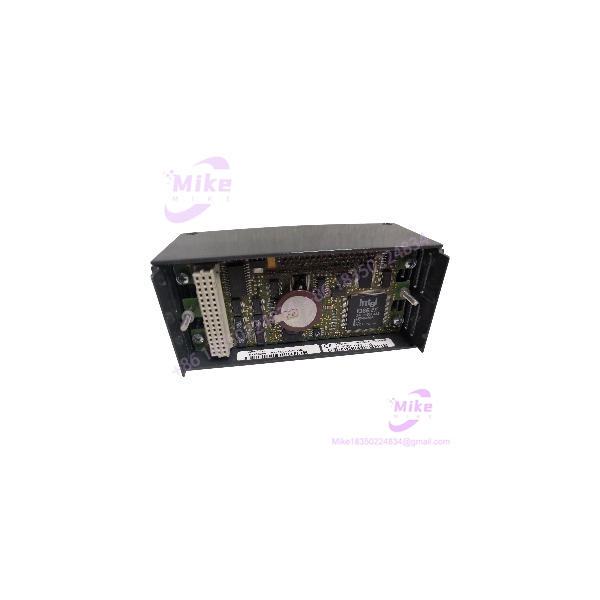
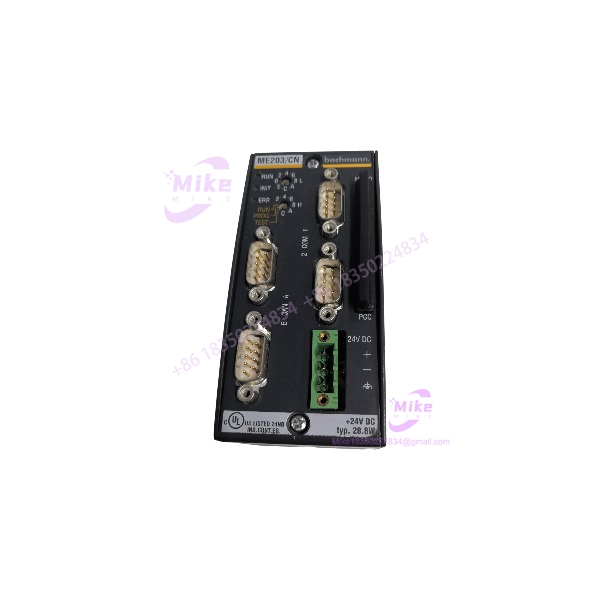
Bachmann ME203CN | M1 Processor Module
Product Introduction
The Bachmann ME203CN is a compact CPU module from the Bachmann M1 controller family. It occupies one standard module width and provides the processing resources and communications interfaces required to operate an M1 control application. The ME203/CN configuration is specifically the CAN/CANopen variant, distinguishing it from the Ethernet-oriented ME203/EN version.
Under the hood, this legacy processor uses an Intel 80386EX running at 33 MHz, with 8 MB DRAM, 512 KB battery-backed SRAM, and 8 MB program flash. It also provides one RS232 interface, one configurable RS232/422/485 interface, a CAN/CANopen interface, watchdog supervision, battery-backed real-time clock functionality, and a front PC-card slot.
ME203CN
Key Technical Specifications
- Manufacturer: Bachmann electronic
- Model: ME203/CN
- Model Number: ME203CN
- M1 Item Number: 00013176-00
- Processor: Intel 80386EX
- CPU Frequency: 33 MHz
- DRAM: 8 MB
- SRAM: 512 KB, battery-backed
- Program Flash: 8 MB
- Boot Flash: 2 MB, with system software allocation
- Serial Interface 1: RS232
- Serial Interface 2: RS232/422/485
- Serial FIFO: 64 bytes
- CAN Interface: 1 × CAN/CANopen
- CAN Data Rate: Up to 1 Mbaud
- PC Card Interface: PCC201-compatible removable memory card
- Integrated Power Supply: Optional 24 VDC input with 17 W available for I/O modules
- External Backplane Supply: 5 V, ±15 V
- Watchdog: Integrated
- Real-Time Clock: Battery-backed
- Status Indicators: RUN, INIT, and ERROR
- Mounting: One standard M1 module width
- Operating Temperature: -30 to +60 °C, fanless
- Storage Temperature: -40 to +85 °C
- Relative Humidity: 5–95% without condensation under the documented standard operating conditions
The exact 00013176-00 item number is documented for ME203/CN. A separate ME203/CN variant, 00016336-00, is identified in Bachmann documentation as the cold-climate version, so these should not be treated as the same environmental configuration.
Application Scenarios & Pain Points
Legacy Bachmann M1 Controller Replacement
The ME203CN is useful when maintaining an installed M1 control system where the CPU itself has failed but the surrounding rack, I/O, field wiring, and application software remain serviceable.
The important procurement target is the complete processor configuration, not simply “Bachmann ME203.”
CAN/CANopen-Based Control Architecture
The /CN configuration provides a CAN/CANopen interface for communication with compatible devices. This makes it materially different from the Ethernet-oriented /EN configuration.
For a brownfield replacement, verify the existing application communications map before substituting another variant.
Distributed Industrial I/O
The optional integrated power supply can provide 17 W for additional I/O modules, while the CPU itself operates as part of the M1 backplane architecture.
That distinction matters when calculating rack power consumption. The 17 W figure is not an indication that the processor is a generic standalone 24 V PLC.
Older Machine-Control Systems
The generation uses legacy x86 processing hardware and removable PC-card storage. It remains relevant for maintaining installed equipment where replacing the entire controller architecture would require application redevelopment and machine revalidation.
Service and Obsolescence Stock
For maintenance departments, a tested ME203CN can be more useful than an untested replacement because the CPU, SRAM battery, memory card, serial interfaces, CAN interface, and backplane connection all affect system recovery.
QA & Live Testing SOP
Step 1 — Exact Identity Verification
Record the module label and verify:
- Bachmann
- /CN or ME203CN
- Item number
- Hardware revision
- Serial number
- CPU/module status
- Installed PC card, if supplied
The standard /CN is documented as 00013176-00; the cold-climate variant uses a different item number.
Step 2 — Physical Inspection
Inspect:
- Backplane connector
- Front connectors
- CAN interface
- Serial interfaces
- PC-card slot
- Battery area
- Status LEDs
- Rotary CPU-ID switches
- PCB and housing
Check for oxidation, bent contacts, cracked connectors, contamination, and evidence of previous board-level repair.
Step 3 — Battery and Memory Check
The uses 512 KB battery-backed SRAM and a battery-backed real-time clock.
For an old-stock processor, battery condition deserves specific attention. A unit can pass a basic power-up test while still carrying a depleted backup battery that threatens retained data or clock functionality.
Step 4 — Controlled Power-Up
Install the CPU in a compatible Bachmann M1 rack using the correct backplane and power configuration.
Verify:
- Startup sequence
- RUN indication
- INIT behavior
- ERROR status
- CPU-ID setting
- Backplane recognition
- No abnormal power draw
Do not energize a loose module outside the intended M1 backplane environment simply to see whether LEDs illuminate.
Step 5 — Communications Test
Where test equipment is available, verify:
- RS232 communication
- RS232/422/485 interface operation
- CAN/CANopen interface
- CAN communication stability
- Application-level device recognition
For CAN testing, verify actual frame exchange rather than merely checking connector continuity.
Step 6 — Application/Memory Test
If the customer’s application card is supplied, verify that the expected application software and configuration are present.
A processor that reaches a normal hardware startup screen is not necessarily a drop-in replacement. The retained application, firmware/software compatibility, CPU-ID, and I/O configuration must also match the installed M1 system.
Step 7 — Packaging
Protect the backplane connector and front interfaces against impact and contamination.
Use ESD-safe packaging and keep the removable PC card protected separately if it is included with the unit.
Field Engineer’s Pitfall Guide
❗ Do not confuse /CN with /EN.
The /CN version is the CAN/CANopen configuration, while the /EN version is associated with Ethernet. They are not interchangeable merely because both belong to the processor family.
❗ Do not ignore the battery-backed memory.
The uses 512 KB battery-backed SRAM and a battery-backed RTC. An old spare can therefore require battery inspection before being trusted with retained application data.
❗ Do not treat 00013176-00 and the cold-climate version as identical.
Bachmann lists 00013176-00 for /CN and 00016336-00 for the cold-climate /CN variant. Environmental requirements should be checked against the machine installation.
❗ Do not assume the processor contains the customer’s application.
The removable PC-card architecture and program memory are part of the M1 system design. Verify the supplied memory hardware and software configuration separately.
Intent-Driven FAQ
Q1. What is the Bachmann ?
The Bachmann / /CN is an M1-series industrial controller processor module designed for Bachmann’s modular automation architecture.
Q2. What CPU does it use?
The /CN uses an Intel 80386EX processor operating at 33 MHz.
Q3. How much memory does the have?
The documented configuration provides 8 MB DRAM, 512 KB battery-backed SRAM, and 8 MB program flash.
Q4. Does support CAN?
Yes. The /CN version has one CAN/CANopen interface, with the documented CAN interface supporting up to 1 Mbaud.
Q5. What serial interfaces are available?
The processor provides one interface plus one /422/485 interface.
Q6. Does the have Ethernet?
The documented /CN configuration is the CAN/CANopen version. Ethernet is associated with the /EN configuration rather than the standard /CN hardware.
Q7. What is the Bachmann item number?
The standard /CN is documented as 00013176-00. Bachmann also produced other /CN configurations, so the physical nameplate should be checked before ordering a replacement.
Q8. What should be checked before buying a used ?
Verify the complete model and item number, hardware revision, battery condition, PC-card configuration, backplane connector condition, CAN interface, serial interfaces, and compatibility with the existing M1 application.
Procurement Note
For an exact replacement, specify Bachmann /CN / and verify the 00013176-00 item number where applicable. Do not substitute the /EN merely because it is another processor; the CAN/CANopen versus Ethernet interface configuration is a material difference.





