

Description
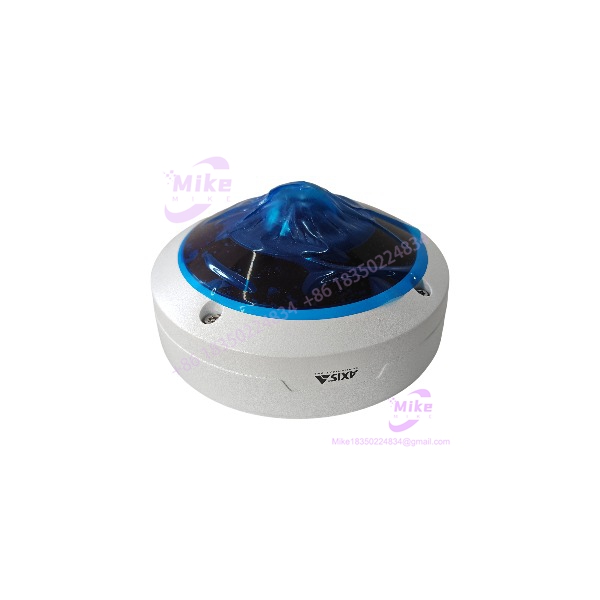
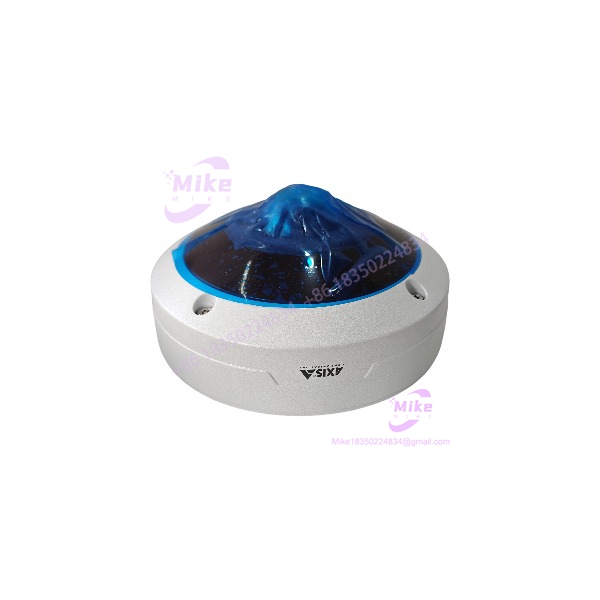
AXIS M4318-PLVE | 12 MP Panoramic Dome Camera
Dynamic Product Introduction
The installation problem this camera addresses is straightforward: one conventional fixed camera often leaves blind zones when the objective is to observe an entire room, entrance area, retail floor, industrial space, or other broad scene. The AXIS M4318-PLVE approaches that problem with a 12 MP panoramic sensor and a stereographic 1.2 mm lens, providing a complete 180° or 360° overview. Digital PTZ and dewarped view areas then allow operators to extract more useful perspectives from the same physical camera position.
The M4318-PLVE is built around Axis ARTPEC-8 processing hardware with 2 GB RAM, 8 GB flash, and a deep-learning processing unit (DLPU). Its video engine supports H.264, H.265, and Motion JPEG, while Forensic WDR can reach up to 120 dB depending on the scene. In practical terms, that combination provides substantially more processing and analytic capability than a basic panoramic IP camera—particularly where object classification, metadata, and multiple dewarped views are required.
For replacement procurement, though, the important distinction is between AXIS M4318-PLVE compatibility and mere physical fit. The camera uses standard Ethernet PoE, supports ONVIF Profiles G, M, S, and T, and integrates with Axis Camera Station products and partner VMS platforms. Those interfaces make migration easier, but the existing VMS version, camera credentials, certificates, recording profiles, analytics configuration, and network security policy still need to be checked.
M4318-PLVE
Key Technical Specifications
- Camera type: Panoramic mini dome network camera
- Image sensor: 1/2.3-inch progressive-scan RGB CMOS
- Maximum overview resolution: 2992 × 2992
- Lens: 1.2 mm, F2.2, fixed focus, fixed iris
- Field of view: 182° horizontal × 182° vertical
- Maximum frame rate: 25/30 fps depending on operating frequency and configuration
- WDR: Forensic WDR, up to 120 dB depending on scene
- Minimum illumination: 0.19 lux color; 0.04 lux B/W; 0 lux with IR illumination
- IR: OptimizedIR, 850 nm LEDs, up to approximately 15 m depending on scene
- Processor: ARTPEC-8 with DLPU
- Memory: 2048 MB RAM / 8192 MB Flash
- Compression: H.264, H.265, Motion JPEG
- Analytics: AXIS Object Analytics, AXIS Scene Metadata, AXIS Video Motion Detection, active tampering alarm
- Storage: microSD/microSDHC/microSDXC and NAS recording
- Network: 10BASE-T/100BASE-TX PoE
- PoE: IEEE 802.3af/802.3at Type 1 Class 3; 6.4 W typical / 12.95 W maximum
- I/O: One supervised alarm input and one output; output provides 12 VDC with maximum 25 mA load
- Environmental rating: IP66 / NEMA 4X / IK10
- Operating temperature: -40°C to +50°C
- Dimensions: 70 mm high × 149 mm diameter
- Weight: 860 g
The published camera resolutions extend beyond the square overview mode, including panorama, double panorama, quad view, corridor, and corner configurations. This matters when integrating the M4318-PLVE into a VMS: the recording profile should be tested against the exact view mode rather than assuming that every available stream operates at the headline 12 MP setting.
Global Sourcing & Live-Test SOP — Transparency Core
For a discontinued camera such as the AXIS M4318-PLVE, procurement control should be tighter than for current production equipment. Axis lists ordering part number 02511-001 for several regions including the US, Japan, EU, UK, China, Korea, and Australia; India uses 02511-113. Verify the actual regional part number on the nameplate before accepting inventory.
Inbound Verification
For every entering stock:
- Photograph the complete nameplate and serial number.
- Record the regional ordering part number.
- Check enclosure condition, dome clarity, mounting hardware, cable gland condition, and RJ45 connector.
- Inspect for evidence of opening, water ingress, corrosion, or unauthorized repair.
- Confirm that the unit’s serial and identification information are internally consistent.
- Where documentation is available, retain the original purchase record and OEM documentation.
A clean housing is not enough. Outdoor cameras can look nearly unused while having suffered condensation, thermal cycling, or PoE-port damage.
Live Simulation
The functional test should reproduce the actual operating environment as closely as practical.
A suitable test rack should include:
- Managed PoE switch capable of IEEE 802.3af/at.
- Isolated test network.
- Laptop or workstation for Axis device discovery and configuration.
- Compatible VMS test environment.
- Known-good Ethernet cabling.
- Calibrated electrical test equipment where power or auxiliary I/O measurements are required.
On power-up, verify PoE negotiation, boot behavior, network acquisition, camera discovery, live video, image orientation, IR operation, and storage detection.
The AXIS should not be described as “fully tested” merely because it responds to ping.
Diagnostics and Protocol Validation
A proper acceptance test should include:
- Web-interface accessibility.
- Firmware/AXIS OS version recording.
- Network configuration verification.
- ONVIF discovery and authentication test.
- RTSP/video-stream validation where applicable.
- H.264 and H.265 stream checks.
- VMS registration and live-view test.
- microSD detection test when storage is supplied.
- Digital input/output verification.
- MQTT or other application integration tests if used by the installation.
- Object Analytics test using controlled human/vehicle movement.
The supports ONVIF Profiles G, M, S, and T, along with VAPIX and ACAP integration. Its published network stack includes IPv4/IPv6, HTTPS, TLS, SNMP, MQTT, RTSP/RTP, SRTP/RTSPS, IEEE 802.1X, and related protocols.
24-Hour Heat Run
For surplus inventory intended for critical surveillance duty, a controlled extended run is worthwhile.
Record:
- Initial PoE consumption.
- Camera temperature/status indications.
- Continuous video stability.
- Network link status.
- IR operation.
- Storage behavior.
- VMS connectivity.
- Any reboot, stream interruption, or thermal alarm.
Axis specifies operation from -40°C to +50°C, with a -30°C startup temperature and 10–100% relative humidity, condensing. A room-temperature bench test obviously does not reproduce the entire environmental envelope.
Final Preparation
Before shipment:
- Record AXIS OS/firmware version.
- Record serial number and tested MAC address.
- Photograph the tested unit.
- Reset customer-specific network credentials.
- Apply ESD-conscious handling and protective packaging.
- Protect the dome against scratches.
- Include only accessories actually verified as compatible.
If warranty is offered on surplus stock, state the warranty period and exclusions in writing. Do not imply an OEM warranty unless that coverage has been confirmed.
The Field Engineer’s Pitfall Guide
❗ Warning 1: Do Not Treat Every 12 MP Setting as Equivalent
The headline 12 MP specification does not mean every viewing mode, WDR configuration, and dewarped stream runs at the same frame rate. Axis specifies up to 25/30 fps for the 360° overview without WDR, while 360° overview plus four dewarped views with WDR can operate at up to 25/20 fps depending on frequency.
I’ve seen surveillance upgrades pass a basic live-view check and then fail the customer’s recording requirement because the actual multi-view profile was never tested.
❗ Warning 2: Check PoE Budget Before Replacing the Camera
The is a PoE-powered device with 6.4 W typical and 12.95 W maximum consumption. Do not calculate switch capacity from typical consumption alone. Leave appropriate PoE headroom, particularly when replacing several cameras simultaneously or operating IR illumination and other functions under maximum conditions.
A Fluke meter can verify the electrical side of the installation, but switch-side PoE negotiation and port power reporting should also be checked.
❗ Warning 3: Discontinued Does Not Mean Interchangeable
Axis lists the in its discontinued-product documentation. A physically similar M43-series camera is not automatically a drop-in replacement. Lens characteristics, view modes, analytics support, firmware behavior, mounting hardware, and VMS compatibility can differ.
When maintaining an existing installation, preserve the original camera configuration before removal. Record the IP address, hostname, VMS assignment, stream profiles, analytics rules, certificates, and mounting orientation.
Intent-Driven FAQ
Q1: Is the AXIS discontinued?
Yes. Axis currently provides a product discontinuation statement covering the . That means procurement should account for remaining inventory and replacement planning rather than assuming unlimited factory supply.
Q2: Can I replace an old with another ?
Generally, another correctly configured is the most direct model-for-model replacement path, but configuration still needs verification. Check the AXIS OS version, VMS compatibility, mounting arrangement, network credentials, analytics configuration, and recording profiles before commissioning.
Q3: Does the AXIS support PoE+?
Yes. The published specification lists IEEE 802.3af/802.3at Type 1 Class 3 PoE, with typical consumption of 6.4 W and maximum consumption of 12.95 W.
Q4: Can I use the AXIS with a non-Axis VMS?
Yes, subject to the VMS implementation. The camera supports ONVIF Profiles G, M, S, and T and provides standard network streaming protocols. However, advanced Axis-specific functions may not map one-for-one into every third-party VMS. Test analytics, metadata, dewarped views, audio, events, and recording behavior rather than validating only basic RTSP video.
Q5: Does the have built-in analytics?
Yes. Axis specifies AXIS Object Analytics, AXIS Scene Metadata, AXIS Video Motion Detection, and active tampering alarm as included functionality. Object Analytics can classify humans and vehicles, with supported vehicle types including cars, buses, trucks, and bikes.
Q6: Can the record directly to an SD card?
Yes. The camera supports microSD, microSDHC, and microSDXC storage, as well as recording to network-attached storage. For a production installation, verify the selected card’s endurance and compatibility rather than using an arbitrary consumer microSD card.
Q7: What warranty should I expect when buying a surplus AXIS ?
That depends on the seller and transaction terms. Axis publishes information regarding its product warranty, but a surplus unit should not automatically be represented as carrying current OEM warranty coverage. Get the actual seller’s warranty period, DOA terms, return procedure, and exclusions in writing before purchase.
Procurement Conclusion
The is a 12 MP panoramic IP camera built around ARTPEC-8 processing, DLPU-based analytics, 182° × 182° optics, integrated OptimizedIR, and PoE operation. Its IP66, NEMA 4X, and IK10 ratings make it suitable for demanding outdoor surveillance installations when the mounting and environmental conditions are correctly engineered.
The procurement issue is its discontinued status. For a replacement project, I would treat the as controlled legacy inventory: verify the exact part number and serial number, document AXIS OS, test PoE and video operation, validate the VMS integration, and establish written warranty terms before releasing the unit to the field.





