

Description
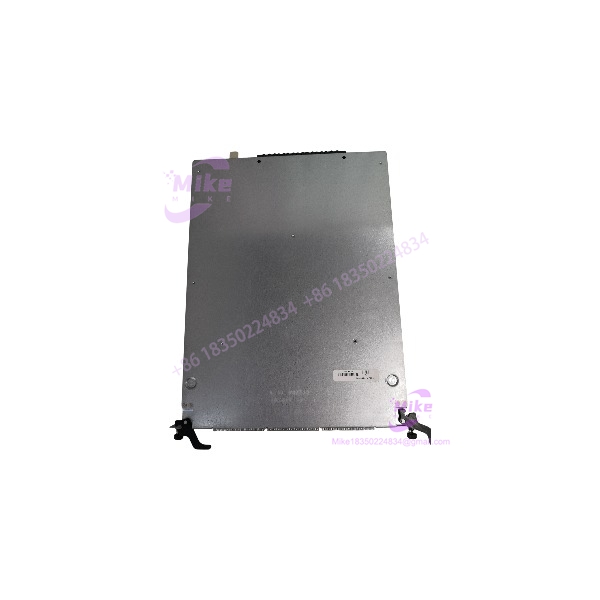
Alcatel-Lucent OS9-GNI-U24E 24-Port Gigabit Ethernet SFP Module
Product Introduction
The OS9-GNI-U24E is intended for enterprise and industrial network environments that require multiple fiber uplinks, backbone connections, or high-density Gigabit Ethernet connectivity within an OmniSwitch 9000E chassis. Its 24-port SFP design allows network engineers to select compatible optical transceivers based on fiber type and link distance rather than committing every port to a fixed optical interface.
For maintenance teams supporting legacy switching infrastructure, this module can serve as a replacement for a failed interface card or help restore available fiber-port capacity. However, the OS9-GNI-U24E should not be assumed interchangeable with the OS9-GNI-U24 simply because the model names are similar. The E-series module is documented for the OmniSwitch 9000E family; verify the exact chassis and supported hardware/software combination before installation.
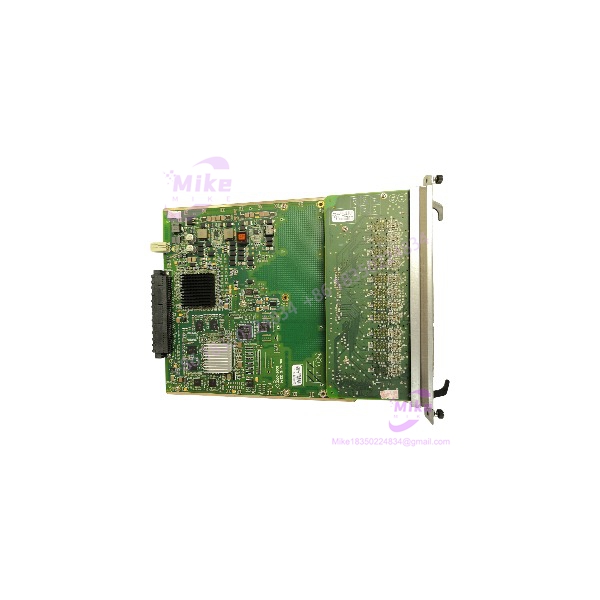
OS9-GNI-U24E
Key Technical Specifications
| Parameter | Specification |
|---|---|
| Manufacturer | Alcatel-Lucent |
| Model | OS9-GNI-U24E |
| Product type | Gigabit Ethernet network interface module |
| Platform | OmniSwitch 9000E series |
| Port count | 24 SFP transceiver slots |
| Port speed | 1 Gbps per port |
| Supported standards | IEEE 802.3z; 1000BASE-SX and 1000BASE-LX |
| Maximum frame size | 9,216 bytes |
| MAC address capacity | 16,000 per NI module, as specified in the hardware guide |
| Power consumption | Approximately 55 W |
| Transceiver type | Compatible Gigabit Ethernet SFPs |
| Fiber compatibility | Depends on the installed SFP; supported options include multimode and single-mode fiber |
| Physical dimensions | Approximately 9.875 × 1.25 × 13.024 inches |
| Hot-swappable transceivers | Yes, subject to the platform’s procedures |
Specifications are based on OmniSwitch 9000E hardware documentation. Confirm the exact software release and transceiver compatibility against the applicable platform guides.
Procurement note: SFP transceivers may not be included with the module. Confirm the supplied accessories, transceiver part numbers, and optical reach before ordering.
Application Scenarios & Pain Points
- Fiber backbone restoration: Replace a failed interface module while preserving the existing switching architecture, subject to verified hardware compatibility.
- High-density fiber connectivity: Provide up to 24 Gigabit Ethernet fiber ports in a supported chassis.
- Industrial network segmentation: Support fiber connections between network distribution points, control-system network segments, and other compatible Ethernet infrastructure.
- Legacy infrastructure maintenance: Maintain serviceability where migration to a newer switching platform is not immediately practical.
- Network expansion: Add fiber-port capacity when the chassis, software release, and system design support the additional module.
The principal operational risk is not simply whether the card fits into the chassis. An incorrect SFP, unsupported software combination, incompatible fiber type, or mismatched optical wavelength can prevent the link from establishing even when the module itself passes hardware diagnostics.
QA & Live Testing SOP
Use the following inspection and verification procedure for incoming stock and replacement hardware.
- Verify identity. Check the product label for the complete OS9-GNI-U24E part number. Record serial number and hardware revision.
- Inspect the module. Examine the PCB, faceplate, SFP cages, backplane connector, and retaining hardware for damage, corrosion, contamination, or signs of repair.
- Confirm chassis compatibility. Compare the intended chassis and installed software release with the applicable OmniSwitch 9000E hardware and release documentation.
- Check transceivers. Verify each SFP’s part number, speed, wavelength, optical reach, and fiber compatibility. Do not assume that every third-party SFP is supported.
- Install using approved procedures. Follow the platform service manual and site change-control process. Observe ESD precautions and applicable hot-swap procedures.
- Verify diagnostics. Check the module hardware-status and software-status indicators. The platform documentation describes green status as a normal hardware indication and a blinking green software indicator as successful software operation; amber indicates a fault condition requiring investigation.
- Test all required ports. Establish links using known-good transceivers and fiber jumpers. Verify negotiated speed, link stability, traffic flow, and error counters.
- Document results. Record the chassis, software version, module serial number, transceiver inventory, tested ports, and any unresolved alarms.
A seller’s visual inspection or power-on test alone does not establish that all 24 ports are functional. For critical networks, request documented port-level test results.
Field Engineer’s Pitfall Guide
- Confusing OS9-GNI-U24E with OS9-GNI-U24: These are related but distinct model designations. Verify the exact hardware generation and chassis compatibility before substituting one for the other.
- Ordering the wrong SFP: 1000BASE-SX and 1000BASE-LX typically use different optical media and wavelength requirements. Match the transceiver to both ends of the link and the installed fiber.
- Assuming 10-Gigabit capability: This is a Gigabit Ethernet module. Do not treat its SFP slots as 10-Gigabit SFP+ ports.
- Ignoring software support: A physically compatible module can still fail to operate correctly if the chassis software or hardware revision is unsupported.
- Overlooking optical cleanliness: Contaminated fiber end faces can cause intermittent links, elevated error rates, or complete link failure.
- Assuming every port was tested: Confirm the actual scope of any seller’s testing, particularly when buying used or surplus equipment.
- Skipping network change control: Even a hot-swappable module replacement can disrupt traffic. Follow the approved maintenance procedure and confirm redundancy before removing a live module.
Intent-Driven FAQ
Q1: What is the OS9-GNI-U24E?
It is a 24-port Gigabit Ethernet SFP network interface module for the Alcatel-Lucent OmniSwitch 9000E platform.
Q2: Does the module include SFP transceivers?
Not necessarily. Confirm the seller’s exact package contents. Compatible transceivers may need to be sourced separately.
Q3: Which fiber standards does it support?
The hardware guide lists IEEE 802.3z, 1000BASE-SX, and 1000BASE-LX. Actual fiber type and transmission distance depend on the selected compatible SFP.
Q4: Can it be installed in any OmniSwitch chassis?
No. Confirm support for the specific OmniSwitch 9000 or 9000E chassis, hardware revision, and software release. Do not rely on the model name alone.
Q5: What is its power consumption?
The OmniSwitch 9000E hardware guide specifies approximately 55 W. Use the applicable chassis documentation for power-budget planning.
Q6: Is this module suitable for a new network installation?
It is primarily relevant to systems designed around the compatible legacy OmniSwitch platform. For a new installation, assess lifecycle support, security requirements, replacement availability, and the cost of maintaining legacy infrastructure.
Q7: What should buyers confirm before ordering a replacement?
Verify the full model number, chassis compatibility, hardware revision, software support, included SFPs, physical condition, warranty or return terms, and whether functional testing has been performed.
Q8: What information should be provided when requesting a quotation?
Provide the part number OS9-GNI-U24E, required quantity, destination country, desired condition (new, refurbished, or used), and any testing or warranty requirements. Include the target chassis and software release when requesting a compatibility check.





