

Description
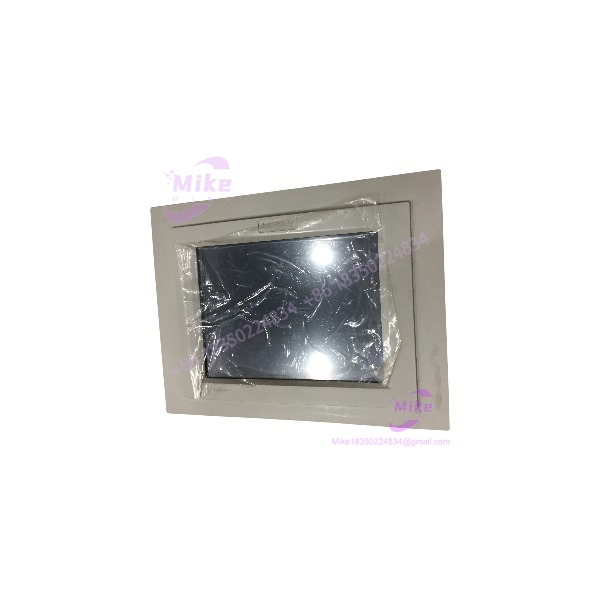
Advantech PPC-105T | 10.4-Inch Panel PC Industrial Computer
Product Introduction
When an automated production cell or CNC processing station suffers a motherboard lockup or display failure on its main operator console, production halts immediately. The Advantech PPC-105T is not a standard desktop computer or commercial touch monitor; it is a hardened, all-in-one industrial Panel PC engineered specifically for continuous, multi-shift operation inside harsh manufacturing environments. Attempting to run factory floor control software on consumer-grade PCs leads to dust contamination, thermal throttling, and early component failure—making this dedicated panel computer essential for operational continuity.
Operating in dusty, electrically noisy factory environments requires hardware designed for thermal endurance and ingress protection. The PPC-105T features an IP65-rated aluminum front bezel that seals tightly against control cabinet cutouts, protecting internal electronics from washdown spray and airborne debris. Onboard serial ports and network interfaces allow direct integration with PLCs, motion controllers, and barcode scanners—though you must ensure proper cabinet ventilation and stable 24VDC or 115/230VAC power supply routing to avoid thermal shutdowns.
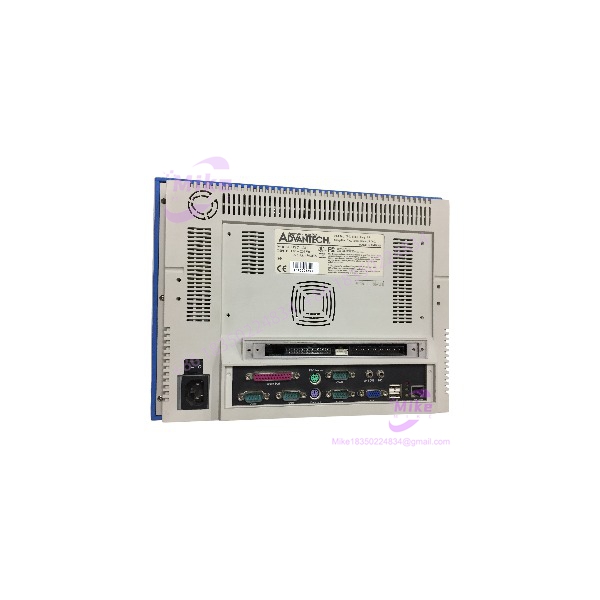
PPC-105T
Key Technical Specifications
- Manufacturer & Model: Advantech PPC-105T
- Display Size & Type: 10.4-inch SVGA color TFT LCD display
- Native Resolution: 800 x 600 pixels
- Touchscreen Interface: 4-wire analog resistive touch screen panel
- Processing Architecture: Low-power embedded industrial x86 processor architecture
- System Memory: Onboard SDRAM / SO-DIMM memory slot options
- Storage Support: CompactFlash card slot, 2.5-inch IDE/SATA HDD drive bay
- Expansion Capabilities: PCMCIA slot / PCI extension slot options for add-in communication cards
- I/O Connectivity: 2 x RS232 serial ports, 1 x RS232/422/485 port, 1 x 10/100 Mbps Ethernet port (RJ45), 2 x USB ports, parallel printer port, PS/2 keyboard/mouse ports
- Front Bezel Protection: IP65 / NEMA 4 compliant aluminum front panel
- Operating Temperature Envelope: 0°C to +45°C (32°F to 113°F)
- Mounting Options: Panel mount cutout format, VESA 75/100 wall/arm mounting support
Application Scenarios & Pain Points
A textile manufacturing plant in North Carolina experienced recurring operator terminal freezes whenever ambient temperatures inside an unconditioned machine enclosure exceeded safe limits. Replacing the failing PC with a tested Advantech PPC-105T restored stable HMI execution and reliable touch responsiveness, preventing unexpected machine downtime and securing full multi-shift operation.
With vs. Without Dedicated Industrial Panel PCs:
- Without the PPC-105T: Commercial desktop PCs lack front IP protection, permitting oil mist and dust to coat internal circuitry, causing short circuits and display failures.
- With the PPC-105T: Sealed front bezel construction and industrial-grade power filtering shield core processing logic from harsh plant floor contamination.
Automated Packaging & Material Handling Lines:
- Condition: Continuous multi-shift conveyor routing and barcode scanning operations running in dusty warehouse environments.
- Impact: Electrical transients and screen wear cause display lockups and uncoordinated conveyor indexing.
- Solution: Deploying the rugged PPC-105T guarantees fast boot times, reliable touch accuracy, and steady fieldbus execution under harsh plant conditions.
QA & Live Testing SOP (Trust Signal)
Every Advantech PPC-105T unit entering our facility undergoes a strict, multi-point inspection protocol. We begin with a full microscopic inspection of the front touch membrane, glass substrate, rear connector pins, housing latches, and internal motherboard caps to verify zero physical cracking, seal degradation, or trace oxidation. Next, the unit is mounted on a test panel and powered with a regulated power supply—we measure internal voltage rail stability using a calibrated Fluke digital multimeter.
During live functional testing, we boot test operating systems and load HMI visualization software, verifying touchscreen touch-grid accuracy, backlight brightness, and serial/Ethernet communication throughput across all active ports. We run a continuous 24-hour thermal soak test to confirm zero display flicker, touch drift, or system runtime lockups under load. Once cleared, the module is wiped clean, fitted with a protective screen film, and vacuum-sealed in ESD protective packaging with custom foam cushioning.
Field Engineer’s Pitfall Guide
❗ GOTCHA #1: Touchscreen Calibration & OS Driver Loading When installing or upgrading operating systems (such as Windows Embedded or legacy MS-DOS/WinXP), ensure you install the exact PenMount or Elo touch drivers specified for the PPC-105T’s internal controller board. Loading generic mouse drivers will cause touch input offset errors or complete touch unresponsiveness.
❗ GOTCHA #2: CompactFlash Partitioning & Boot Order If running operating systems or firmware from a CompactFlash card, format the card using industrial-grade fixed-disk partitioning. Consumer CF cards configured as removable media will often fail to boot as primary master C: drives in embedded BIOS environments.
❗ GOTCHA #3: Front Panel Gasket Compression Torque Do not over-torque the rear panel-mounting clamps when securing the unit into an enclosure cutout. Excessive clamping pressure warps the aluminum frame, causing permanent touch grid alignment drift or breaking the IP65 environmental seal against liquid ingress.
Intent-Driven FAQ
What is the primary function of the Advantech PPC-105T?
The PPC-105T is a 10.4-inch industrial Panel PC designed to serve as an all-in-one human-machine interface (HMI) and edge controller for automated industrial equipment, machine tools, and process monitoring racks.
What operating systems are supported by the PPC-105T?
Depending on installed processor and memory configurations, the PPC-105T supports legacy industrial operating systems such as MS-DOS, Windows 98/2000, Windows XP Embedded, and embedded Linux distributions.
Can I replace just the front touch glass panel if the touch membrane becomes scratched?
Yes. Replacement 10.4-inch resistive touch glass overlays (such as the 1pc PPC-105T touch screen glass panel can be installed to restore touch accuracy without needing to replace the entire internal computer motherboard assembly.
How do I trigger a touchscreen recalibration?
Touchscreen calibration can be executed through the installed touch controller utility software (such as PenMount Control Panel) inside the operating system environment or via a bootable diagnostic utility disk.
What maintenance should be performed during routine machine service?
Gently clean the front display screen using a soft cloth with mild isopropyl alcohol solutions, verify that rear mounting clamps remain snug, blow dust out of rear chassis cooling slots using dry compressed air, and inspect power input connections for terminal tightness.
If you like, I can pull together additional panel mounting clamp kits, power supply units, or replacement touch screen glass overlays tailored to your control cabinet layout. Would you like me to do that?





