

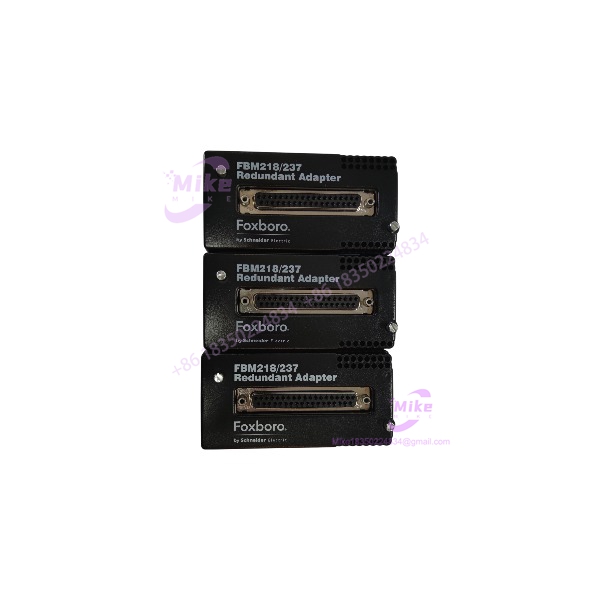
Description
Foxboro FBM218/237 P0916QD | Redundancy Adapter
Product Introduction
When an FBM218 or FBM237 is configured as a redundant pair, the field termination assembly needs an interface that can accommodate the two-module architecture. Foxboro FBM218/237 P0916QD performs that specific job. It is not an analog I/O module, and it is not the field termination assembly itself.
The P0916QD sits in the redundant connection architecture between the modular baseplate and the applicable termination arrangement. Schneider’s documentation identifies the current RH916QD as the redundancy adapter for both FBM218 and FBM237, with RH916QD superseding the legacy P0916QD designation.
That distinction matters during procurement. Ordering an FBM218 or FBM237 when the failed component is actually the redundancy adapter can leave the cabinet electrically unchanged while the real hardware fault remains.

FBM218/237 P0916QD
Key Technical Specifications
- Part Number: P0916QD
- Current Replacement: RH916QD
- Compatible FBMs: FBM218 and FBM237
- Product Type: Redundancy adapter
- System: Foxboro I/A Series 200
- Primary Function: Interface for redundant FBM configurations
- Redundancy Architecture: Two FBM modules sharing the applicable termination arrangement
- Compatible Module Application 1: HART Communication Redundant Output Module
- Compatible Module Application 2: FBM237 0–20 mA Output Module
- Mounting Architecture: Foxboro modular baseplate system
- Field Termination: Used with the applicable FBM termination assembly and termination cable
- Typical Application: Continuous-process DCS analog-output redundancy
What the P0916QD Actually Does
The terminology is easy to get wrong.
is the redundancy adapter.
It should not be described as:
- An 8-channel analog output module
- A HART communication module
- A standard termination assembly
- An electronic module
- An FBM237 electronic module
For , the actual electronics module is associated with the HART redundant output function. Historical documentation identifies the module as P0922VW, while is separately identified as the redundancy adapter.
For , the historical module designation is P0914XS. The is again the separate redundant adapter used when two modules are configured as a redundant pair.
This is why marketplace listings sometimes appear as “/237 .” The slash identifies the compatible module family rather than implying that /237 is one combined electronic module.
Redundancy Application
is the Foxboro HART communication redundant output platform. Its field side supports 4–20 mA output with HART communication capability.
In a redundant installation, two modules work as a redundant pair. The provides the required redundant connection architecture so the pair can interface with the shared termination arrangement.
For maintenance planning, the adapter therefore belongs to the redundancy infrastructure, not the signal-generation electronics.
Redundancy Application
provides eight isolated 0–20 mA analog output channels and can operate as a single module or redundant pair.
Foxboro documentation specifically states that when two modules are used as a redundant pair, the termination assembly connects to the baseplate through the redundant adapter. The historical part number is , while the current replacement is RH916QD.
This makes particularly relevant when maintaining older I/A Series cabinets where the installed hardware still carries legacy Foxboro part numbers.
Procurement Identification
Before purchasing a replacement, verify the following against the installed cabinet:
- Marking on the hardware: or RH916QD
- Installed FBM family: or
- Whether the system uses a single module or redundant pair
- Baseplate configuration
- Associated termination assembly part number
- Termination cable type and length
- Connector condition
- Mechanical condition of the adapter interface
- Evidence of oxidation, contamination, bent contacts, or mechanical damage
Do not substitute a termination assembly merely because its part number appears in the same cabinet BOM.
The current Schneider documentation explicitly groups RH916QD as the redundancy adapter for /, while the older designation is the superseded version.
Global Sourcing & Live-Test SOP
1. Inbound Verification
- Photograph the complete before unpacking.
- Record OEM marking, serial/identification labels, and hardware revision where present.
- Compare the physical adapter against the requested configuration.
- Verify the seller’s description does not incorrectly identify it as an or I/O module.
- Trace OEM documentation and replacement references from to .
2. Physical Inspection
Check:
- Connector pins
- Housing and mounting hardware
- Locking features
- Contact surfaces
- Signs of oxidation
- Cracked insulation
- Bent or recessed contacts
- Evidence of previous cabinet overheating
For surplus hardware, cosmetic condition alone is not enough.
3. Live Simulation
The appropriate verification should be performed on a compatible Foxboro test rack containing the applicable redundant FBM configuration.
For an installation, verify that the adapter supports the intended redundant connection between the paired modules and termination assembly. For an installation, verify the corresponding redundant HART output architecture.
Do not claim a has passed a live test unless the actual unit has been tested.
4. Diagnostics and Final Preparation
- Confirm redundant-pair recognition at the system level.
- Check module status and Fieldbus diagnostics.
- Verify output behavior during controlled module failover.
- Record installed firmware on the associated FBMs.
- Check connector retention after installation.
- Package the adapter in ESD-safe material.
- Preserve OEM labels and identification markings.
- Document the exact legacy-to-current relationship: → .
Field Engineer’s Pitfall Guide
❗ Do not confuse the adapter with the FBM.
does not provide eight analog output channels. The and are the actual I/O modules; provides the redundant connection architecture.
❗ Verify the module family before substitution.
is documented for both and , but the surrounding termination assembly and signal architecture differ. Do not assume that every termination component can be transferred directly to an installation.
❗ Check the legacy/current part-number relationship.
A cabinet may still specify while current Schneider documentation identifies as its successor. Treat the two numbers as a procurement cross-reference, then verify mechanical and system compatibility before installation.





